LC-40E67U/LC-40E77U
5 – 24
8. Initialization of factory settings
8.1. Making factory settings
Use the adjustment remote controller for the factory settings.
8.1.1 Hold on the remote controller’s FACTORY SETTING key.
8.1.2 Sever seconds later, “SETTING COMPLETE” COMPLETE” “TV VER *.**” appears at the center of the screen.
If background of screen is green, the settings are complete.
8.1.3 Power off the set.
NOTE: Do not turn on the power once the factory settings have been made. Otherwise the factory setting must be made again.
9. Model number ID plug
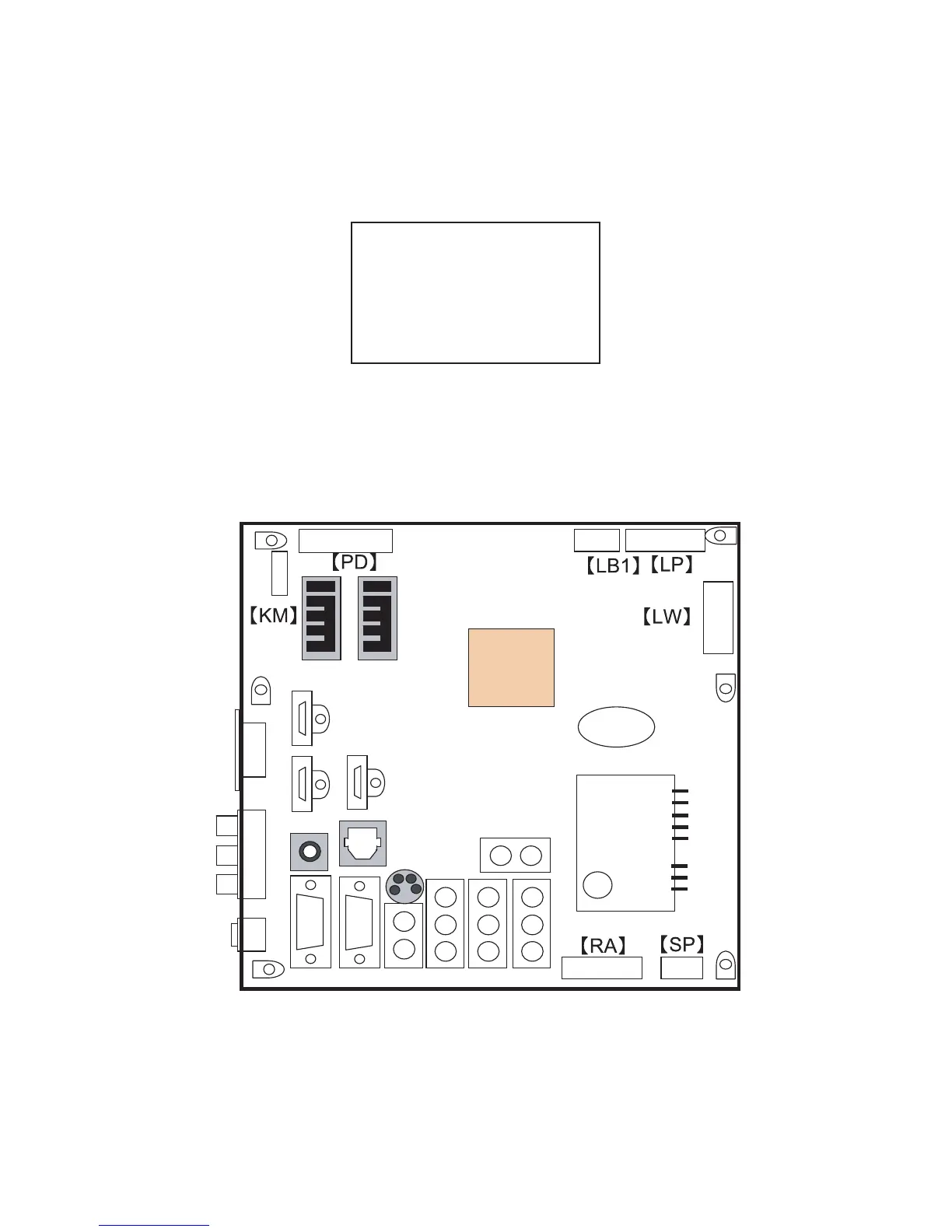
Model numbers are identified by inserting the destination ID plug (QCNCMA275WJQZ) in its specified slot of the destination ID connector SC9002/
SC9003 (QCNCWA715WJQZY).
SETTING COMPLETE
TV VER
*
.
**
optical
out
C5
V/LR HDMI
USB
11014
L/R out
Analog RGBRS-232C
Svideo
PC Audio IN
1
41
112
1
4
TUNER
MAIN Unit
115
DDR
Position
SC9002
SC9003
HDMI




 To Next Page