LC-60G9T / LC-70G9T
2 – 4
Attaching the stand unit
• Before attaching (or detaching) the stand, unplug the AC
cord.
• Before performing work, spread cushioning over the surface
on which you will be laying the TV. This will prevent it from
being damaged.
• Be sure that two or more persons attach the stand.
CAUTION
• Attach the stand in the correct direction.
• Be sure to follow the instructions. Incorrect installation
of the stand may result in the TV falling over.
• After attaching the stand to the TV, do not hold the
stand when you put up, set up, move or lay down the
TV.
• Do not remove the stand from the TV unless using a
wall mount bracket to mount it.
1
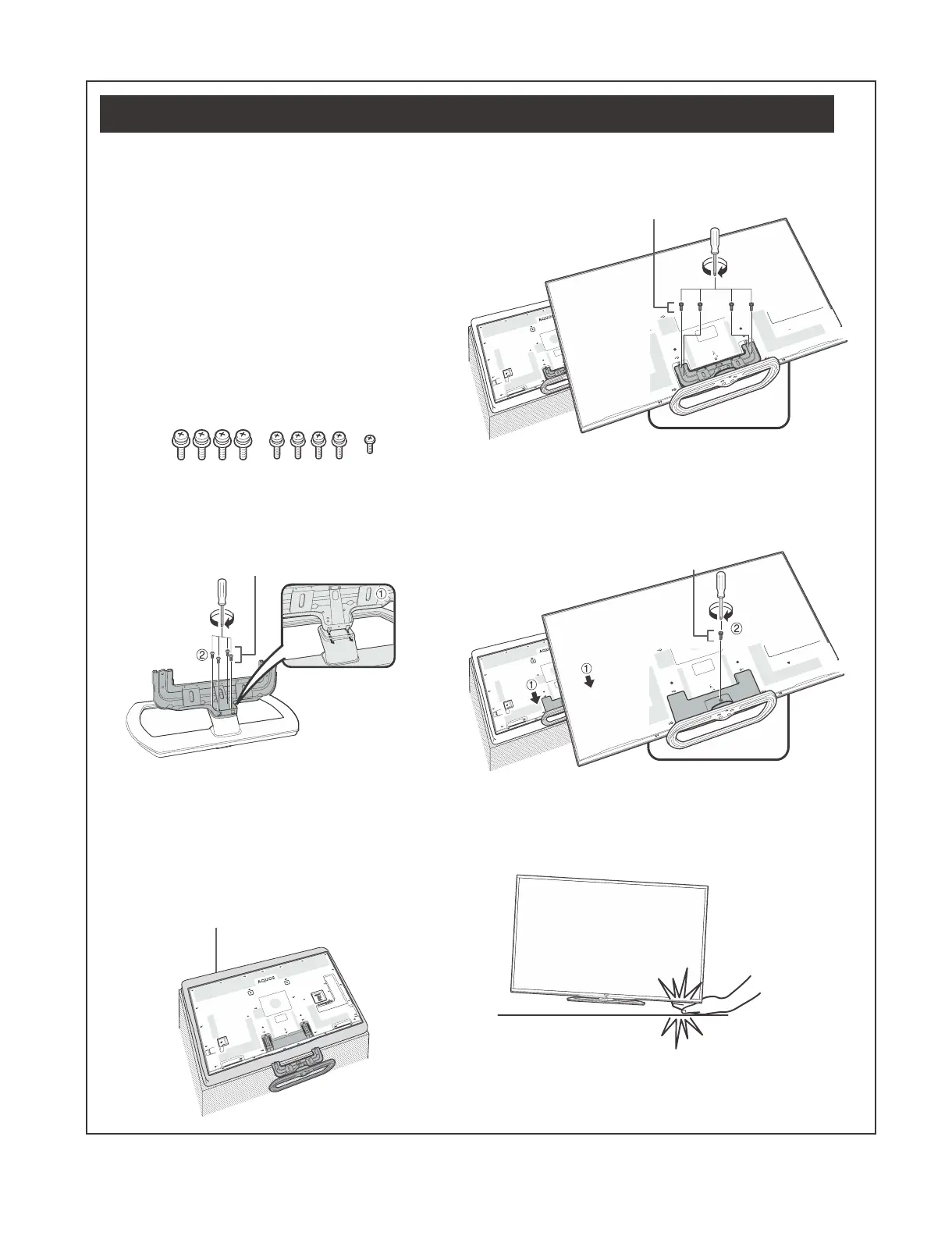
Confirmthatthereare9screws(fourM6screws,
fourM5screwsandoneM4screw)suppliedwith
thestandunit.
2
Attachthesupportingposttothestandbase.
1
Insert the claws of the supporting post into the stand
base.
2
Secure the post and the base using the M6 screws
(length: 60" (10 mm / 70" (20 mm)) and a screwdriver.
M6 screws
NOTE
• Tighten the screws to the holes of the mark “b”.
3
Insertthestandintotheopeningsonthebottom
oftheTV(holdthestandsoitwillnotdropfrom
theedgeofthebasearea).
• Make sure that the stand is firmly inserted into the TV.
Improper installation may result in tilting of the TV set.
Soft cushion
4
InsertandtightentheM5screws(length:14mm)
intotheholesontherearoftheTV.
M5 screws
5
Attachingthestandcover.
1
Insert the stand cover.
2
Insert and tighten the M4 screw (length: 8 mm) into the
holes of the stand cover.
• Tighten the screw by pressing the bottom of the
stand base to the TV side.
M4 screw
NOTE
• To detach the stand unit, perform the steps in reverse order.
• A screwdriver is not supplied with this product.
• In the installation procedure, be careful not to catch your
fingers between the TV set and the floor.



 To Next Page