29
CHANGING THE PORT
When using the machine in a Windows environment, follow the steps below to change the port when you have changed
the IP address of the machine or have installed the PC-Fax driver when the machine is connected with a USB cable.
1
Click the [Start] button ( ), click
[Control Panel], and then click [Printer].
• In Windows XP/Server 2003, click the [start] button
and then click [Printers and Faxes].
• In Windows 98/Me/NT 4.0/2000, click the [Start]
button, select [Settings], and then click [Printers].
2
Open the printer properties window.
(1) Right-click the printer driver icon of the
machine.
(2) Select [Properties].
3
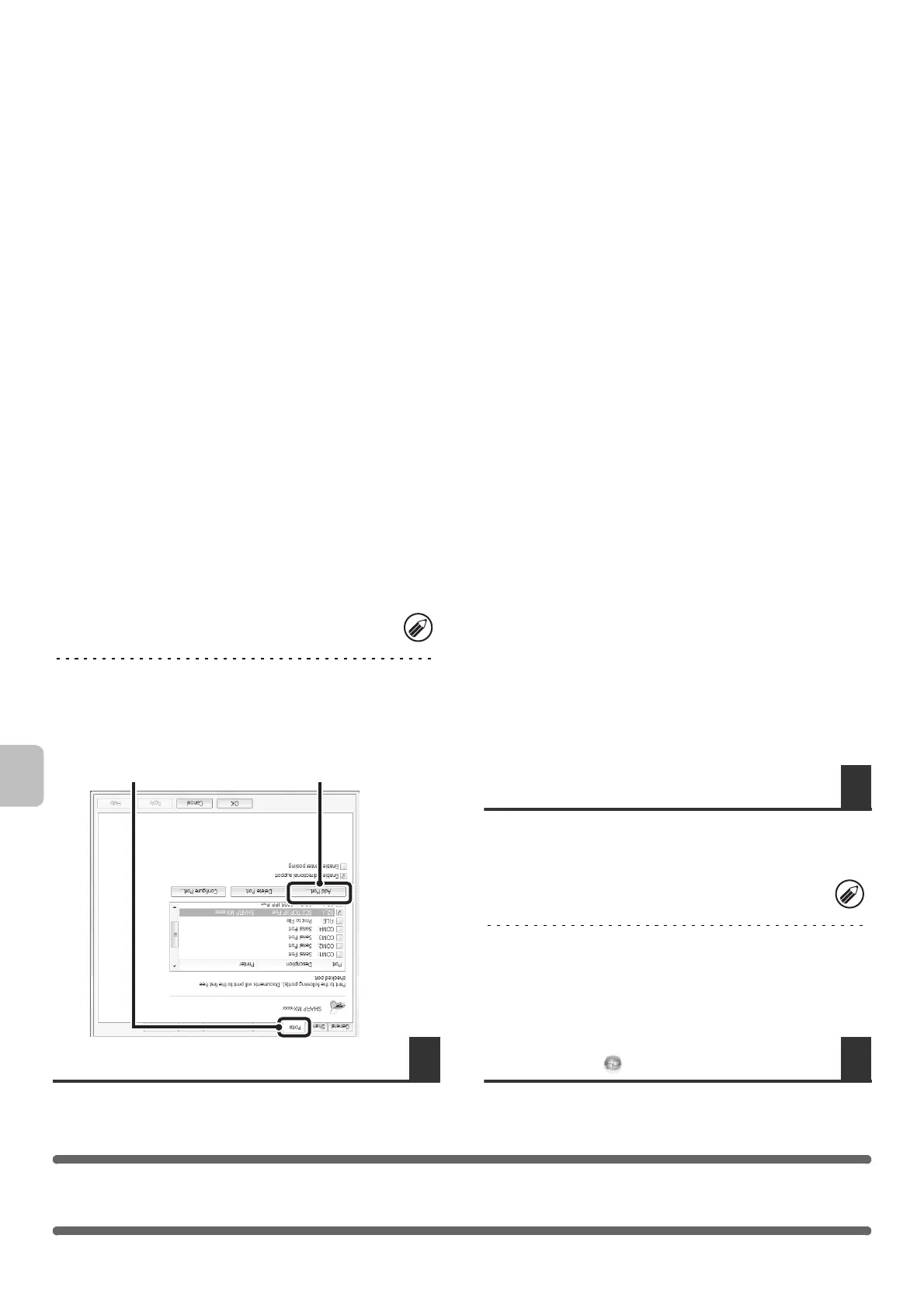
Adding or changing a port.
(1) Click the [Ports] tab.
In Windows 98/Me, click the [Details] tab.
(2) Click the [Add Port] button.
If [Printers and Faxes] does not appear in the [start]
menu in Windows XP, click the [start] button, click
[Control Panel], click [Printers and Other Hardware],
and then click [Printers and Faxes].
To change to a previously created port such as USB
port, select the desired port (USB001, etc.) from the
list and click the [Apply] button. This changes the port.
(2)
(1)



 To Next Page