42
E
MULTI/PIP menu
Function
Command Direction
Parameter Reply Control/Response contents *
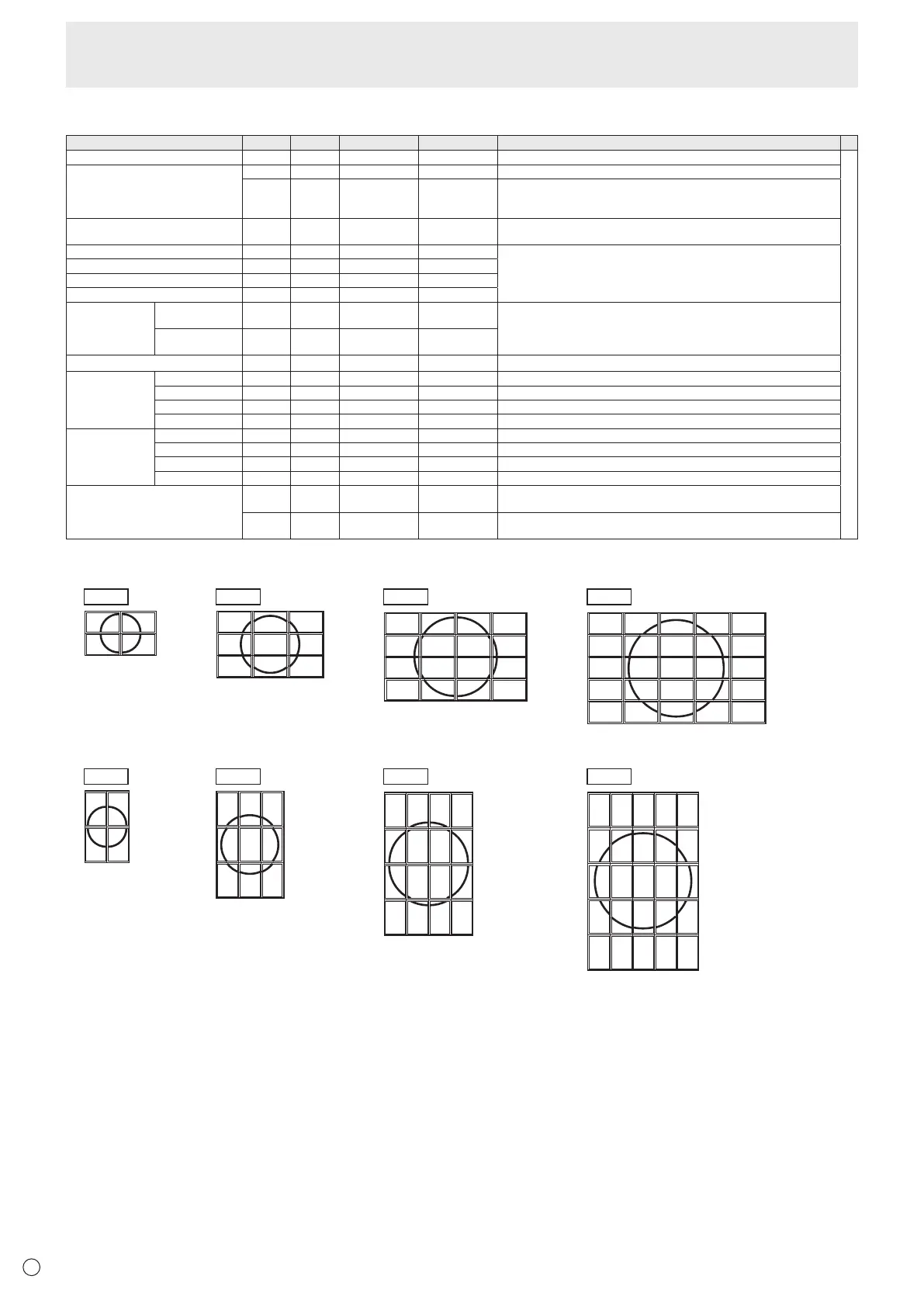
ENLARGE ENLG WR 0-1 0-1 0: OFF, 1: ON
-
ENLARGE MODE EMAG WR 1-4 1-4 1: 2 x 2, 2: 3 x 3, 3: 4 x 4, 4: 5 x 5
EMHV WR 12(21)-55 12(21)-55 1 x 2 (2 x 1) to 5 x 5 (“m x n” is expressed as “mn”, where m and n are the
numbers of monitors specied for the longest direction and the shortest direction
respectively.)
IMAGE POSITION (M x N) EPHV WR 11-55 11-55 Species values in the order of IMAGE POSITION IN LONGEST/ SHORTEST
DIRECTION.
IMAGE POSITION (2 x 2) EPOS WR 0-3 0-3 See the description below.
IMAGE POSITION (3 x 3) EPOS WR 0-8 0-8
IMAGE POSITION (4 x 4) EPOS WR 0-15 0-15
IMAGE POSITION (5 x 5) EPOS WR 0-24 0-24
ENLARGED
SCREEN
POSITIONING
THE LONGEST
DIRECTION
EPSH WR -999-999 -999-999 The setting range depends on the ENLARGE MODE setting and the IMAGE
POSITION.
THE SHORTEST
DIRECTION
EPSV WR -999-999 -999-999
BEZEL ADJUST BZCO WR 0-1 0-1 0: OFF, 1: ON
BEZEL ADJUST TOP BZCT WR 0-1 0-1 0: OFF, 1: ON
BOTTOM BZCB WR 0-1 0-1 0: OFF, 1: ON
RIGHT BZCR WR 0-1 0-1 0: OFF, 1: ON
LEFT BZCL WR 0-1 0-1 0: OFF, 1: ON
BEZEL WIDTH TOP BZWT WR 0-100 0-100
BOTTOM BZWB WR 0-100 0-100
RIGHT BZWR WR 0-100 0-100
LEFT BZWL WR 0-100 0-100
ENLARGE/IMAGE POSITION SETTING ESTG WR XXYY XXYY XX: ENLARGE MODE (Same as EMAG), YY: IMAGE POSITION (Same as
EPOS)
ESHV WR XXYY XXYY XX: ENLARGE MODE (Same as EMHV), YY: IMAGE POSITION (Same as
EPHV)
• IMAGE POSITION (EPOS) setting
In landscape orientation
1
3
0
2
012
345
678
2
6
10
3
7
11
0
1
45
89
12
13 14
15
0
5
10
15
20
1
6
11
16
21
2
7
12
17
22
3
8
13
18
23
4
9
14
19
24
2 x 2 3 x 3 4 x 4 5 x 5
In portrait orientation
2 x 2 3 x 3 4 x 4 5 x 5
2
0
31
15
14
13
11
10
9
7
6
5
12
8
4
3
2
1
0
24
23
22
19
18
17
14
13
12
211611
9
8
7
6
4
3
2
1
20
151050
8
7
6
5
4
3
2
1
0
Controlling the Monitor with a PC (RS-232C)



 To Next Page