Turning Power On/Off
Turning power on/off
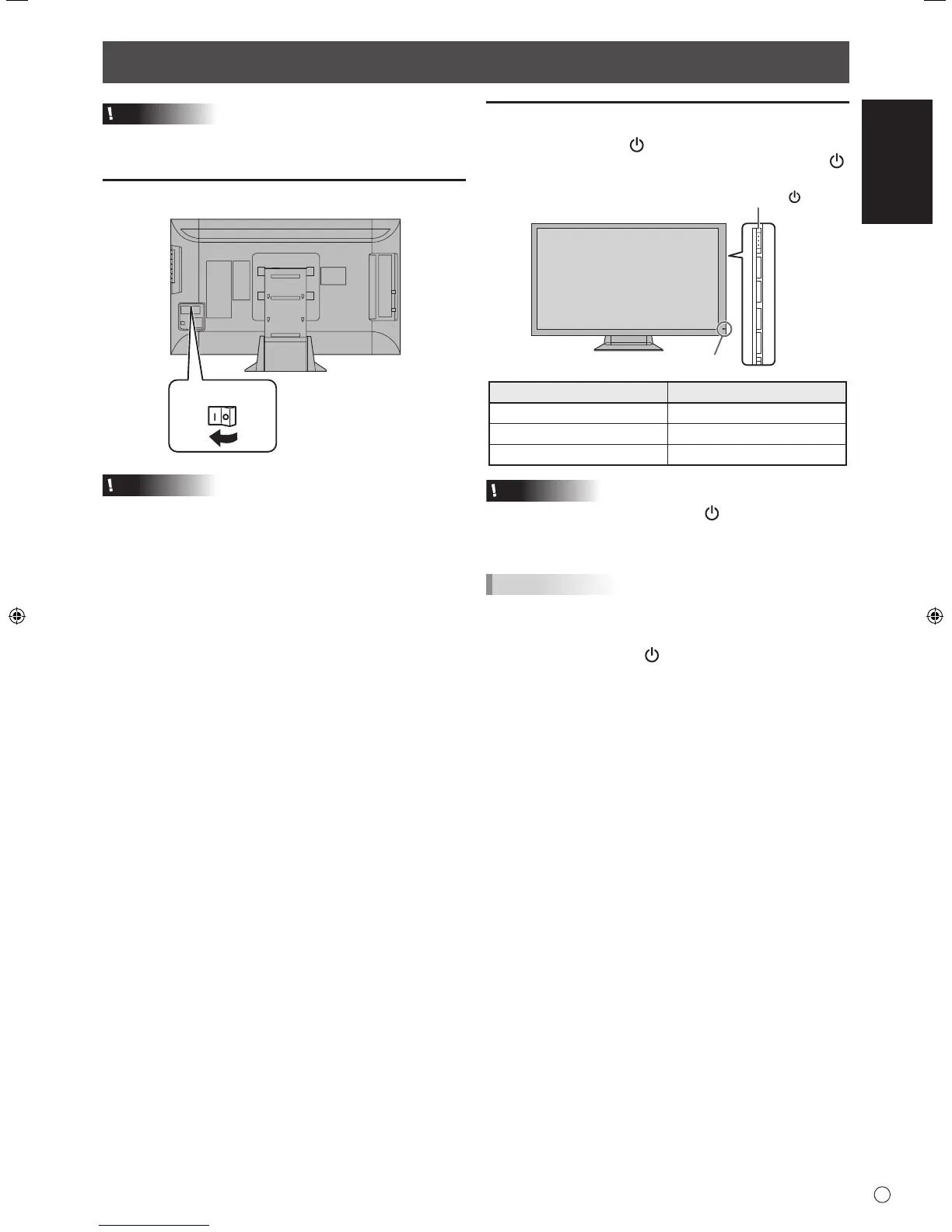
Press the power button ( ) to turn the power ON/OFF.
To turn off the power, press and hold down the power button ( )
for about 2 seconds.
Power lamp status Status of the monitor
Green lit Power on
Off Power off (Standby mode)
Orange lit Input signal waiting mode
Caution
• When switching the power button ( ) off and back on,
always wait for at least 5 seconds. A short interval may
result in a malfunction.
TIPS
• When the main power switch is off, the monitor cannot be
turned on.
• If the monitor is in the input signal standby mode and you
press the power button (
), the monitor enters standby
mode.
Caution
• Turn on the monitor rst before turning on the PC or
playback device.
Turning on the main power
Caution
• The main power must be turned on/off with the main power
switch. Do not connect/disconnect the power cord or turn
the breaker on/off while the main power switch is on.
• When switching the main power switch off and back on,
always wait for at least 5 seconds.
• For a complete electrical disconnection, pull out the main
plug.


 To Next Page