EasyManua.ls Logo

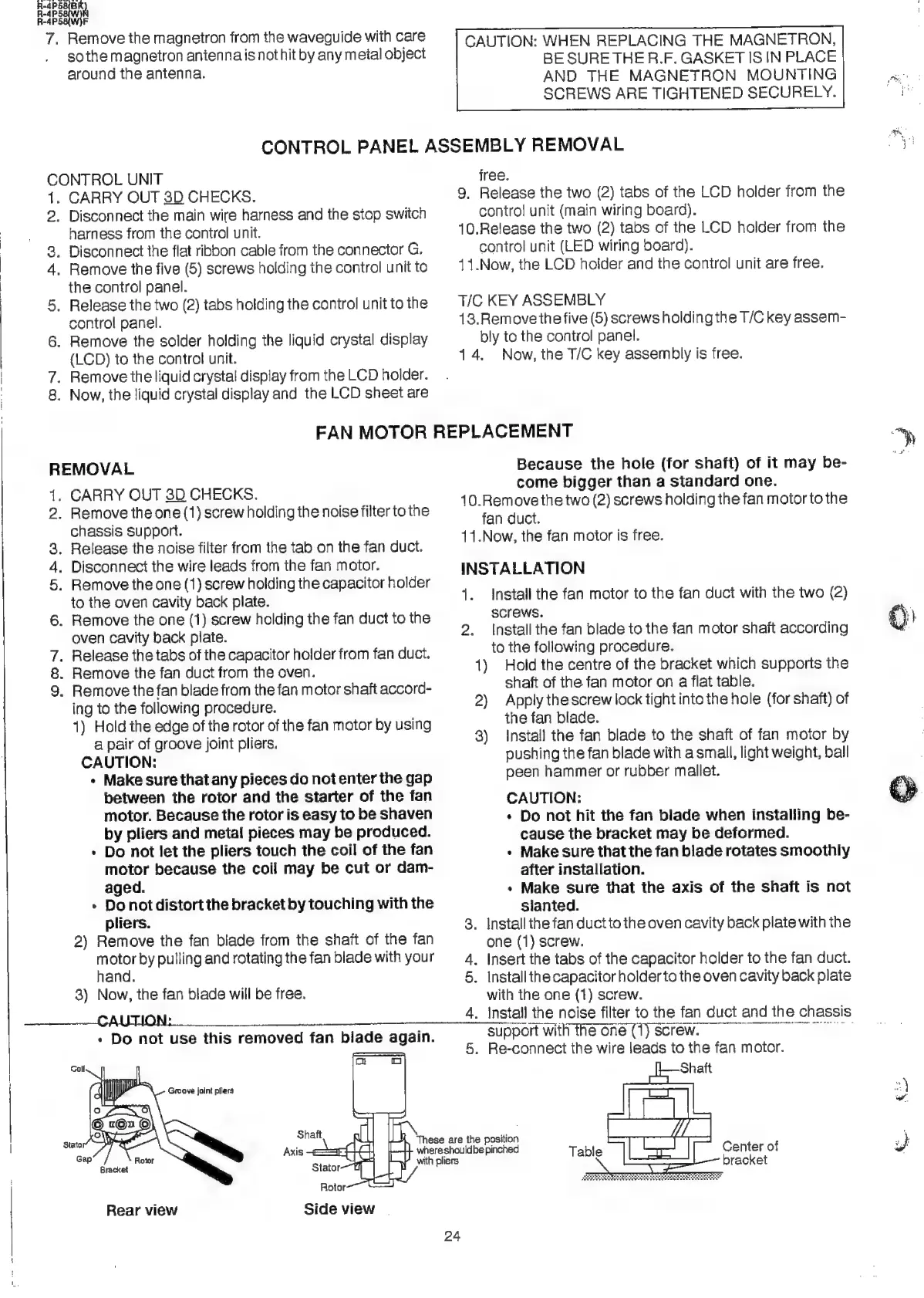
Sharp R-4P58 - Page 26

Sharp R-4P58
44 pages
Print Icon
To Next Page IconTo Next Page
To Previous Page IconTo Previous Page
Loading...
7.
Remove
the
magnetron
from
the
waveguide
with
care
so
the
magnetron
aniennais
not
hit
by
any
metal
object
around
the
antenna.
CAUTION:
WHEN
REPLACING
THE
MAGNETRON,
BE
SURE
THE
R.F.
GASKET
IS
IN
PLACE
AND
THE
MAGNETRON
MOUNTING
SCREWS
ARE
TIGHTENED
SECURELY.
CONTROL
PANEL
ASSEMBLY
REMOVAL
CONTROL
UNIT
free.
1.
CARRY
OUT
3D
CHECKS.
9,
Release
the
two
(2)
tabs
of
the
LCD
holder
from
the
2.
Disconnect
the
main
wire
harness
and
the
stop
switch
control
unit
(main
wiring
board).
harness
from
the
control
unit.
10.Release
the
two
(2)
tabs
of
the
LCD
holder
from
the
3.
Disconnect
the
flat
ribbon
cable
from
the
connector
G.
control
unit
(LED
wiring
board).
4.
Remove
the
five
(5)
screws
holding
the
control
unit
to
11.Now,
the
LCD
holder
and
the
control
unit
are
free.
the
control
panel.
5.
Release
the
two
(2)
tabs
holding
the
control
unittothe
©
T/C
KEY
ASSEMBLY
control
panel.
13.Removethe
five
(5)
screws
holding
the
T/C
key
assem-
6.
Remove
the
solder
holding
the
liquid
crystal
display
bly
to
the
control
panel.
(LCD)
to
the
control
unit.
14.
Now,
the
T/C
key
assembly
is
free.
7.
Remove
the
liquid
crystal
display
from
the
LCD
holder.
8.
Now,
the
liquid
crystal
display
and
the
LCD
sheet
are
FAN
MOTOR
REPLACEMENT
“yy
REMOVAL
Because
the
hole
(for
shaft)
of
it
may
be-
come
bigger
than
a
standard
one.
1.
CARRY
OUT
3D
CHECKS.
SiN
a4
10.Remove
the
two
(2)
screws
holding
the
fan
motor
to
the
2.
Remove
the
one
(1)
screw
holding
the
noise
filter
to
the
fan
duct
chassis
support.
:
3.
Release
the
noise
filter
from
the
tab
on
the
fan
duct.
11.Now,
the
fan
motor
Is
tree.
4.
Disconnect
the
wire
leads
from
the
fan
motor.
INSTALLATION
5.
Remove
the
one
(1)
screw
holding
the
capacitor
holder
to
the
oven
cavity
back
plate.
1.
Install
the
fan
motor
to
the
fan
duct
with
the
two
(2)
6.
Remove
the
one
(1)
screw
holding
the
fan
duct
to
the
SCTEWS.
oven
cavity
back
plate.
2.
Install
the
fan
blade
to
the
fan
motor
shaft
according
7.
Release
the
tabs
of
the
capacitor
holder
from
fan
duct.
to
the
following
procedure.
8.
Remove
the
fan
duct
from
the
oven.
1)
Hold
the
centre
of
the
bracket
which
supports
the
9.
Remove
the
fan
blade
from
the
fan
motor
shaft
accord-
shaft
of
the
fan
motor
on
a
flat
table.
ing
to
the
following
procedure.
1)
Hold
the
edge
of
the
rotor
of
the
fan
motor
by
using
a
pair
of
groove
joint
pliers.
CAUTION:
«
Make
sure
that
any
pieces
do
not
enter
the
gap
between
the
rotor
and
the
starter
of
the
fan
motor.
Because
the
rotor
is
easy
to
be
shaven
by
pliers
and
metal
pieces
may
be
produced.
»
Do
not
let
the
pliers
touch
the
coil
of
the
fan
motor
because
the
coil
may
be
cut
or
dam-
2)
Apply
the
screw
lock
tight
into
the
hole
(for
shaft)
of
the
fan
blade.
3)
Install
the
fan
blade
to
the
shaft
of
fan
motor
by
pushing
the
fan
blade
with
a
small,
light
weight,
ball
peen
hammer
or
rubber
mallet.
CAUTION:
«
Do
not
hit
the
fan
blade
when
installing
be-
cause
the
bracket
may
be
deformed.
*
Make
sure
that
the
fan
blade
rotates
smoothly
after
installation.
aged.
a
»
Make
sure
that
the
axis
of
the
shaft
is
not
»
Do
not
distort
the
bracket
by
touching
with
the
slanted.
pliers.
3.
Install
the
fan
duct
to
the
oven
cavity
back
plate
with
the
2)
Remove
the
fan
blade
from
the
shaft
of
the
fan
motor
by
pulling
and
rotating
the
fan
blade
with
your
hand.
3)
Now,
the
fan
blade
will
be
free.
Side
view
|
Rear
view
one
(1)
screw.
4.
Insert
the
tabs
of
the
capacitor
holder
to
the
fan
duct.
5.
Install
the
capacitor
holder
to
the
oven
cavity
back
plate
with
the
one
(1)
screw.
4.
Install
the
noise
filter
to
the
fan
duct
and
the
chassis
support
wit
the
oné
(1)
screw.
5.
Re-connect
the
wire
leads
to
the
fan
motor.
SEPP
EIS
EIT
Sees
Shaft
These
are
the
position
u}
Axis
==
whereshouldbe
pinched
Table
Center
of
SS
with
pliers
bracket

Related product manuals