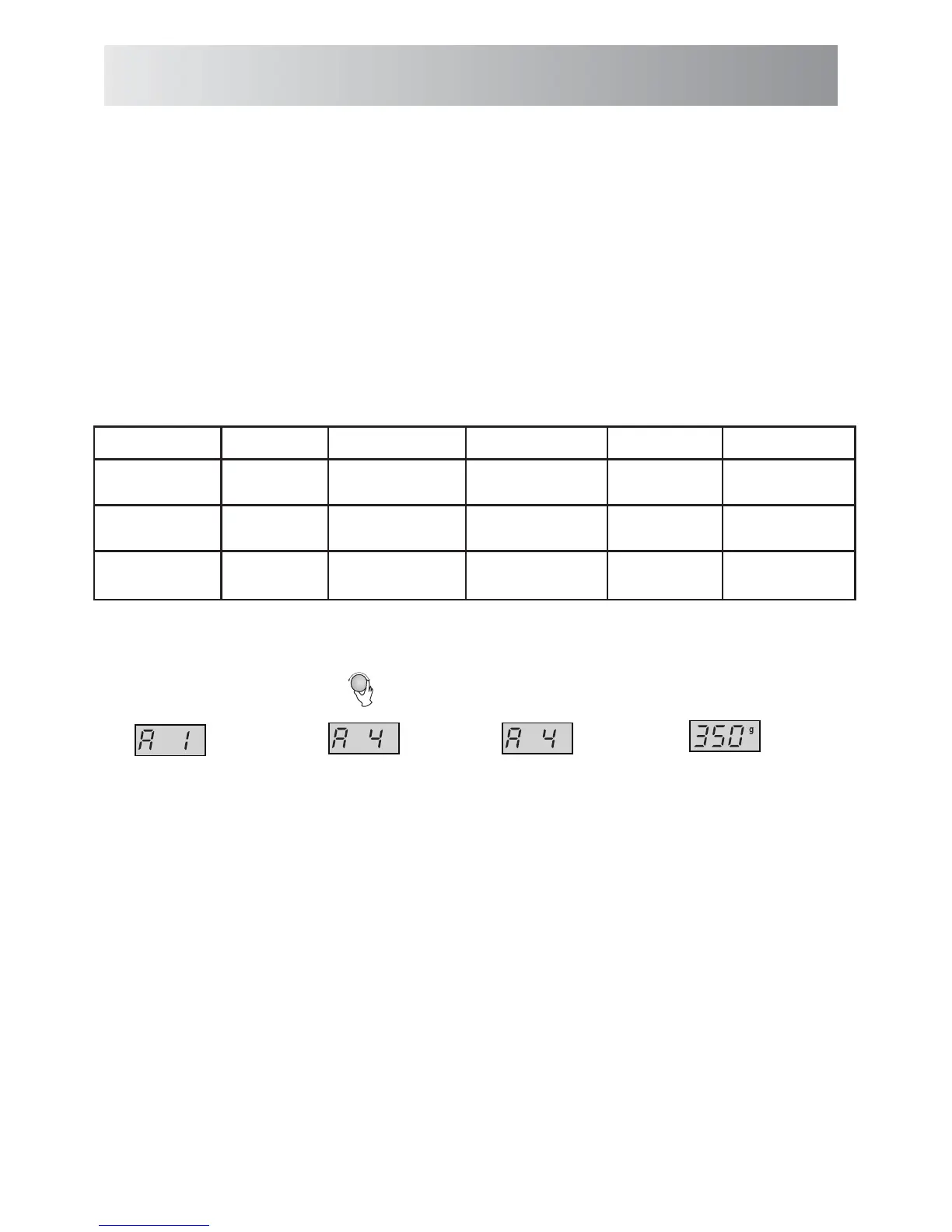
Example:
R
otate the ENTRY dial and
select the desired auto menu.
P ress the
button to con rm the
setting.
Enter the desired weight by
rotating the ENTRY dial until
the display shows:
At the same time “g” indicator
will illuminate on the display.
P ress the
button to start cooking.
(The display will count down
through menu time)
NOTES:
• The weight or quantity of the food can be input by rotating the ENTRY dial until the desired weight/quantity is displayed.
Enter the weight of the food only. Do not include the weight of the container.
• For food weighing more or less than the weights/quantities given in the AUTO MENU chart on page
1.
P
ress AUTO MENU
2. 3.
4.
5.
AUTO MENU x1
CONFIRM/+30S/START
CONFIRM/
+30S
/
START
9-10 cook by manual operation.
To cook 350g of frozen vegetables.
.
SMART AUTO MENU OPERATION
SMART Auto Menus have been pre-programmed with a cook time and power level to make cooking and
SMART Auto Menus include:
reheating more convenient.



 To Next Page