11
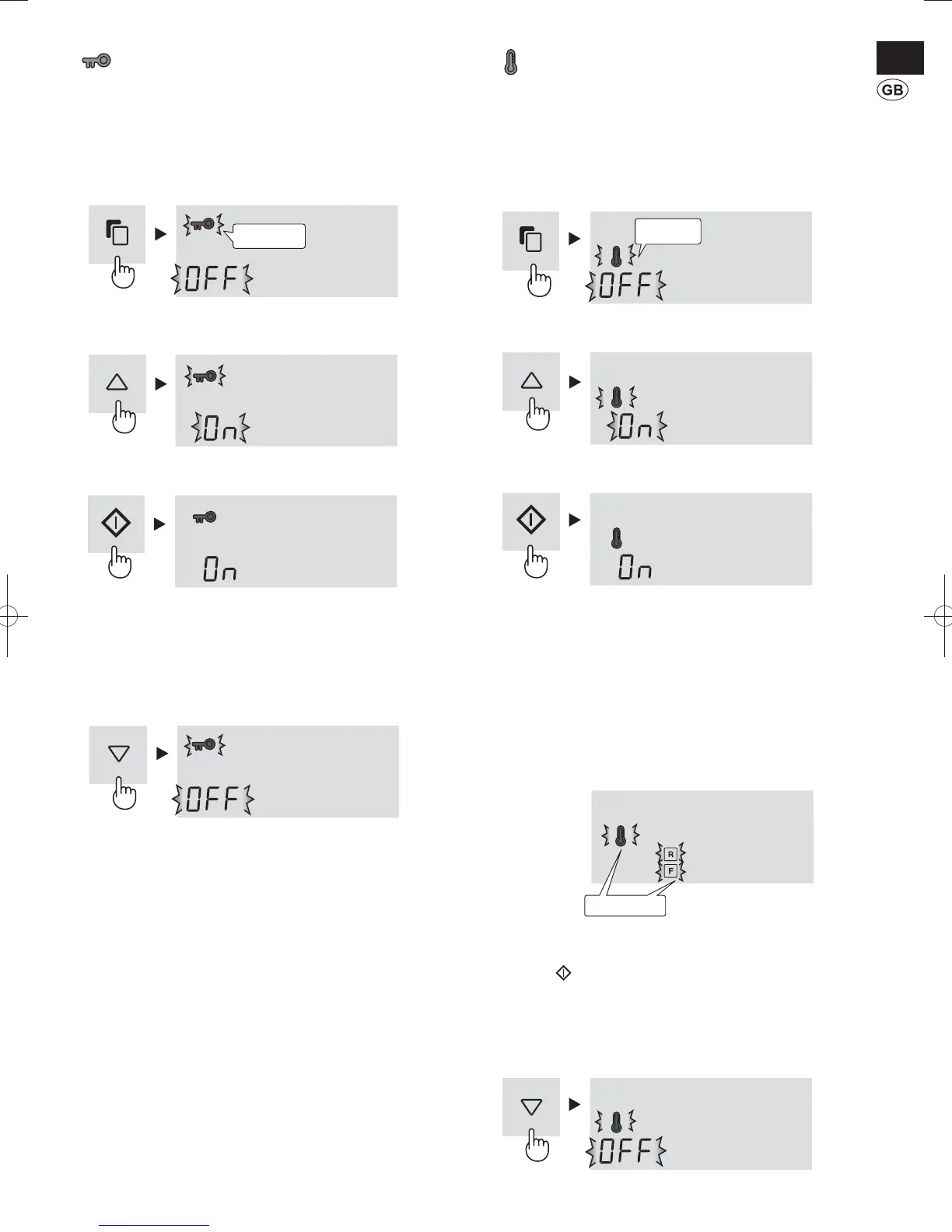
Child Lock
Key operation of the control panel will be locked. Use this
feature to prevent the panel from being used unintentionally by
children or someone.
To start operation
1
Select “Child lock” icon.
2
Select “ON”.
3
Finalize the setting.
To cancel operation
It is the same method as starting operation.
Select “OFF” in step 2.
Temperature Increase sign
While this feature is operating, it will indicate the rise of inside
temperature caused by power failure or some other malfunction.
To start operation
1
Select “Temperature increase sign” icon.
(The icon is orange.)
2
Select “ON”.
3
Finalize the setting.
Additionally the handle indicator (Orange)
will blink
3 times.
Indication of temperature increase
If the inside temperature becomes as follows, temperature •
increase will be indicated.
Refrigerator : more than 10°C
Freezer: more than -10°C
Check the quality of food before you eat.•
Indication
Icons will blink.•
Handle indicator (orange) will blink every 30 seconds.•
How to cancel the indicator blink
Press the key while the icons are blinking.
To cancel operation
It is the same method as starting operation.
Select “OFF” in step 2.
Flashing
Flashing
Blink slowly
(B423)W1.indb11(B423)W1.indb11 2013/04/1818:24:292013/04/1818:24:29


 To Next Page