CHECKING AND ADJUSTMENT OF TAKE-UP
TORQUE IN PLAYBACK MODE
1.
Remove the cassette housing control assembly.
2.
Ooen
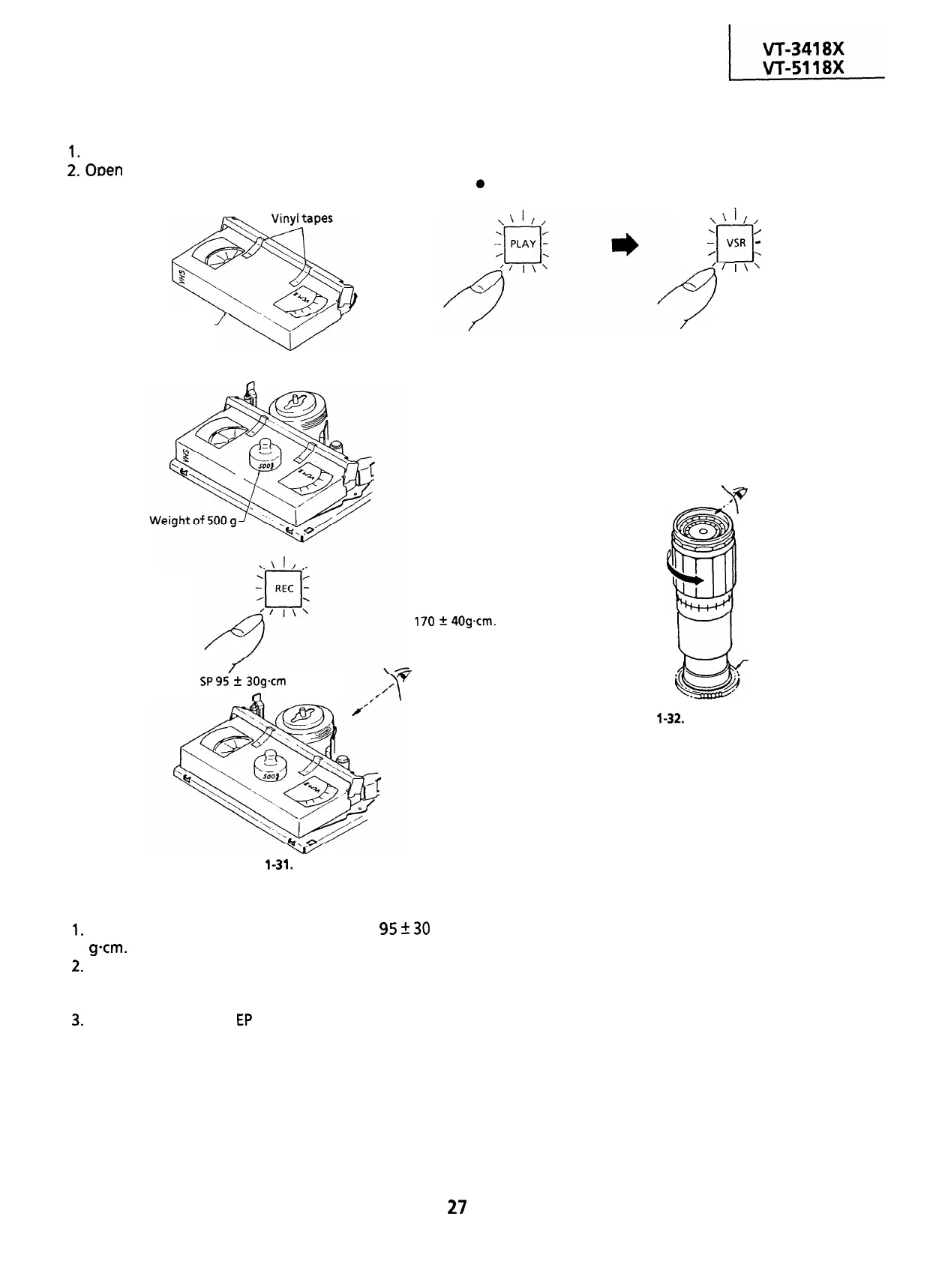
the lid of the cassette torque meter, and
hold it with two pieces of vinyl tapes.
CHECKING AND ADJUSTMENT OF TAKE-UP
TORQUE IN VIDEO SEARCH REWIND MODE
l
Remove the cassette housing control assembly.
a
Checking
Cassette torque meter
Open here
Load a cassette torque meter into the unit.
Set value
SP95
+
30gcm
n
\‘I//
1
0
/
VSR
-
/
‘/
,,:
?
Push the play button to place
the unit in the playback mode.
Push video search rewind
button to place the unit in the
video search rewind mode.
Torque gauge
v
.N
Place the torque gauge on the supply reel
disk, and turn it counterclockwise very slowly
(one rotation every 2 to 3 seconds) and check
that the torque is within the set value
170
f:
40gcm.
I7
Figure
l-31.
l
Checking
1.
Check that the torque is in the range of
95
2
30
g-cm.
2.
The torque fluctuates due to the rotational
deviation of the reel drive unit. Use the center of
the fluctuation as the value.
3.
Place the unit in the
EP
record mode, and check
that the take-up torque is within the range.
l
Adjustment
If the take-up torque in the playback mode is
outside the range, replace the take-up reel disk.
Note:
Stabilize the cassette torque meter to prevent
floating.
Supply reel disk
Figure
l-32.
Note:
Set the torque gauge securely on the supply reel
disk. If it is not secure, the measurement will be
incorrect.
l
Adjustment
If the take-up torque in video search rewind mode
is outside the range, replace the supply reel disk.
Note:
The torque fluctuates due to the rotational
deviation of the supply reel disk. Use the center of
the fluctuation at the value.
27


 To Next Page
 Loading...



