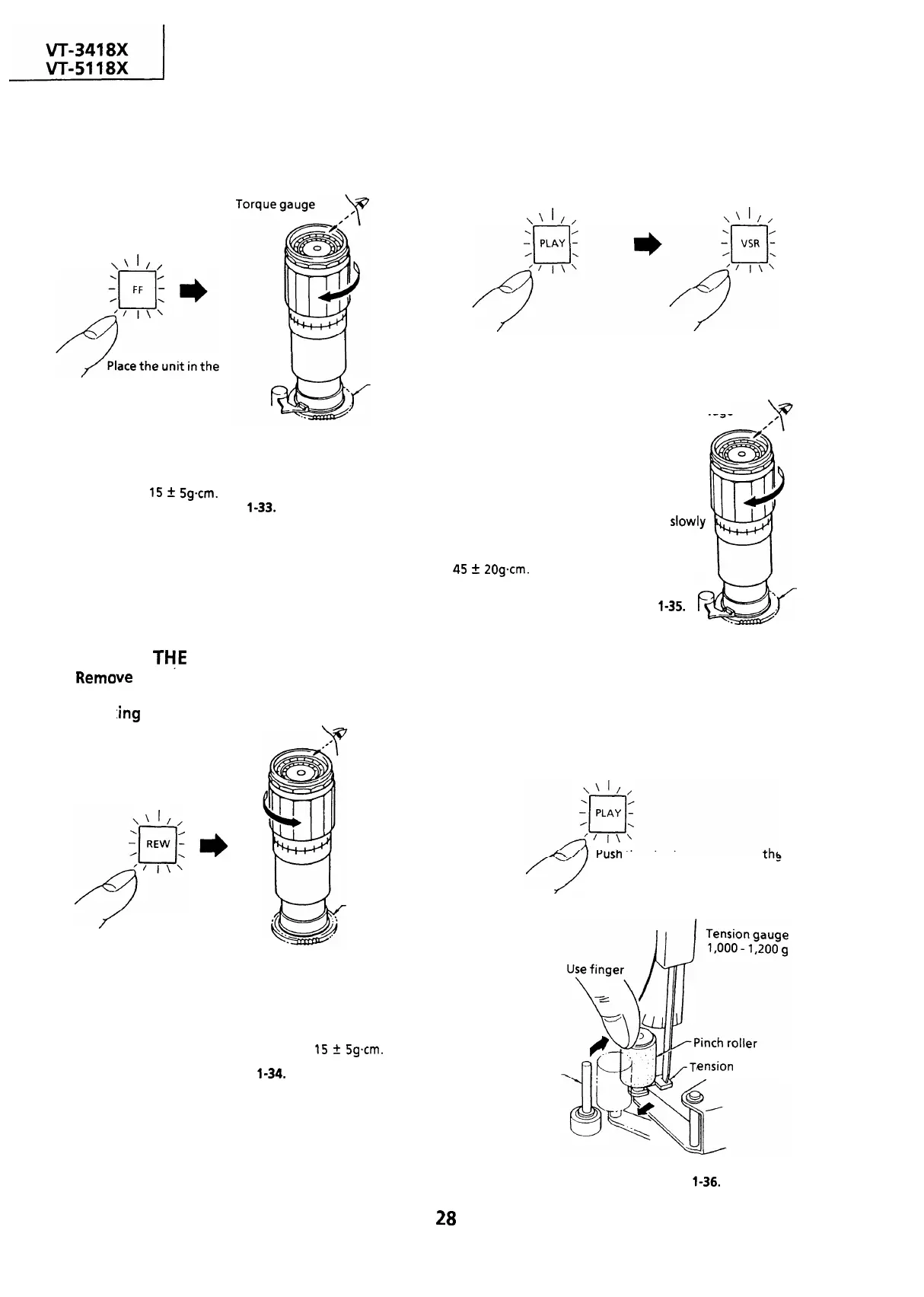
CHECKING THE FAST FORWARD BACK
TENSION
l
Remove the cassette housing control assembly.
l
Checking
\‘I//
CHECKING THE VIDEO SEARCH REWIND
BACK TENSION
l
Remove the cassette
housing control assembly.
l
Checking
\‘I//
\\I//
fast forward mode.
Push the play button to place
Push the video search rewind
the unit in the playback mode. button to place the unit in the
Supply reel disk
videosearch rewind mode.
Torque gauge
Place the torque gauge on the supply
reel disk, and turn it clockwise very
slowly (one rotation every 2 to 3 seconds)
and check that the torque is within
15
f
5gcm.
Figure
l-33.
Place the torque gauge on the take-up reel
disk, and turn it counterclockwise very
s10wly
Note :
(one rotation every 2 to 3 seconds) and check
Set the torque gauge securely on the supply reel
that the torque is within the set value
45
5 2Ogcm.
disk.
If the torque gauge is not securely set on the
reel disk, measurement will be incorrect.
Figure
l-35.
Take-up
reel disk
Note :
CHECKING
THE
REWIND BACK TENSION
l
Remo
ve the cassette housing control assembly.
l
Check
:ing
Place the unit in the
rewind mode.
Take-up reel disk
Place the torque gauge on the
take-up reel disk, and turn it
counterclockwise very slowly
(one rotation every 2 to 3
seconds) and check that the
torque is within
15
t
5gcm.
Note:
Figure
l-34.
Set the torque gauge securely on the take-up reel
disk. If it is not secure, the measurement will be
incorrect.
Set the torque gauge securely on the take-up reel
disk. If it is not secure, the measurement will be
incorrect.
CHECKING THE PINCH ROLLER PRESSURE
l
Remove the cassette housing control assembly.
rusn the play button to place
the
unit in the playback mode.
Capstan shaft
ension gauge adaptor
Figure
l-36.
28


 To Next Page
 Loading...



