- 2 -
FEATURES
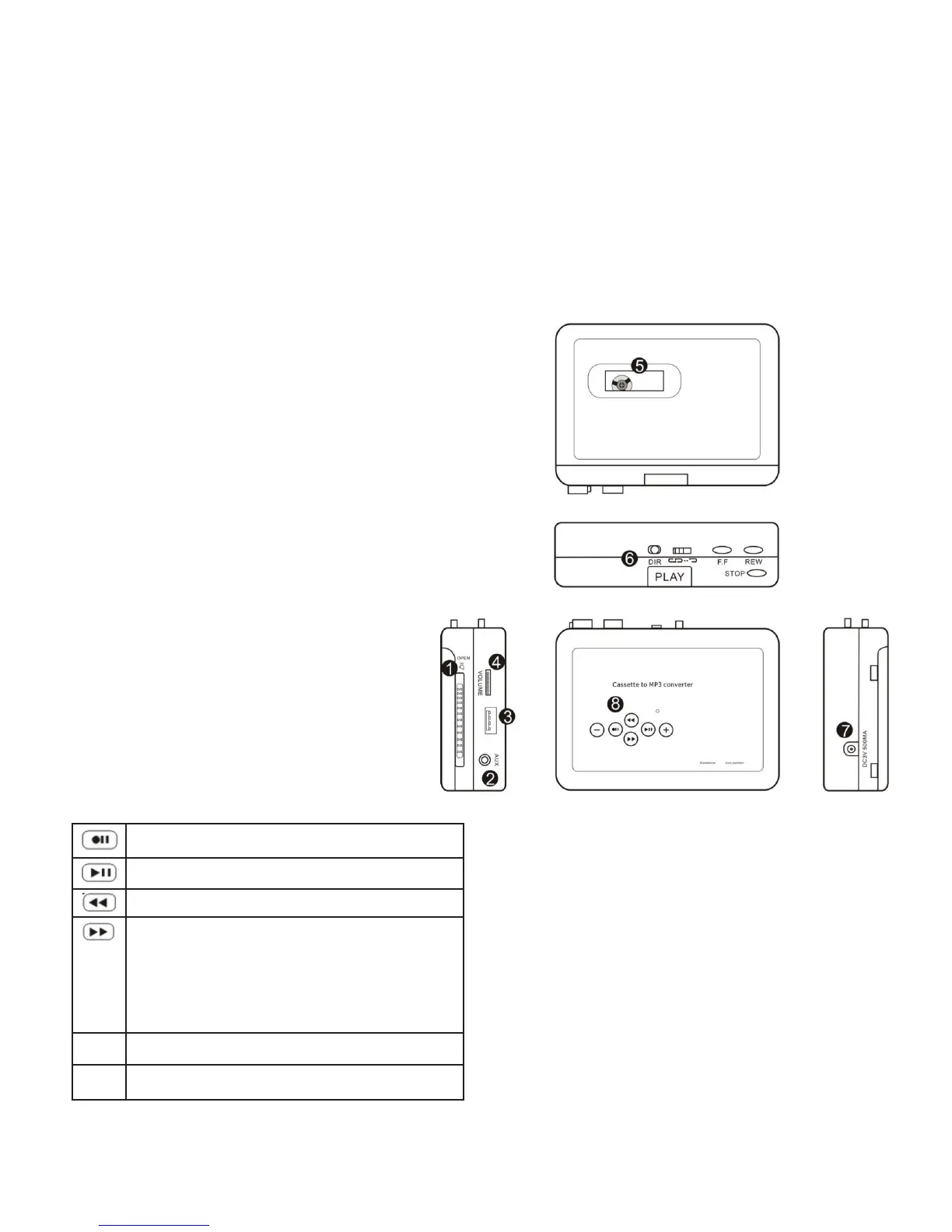
IDENTIFICATION OF PARTS
• Easy to use
• Converts cassettes to MP3 files without a computer or additional software
• Makes high-quality 128 Kbps recordings
• Auto and Manual recording modes
• AUX line in port lets you convert audio from other sources (radio, CD player, etc.)
• Operates on 2 AA batteries or plugs into a USB port
• Includes 8GB USB flash drive (about 2,000 songs)
1. Cassette lid lock switch
2. AUX port (line out to headphones or an external
speaker, OR line in from audio source)
3. OTG port (“On the go” — plug in your USB flash
drive or a USB card with card reader)
4. Volume control
5. Tape viewing window
6. Cassette operation buttons:
• PLAY
• STOP
• FAST FORWARD
• REWIND
• DIRECTION (Change direction of tape
to switch from Side A to Side B)
• AUTO REVERSE (Slide to engage
Auto Reverse Mode)
7. DC port (5V DC power)
8. Converter operation buttons
Press to Start/Stop recording
Press to Start/Stop playback
Previous track
1. Advance to next track during playback.
2. Long press to change recording modes
(Manual or Auto) in Standby mode.
3. Short press to manually insert a track
break in Manual recording mode.
+ Playback volume increase
_ Playback volume decrease



 To Next Page