Introduction
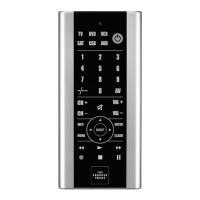
The Soft-Touch 6-In-1 Wireless IR Re-
mote can operate up to six different
machines. One device controls your
TV, DVD, VCR, audio, satellite and
cable. The database supports up to
500 different brands and models. An
EL backlight automatically illuminates
the controls when it’s picked up. The
remote also allows you to conduct an
automatic or manual code search for
a particular device. You may need to
review the operating manuals of your
original devices to refresh yourself
regarding the functions of those units.
Battery Precautions —
Handling and Usage
WARNING: Only adults should
handle batteries. Do not allow a child
to use this product unless the battery-
compartment cover is securely
attached to the battery compartment,
in accordance with all product
instructions.
• Follow the battery manufacturer’s
safety and usage instructions.
• Keep batteries away from children
and pets.
• Do not mix a used battery with a
new battery, or mix different sizes
of batteries together.
4


 To Next Page
 Loading...