doneness level for different foods by viewing the boxes
beneath the appropriate food icon.
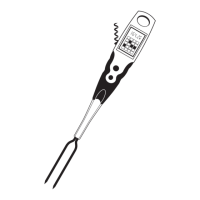
• If desired, insert the prongs into different places in the meat
to ensure that the temperature is even throughout.
• The All-In-One Grill Fork can be set to a specific tempera-
ture by pressing the SET button and holding until desired
temperature is indicated. Insert the prongs into meat. When
the food temperature reaches the set temperature, the
numerical temperature display will flash and beep.
• Remove from food and clean according to the instructions.
Caution: After use, allow the prongs to cool for 60 seconds
before touching them.
Temperature Range in °F
Fish Red Meat White Meat Poultry
Well 160 170 170
Medium 140-159 160-169 160-169
Med. Rare 130-139 130-139
Rare 120-129 120-129
Simplified Operation


 To Next Page