EasyManua.ls Logo

Sharper Image OWN ZONE - User Manual

Sharper Image OWN ZONE
6 pages
Print Icon
To Next Page IconTo Next Page
Loading...
INSTRUCTION MANUAL
FOR TIPS AND INSTRUCTIONAL VIDEOS, PLEASE VISIT
WWW.OWNZONETIPS.COM
FOR TIPS AND INSTRUCTIONAL VIDEOS, PLEASE VISIT
WWW.OWNZONETIPS.COM
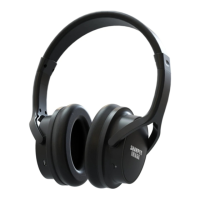
OWN ZONE™ WIRELESS HEADPHONES (1)
OWN ZONE™ WIRELESS HEADPHONES
MICRO USB CHARGING CABLES (2)
TRANSMITTER (1)
OPTICAL CABLE (1) RCA CABLE (1) AUX CABLE (1)
FCC COMPLIANCE
FCC PART 15:
This equipment has been tested and found to comply with the requirements for a
Class B digital device under Part 15 of the Federal Communications Commission
(FCC) rules. These requirements are intended to provide reasonable protection
against harmful interference in a residential installation. This equipment generates,
uses and can radiate radio frequency energy and, if not installed and used in accor-
dance with the instructions, may cause harmful interference to radio communications.
However, there is no guarantee that interference will not occur in a particular installa-
tion. If this equipment does cause harmful interference to radio or television recep-
tion, which can be determined by turning the equipment off and on, the user is
encouraged to try to correct the interference by one or more of the following
measures:
- Re-orient or relocate the receiving antenna.
- Increase the separation between the equipment and receiver.
- Connect the equipment into an outlet on a circuit different from that to which the
receiver is connected.
- Consult the dealer or an experienced radio/TV technician for help.
Do not attempt to repair or modify this equipment.
WARNING: Changes or modifications to this equipment not expressly approved by
the party responsible for compliance could void the user’s authority to operate the
equipment.
This device complies with Part 15 of the FCC Rules. Operation is subject to the
following two conditions:
1. This device may not cause harmful interference, and
2. This device must accept any interference received, including interference that may
cause undesired operation.
FCC RF Radiation Exposure Statement Caution: To maintain compliance with the FCC’s
RF exposure guidelines, place the product at least 20cm from nearby persons.
© 2018 APG. All rights reserved. Own Zone is a trademark of APG. Made in China.
IM3
Question and Answer IconNeed help?

Do you have a question about the Sharper Image OWN ZONE and is the answer not in the manual?

Summary

FCC Compliance

FCC Part 15

Details FCC Part 15 compliance for Class B digital devices and measures to correct interference.

FCC RF Radiation Exposure Statement

Caution to maintain compliance with FCC RF exposure guidelines, placing the product at least 20cm from nearby persons.

Setting Up the Transmitter

Power the Transmitter

Instructions on powering the transmitter using a micro USB cable and a suitable power source.

Connecting to TV Audio Port

Guidance on connecting the transmitter to the TV's audio output via different methods.

The Preferred Method: Optical

Details connecting the transmitter via the TV's Optical audio port for sound output.

Troubleshooting

No Audio from Headphones

Checks to perform if no audio is heard from the Own Zone™ Wireless Headphones.

Static Interference

Steps to address static interference and improve audio playback quality.

Beeping During Playback

Indicates headphones need charging when a series of beeps are heard during use.

Wired to Wireless Switching Issue

Steps to resolve issues when switching back to wireless mode after using as wired headphones.

Alternative TV Audio Connections

RCA Audio Out Connection

Details connecting the transmitter via RCA audio jacks on the TV.

Headphone Jack Connection

Details connecting the transmitter via the TV's headphone jack using an AUX cable.

Using the Own Zone Headphones

Powering On and Pairing

Instructions on powering the transmitter and headphones and ensuring they pair automatically.

Volume Adjustment

Guidance on adjusting the volume using the headphone controls or TV remote.

System Reset Instructions

Performing a System Reset

Step-by-step guide to reset the system by holding scan buttons on transmitter and headphones.

Pairing Your Own Zone Wireless Headphones

Automatic Pairing Process

Details on how headphones should pair automatically with the transmitter.

Manual Pairing Steps

Instructions for manual pairing if headphones do not pair automatically.

Charging Your Own Zone Wireless Headphones

Charging Procedure

Instructions for fully charging the headphones before first use via micro USB.

Low Battery Indication

Note on hearing beeps indicating low batteries and the need for charging.

Adjusting Volume on Headphones

Using Volume Controls

Instructions on using the volume controls located on the right earcup for comfort.

Troubleshooting No Audio

Checks for muted/low volume on TV/headphones and correct audio port connection.

Using Headphones as Wired Headphones

Wired Connection Setup

Steps to use the Own Zone™ Wireless Headphones as wired headphones via AUX cable.

Wired Mode Limitations

Note that wireless audio is not picked up when the AUX cable is plugged in.

Sharper Image OWN ZONE Specifications

General IconGeneral
BrandSharper Image
ModelOWN ZONE
CategoryOther
Power SourceBattery
ColorBlack
MaterialPlastic
Battery TypeLithium-Ion
Battery Count1

Related product manuals