Swift Operating Instructions
Page 8 Doc 57025-01 Rev G
Turn on the Transmitter
Turn on the transmitter by opening the tank valve. The transmitter will automatically wake up
when it detects pressure over 7 bar (100 psi). Pressure data is transmitted approximately every
5 seconds.
LED Indicator
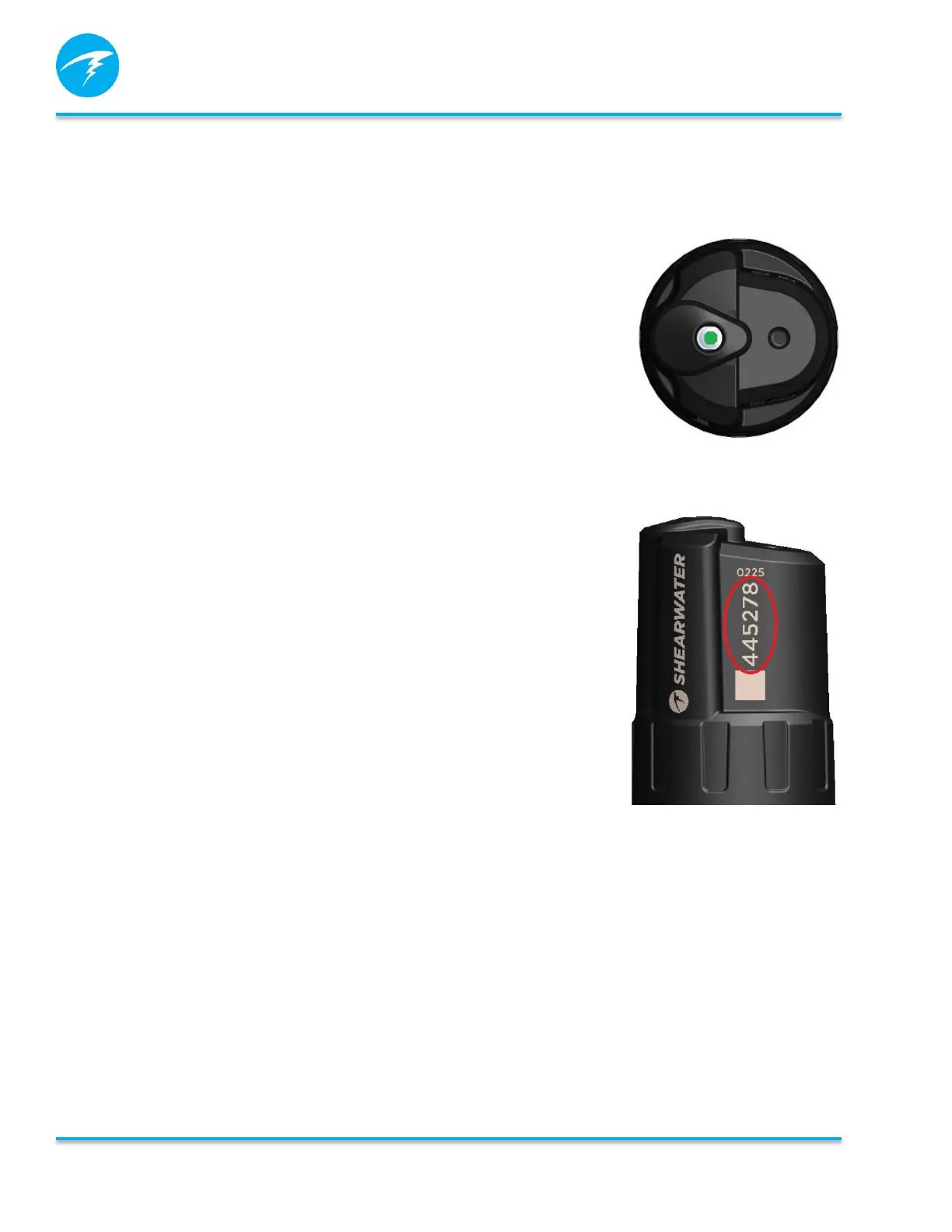
The LED indicator on the top of the Swift will flash green when a
transmission is sent. This helps to indicate that the transmitter is
operating properly. The LED will flash red if an interfering signal is
detected. The Swift will try to transmit again when the channel is
free.
Setting up AI on the Dive Computer
• Enable AI on the dive computer
• Pair the Swift transmitter
• Configure AI display on home screen
Refer to the dive computer manual for details on setting up the AI
system.
Pairing the Transmitter
Each transmitter has a six digit serial number etched on its body.
AI communications are coded with this number so that the source
of each pressure reading can be identified. Enter the six digit
serial number (including any leading zeros) in to the transmitter
serial number setting of the dive computer menu. Enter the rated
(full tank) pressure value as well as desired reserve pressure level.
Turning off the Transmitter
To turn off the transmitter, close the tank valve and purge the
second stage regulator to drain pressure from the hoses. The
transmitter will automatically power down after 1 minute of no
applied pressure (less than 3.5 bar or 50psi).


 To Next Page