time. Return to Clock state when short press “Alarm 1” or 5S no operate.
2. Check Alarm 2: When CLOCK mode. Short press “Alarm 2” to show Alarm 2 setting
time. Return to Clock state when short press “Alarm 2” or 5S no operate.
3. The icon of Alarm 1 and Alarm 2 will light on CLOCK interface if the setting is
4. Cancel Alarm 1: When CLOCK mode. Long press “Alarm 1” when hour number
flashes. In this interface, long press “Alarm 1” to return to CLOCK state. The icon of
Alarm 1 light off, Alarm 1 close.
5. Cancel Alarm 2: When CLOCK mode. Long press “Alarm 2” when hour number
flashes. In this interface, long press “Alarm 2” to return to CLOCK state. The icon of
Alarm 2 light off, Alarm 2 close.
6. Long press “Snooze” button to turn off the alarm when rings. Short press or Long
press any other keys is a snooze function ( the screen brightness adjustment key / projection key
are invalid) .
The snooze time interval is 10 minutes, the alarm time is 2 minutes.
Maximum 5 times after no operate when snooze followed by recycling.
7. When alarm rings, ringtone volume from small to large, every time is 2 minutes. Rings again
after 10 minutes if no operation within 2 minutes.
The alarm will be turned off after 5 times if without any operation. Until the alarm rings again
next day.
If there is no operation after the first alarm rings and second alarm time is up, then rings the
second alarm.
If the first alarm snooze rings again and Alarm 2 time is up, then rings the second alarm.
DIY Ringtone Setting:
1. When CLOCK mode, long press “Snooze” button and display REC, recording 10S ringtone;
release “Snooze” button and play sound just recorded.
2. Set the hour or minute character beat when setting the alarm, short press “Snooze” button
to select DIY ringtone.
FM Function:
1. Short press “M” key , switch to Radio state.

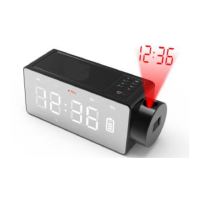

 To Next Page
 Loading...