
 Need help?
Do you have a question about the Shenzhen MD-3010? and is the answer not in the manual?
Lists key features of the metal detector, such as automatic detection, LCD display, and target identification.
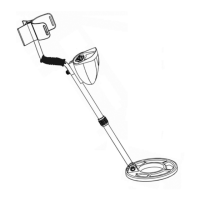
Identifies and labels all the physical components of the metal detector with corresponding numbers.
Provides step-by-step instructions for assembling the metal detector, including stem adjustments and coil connection.
Details the process of installing 6 1.5V AA alkaline batteries, emphasizing polarity.
Explains how the battery icon on the LCD indicates the remaining battery life and when to replace batteries.
Advises on the benefits and connection of headphones for improved audio detection and battery saving.
Introduces the control panel layout, identifying buttons like MODE, SET, ENTER, and POWER.
Shows the LCD display and its various icons and indicators for operation.
Explains the meaning and function of various icons on the LCD display, such as Sensitivity, Depth, and Target Icons.
Details how to use the detector in its normal operating state, including basic power-on and adjustments.
Describes the initial state upon powering on the detector and its readiness for use.
Explains how to adjust the sensitivity level of the detector for optimal performance.
Guides on how to set the detector to ignore specific types of targets.
Details how to adjust the volume of the audio tones produced by the detector.
Explains how to reset the detector to its original factory default settings.
Provides instructions on how to test the detector's performance with known targets.
Describes how to perform initial tests of the detector in an indoor environment.
Explains how to conduct tests of the detector in an outdoor setting.
Offers advice and best practices for using the metal detector effectively.
Discusses how to interpret signals when target icons don't match detected objects or when soil is mineralized.
Explains what false signals are and how to distinguish them from real targets.
Provides guidance on the correct technique for sweeping the search coil for maximum coverage.
Provides essential tips for keeping the detector clean, dry, and protected from extreme conditions.
Details key technical parameters like battery type, operating current, frequency, sensitivity, and dimensions.
 General
| Type | Handheld Metal Detector |
|---|---|
| Sensitivity Adjustment | Yes |
| Voltage | 9V |
| Sensitivity | Adjustable |
| Audio Alert | Yes |
| Search Coil Size | 8 inches |
| Waterproof | Coil only |
| Detection Depth | 1.5m (Max) |

 To Next Page