
 Need help?
Do you have a question about the Shidu SD-M800 and is the answer not in the manual?
Explains UHF wireless amplification and manual pairing steps for sound issues.
Instructions for playing audio files from TF card or USB flash disk.
Details on single-song and all-song loop playback options in MP3 mode.
Guide on how to record audio using a wired microphone.
Connecting external audio devices like computers or phones via AUX cable.
Instructions for charging the speaker unit and using it as a power bank.
Step-by-step guide to connect the device via Bluetooth.
Guide on charging the wireless microphone and indicator light status.
Information on disconnecting, reconnecting, and volume control for UHF.
Diagnosing and resolving issues when there is no sound from the speaker.
Steps to re-pair the UHF frequency point to avoid mutual interference.
Tips to prevent microphone feedback or screaming sounds.
Key warnings regarding microphone aiming, connections, charging, and environment.
Information on the 1-year warranty and customer service contact.
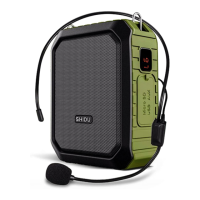
The SHIDU SD-M800 is a versatile portable voice amplifier designed for various applications, including teaching, training, and public speaking. It offers multiple functionalities, including wireless amplification, media playback, recording, and power bank capabilities, making it a comprehensive solution for audio needs.
The device features a clear and intuitive interface with several control buttons and ports. The main power switch also doubles as a play/pause button for media playback. A short press turns the device on/off, while a short press during music playback pauses or resumes the audio. Dedicated buttons for "Previous/Volume -" and "Next/Volume +" allow users to navigate tracks with a short press and adjust the volume with a long press.
A "Mode Key" (M button) enables selection between different operating modes: Bluetooth, USB flash disk, TF card, AUX input, and UHF wireless amplification (available only in the UHF version). This allows for flexible audio source options.
For recording, the device includes a "MIC in socket" for connecting a wired microphone. It supports recording to a USB flash disk or TF card. A "DC 5V charging port" is provided for recharging the device, and an "AUX input" allows connection to external audio devices like computers, phones, or MP3/MP4 players for direct amplification.
The device also features an "LED screen" that primarily displays the battery level. For media playback, a "USB flash disk slot" allows users to insert and play audio files directly from a USB drive. This slot also functions as a "power bank" to charge other mobile devices. Additionally, a "TF card slot" is available for playing audio files from a TF card.
Upon powering on, the device automatically enters UHF wireless amplification mode. If there's no sound, users can manually pair the UHF frequency point. This involves turning on the amplifier, pressing and holding the "M" key for 5 seconds until "UHF" appears on the screen, then turning on the wireless microphone and pressing and holding "+". A "UHF is connected" voice prompt confirms successful pairing. This manual pairing is useful if the wireless microphone has no sound, is damaged, replaced, or if multiple UHF amplifiers are used in close proximity to avoid interference. It's important to note that after successful pairing, users should avoid pressing and holding "volume +" on the wireless MIC, as this will re-enter pairing mode and disrupt normal amplification. Typically, the wireless MIC and voice amplifier are pre-paired at the factory, so manual pairing is not usually required for first-time use.
To play audio files, simply insert a TF card or USB flash disk into its respective slot. If both are inserted, the "M" key can be used to switch between TF card and USB flash disk play modes. A short press of the play/pause button initiates or pauses playback.
In MP3 playing mode, pressing and holding the "M" key for 3 seconds toggles between single song loop and all loop. By default, the speaker will be in "all loop" mode after being powered on again.
The device supports wired MIC recording. Users must ensure a USB flash disk or TF card is inserted, then plug a wired MIC into the "MIC" port. A short press of the "REC" key starts recording. After recording, another short press of "REC" plays the latest recording file. To play other recordings, a long press of the "REC" key in MP3 playing mode is used.
For direct amplification of external audio, connect the amplifier to devices like computers, phones, MP3 players, or MP4 players using an AUX cable.
To use the Bluetooth function, first switch on the amplifier and enter or switch to Bluetooth mode. Then, on the mobile device, go to "Settings," turn on Bluetooth, search for "SD-M800," and connect. A "Bluetooth is connected" voice prompt confirms a successful connection.
The speaker should be charged promptly when the battery is low, indicated by a "Low battery, please charge" voice prompt. Use a DC 5V power charger, connecting the other end to an AC 110~220V power supply. The number on the LED screen will increase as the battery charges. It's recommended to fully recharge the device before its first use. All functions will pause during charging. Once fully charged, unplug the charger.
The wireless MIC indicates low battery when its blue indicator blinks. Turn it off and charge it using a mini-USB cable connected to a DC 5V charger. A red indicator light will be on during charging and will turn off once fully charged. Unplug the charger as soon as it's fully charged. If the wireless MIC is in use, pressing and holding "+" will disconnect it from the speaker; to reconnect, follow the manual UHF pairing steps. In UHF amplification mode, short presses of "+/-" adjust the volume.
The device can act as a power bank. Connect the speaker to a mobile phone using a standard charging cable to charge the phone.
When speaking, aim at the handheld MIC capsule and maintain a distance of over 60cm between the amplifier and MIC to prevent howling. Avoid frequent insertion or removal of connectors to prevent socket looseness or poor connections, and always distinguish between MIC and AUX plugs. Recharge the device promptly when the battery is low. Store the amplifier in a dry, well-ventilated area, avoiding rain, water, or impacts. Use original accessories if replacements are needed. Non-professional technicians should not dismantle or repair the product; contact the local agent for any service requirements.
The SHIDU SD-M800 offers a 1-year warranty and guarantees 100% product satisfaction. Users can contact customer service for any questions or support.
 General
| Impedance | 4Ω |
|---|---|
| Frequency Response | 20Hz - 20kHz |
| Total Harmonic Distortion | ≤ 0.1% |
| Working Time (microphone) | 8-10 hours |
| Working Time (music) | 6-8 hours |
| Battery Capacity | 2000mAh |
| Wireless Distance | 10m |
| Connectivity | Bluetooth, AUX, USB |

 To Next Page