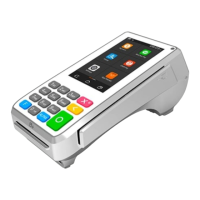
A800 QUICK REFERENCE GUIDE
CREDIT SALE
1. From the application idle screen, tap SALE
2. Enter the sale amount
3. Tap CONFIRM
4. Enter the tip amount (if applicable)
5. Tap the blue CONFIRM button
6. Insert, Swipe, Tap or Manually key-in card
•
If Manual:
•
Tap inside the text box to bring up on-screen keyboard
Enter the card number
Tap the keyboard logo in the bottom left to minimize the keyboard
Enter expiry (expiration) date
Enter address and zip code (if applicable)
Tap CONFIRM
Enter CID (CVV)
CONFIRM
7. Terminal communicates with host
8. Press OK
9. Tear slip
CREDIT RETURN
1. From application idle screen, tap RETURN
2. Enter the amount
3. Tap CONFIRM
4. Enter the card number or swipe card
If Manual:
Enter the amount
Tap CONFIRM
Enter the expiry (expiration) date
Tap CONFIRM
5. Terminal communicates with host
6. Tear slip
CREDIT VOID
1. From application idle screen, tap V/SALE
2. Enter the original transaction number
3. Tap CONFIRM
4. View the transaction information
5. Tap CONFIRM
6. Terminal communicates with host
7. Tear slip and hit OK
PAGE 1 0F 2
DEBIT SALE
1. From the application idle screen, tap DEBIT
2. Tap SALE
3. Enter the amount
4. Select CONFIRM
5. Enter the tip Amount
6. Tap the blue CONFIRM button
7. Insert, swipe, or tap the card
8. Customer enters their PIN
9. Terminal communicates with host
10. Tear slip and tap OK
DEBIT VOID
1. From the application idle screen, tap DEBIT
2. Tap V/SALE
3. Enter the original transaction number
4. Tap CONFIRM
5. Review the transaction information
6. Tap CONFIRM
7. Terminal communicates with host
8. Tear slip and OK
TIP ADJUSTMENT (RESTAURANT ONLY)
1. From application idle screen, tap FUNC
2. Tap TIP MENU
3. Tap which search you would like to find the transaction by (Invoice No., Card No., etc.)
4. Tap the transaction you would like to adjust
5. Tap ADJUST
6. Enter the tip amount
7. Tap CONFIRM
PRINT REPORT
1. From the application idle screen, tap FUNC
2. Tap REPORTS
3. Enter password
4. Tap ENTER
5. Tap on the desired report and follow prompts
POWER ON
1. Press and hold the power button on the left-hand side of the terminal
POWER OFF
1. Press and hold the power button on the right-hand side
2. After two seconds the follow the prompts on the right-hand side of the screen
3. Holding the power button for 15 seconds will reboot the terminal


 To Next Page
 Need help?
 General