EasyManua.ls Logo

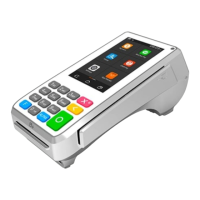
SHIFT4 A80 - User Manual

SHIFT4 A80
2 pages
Print Icon
To Next Page IconTo Next Page
Loading...
*Prompts for manual entries marked in blue.
S1281_03212021_SK
A80
Harbortouch Support: 800-632-1888
Shift4 Payments, Restaurant Manager, POSitouch, Future POS Support: 888-276-2108
QUICK REFERENCE GUIDE
PAGE 1
CREDIT SALE
1. From application idle screen, tap SALE
2. Enter sale amount
3. Tap CONFIRM
4. Insert, swipe, tap card, or key-in card number
5. Minimize keyboard*
6. Tap CONFIRM*
7. Enter expiration date*
8. Tap CONFIRM*
9. Select Card Present 1. Yes 2. No*
10. Tap OK*
11. Enter numeric portion of Street Address*
12. Enter Zip Code*
13. Tap CONFIRM*
14. Enter CVC2 code*
15. Tap CONFIRM*
16. Terminal communicates with HOST
17. Tear slip and enter OK
DEBIT SALE
CREDIT RETURN
CREDIT VOID
1. From application idle screen, tap V/SALE
2. Tap ENTER
3. Enter original transaction number
4. Tap CONFIRM
5. Review transaction information
6. Tap CONFIRM
7. Terminal communicates with HOST
8. Tear slip and enter OK
1. From application idle screen, tap DEBIT
2. Tap SALE
3. Enter sale amount
4. Tap CONFIRM
5. Insert, swipe or tap card
6. Customer enters PIN
7. Terminal communicates with HOST
8. Tear slip and enter OK
1. From application idle screen, tap RETURN
2. Enter password
3. Tap ENTER
4. Enter return amount
5. Tap CONFIRM
6. Swipe card or key-in card number
7. Minimize keyboard*
8. Tap CONFIRM*
9. Enter expiration date*
10. Tap CONFIRM*
11. Select Card Present 1. Yes 2. No*
12. Tap OK*
13. Terminal communicates with HOST
14. Tear slip and enter OK
PLEASE NOTE: Be sure to access the Shift4 Valutec app in order to operate the A80 terminal. The in-app password is the date
entered MMDDYYYY.
BroadPOS
Shift4 Valutec
Question and Answer IconNeed help?

Do you have a question about the SHIFT4 A80 and is the answer not in the manual?

Summary

Credit Card Transactions

Credit Sale Process

Steps for processing a credit card sale, including entering amount, card details, and confirmation.

Credit Return Process

Steps for processing a credit card return, including entering amount, card details, and confirmation.

Credit Void Process

Steps for voiding a previous credit card transaction by entering the original transaction number.

Debit Card Transactions

Debit Sale Process

Steps for processing a debit card sale, including entering amount, card details, and customer PIN entry.

Debit Void Process

Steps for voiding a previous debit card transaction by entering the original transaction number and password.

Terminal Operations

Tip Adjustment

Process for adjusting the tip amount on a transaction, typically for restaurant services.

Enable Debit Functionality

Configuration steps to enable debit card processing and transaction settings on the terminal.

Print Reports

Instructions for printing various reports from the terminal, including default and specific reports.

Settlement Process

Procedure for closing out daily transactions and preparing for settlement, often involving a batch close.

External PIN Pad Setup

Guide for connecting and configuring an external PIN pad for payment processing.

Power Management

Instructions for turning the terminal on and off using the power button and on-screen prompts.

Wi-Fi Connectivity

Steps to connect the terminal to a Wi-Fi network, including selecting and securing the connection.

SHIFT4 A80 Specifications

General IconGeneral
Memory2GB RAM, 16GB Storage
Camera5MP rear camera
Operating SystemAndroid
Connectivity4G, Wi-Fi, Bluetooth
Card ReaderMagnetic stripe, contactless
ProcessorQuad-core Cortex-A53
Payment MethodsNFC