6
Quick Start Guide - ProGrip Quick Start Guide - ProGripPart I Part I
7
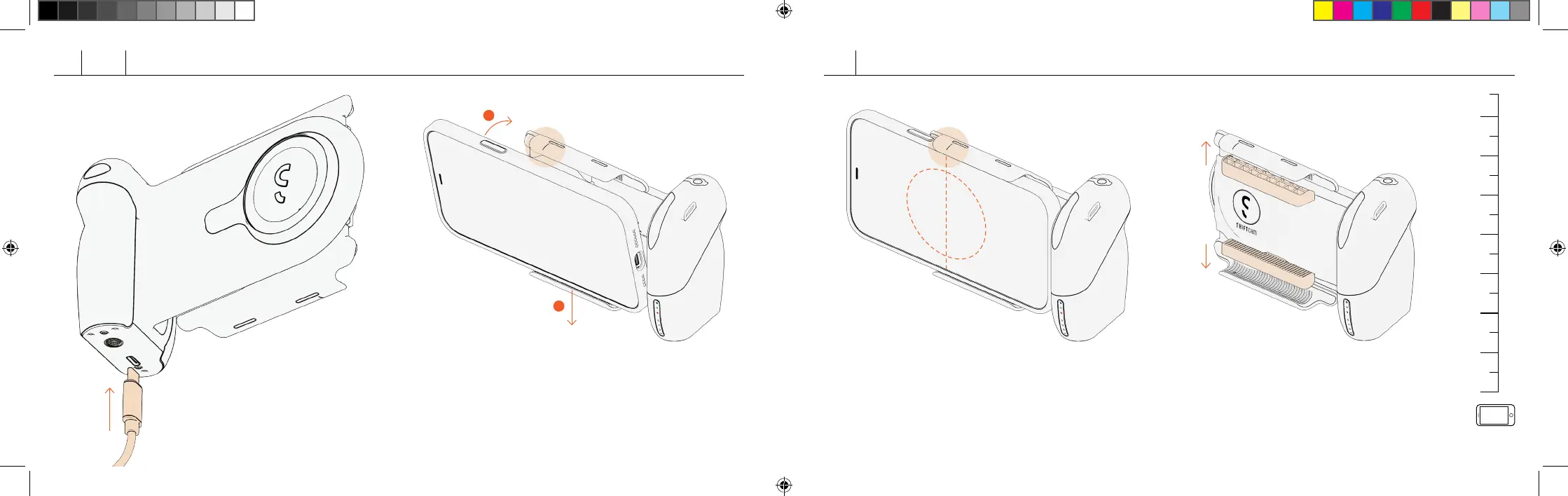
Charging ProGrip
Connect to power source through USB-C
cable to charge.
Attaching ProGrip to Phone
Align your smartphone to the center of the clamp, push down
the lower arm with your smartphone to open up clamp. Push
your smartphone into the top arm and release to secure.
For Smaller Phone Models
If your phone’s width is <75mm, add the Rubber
In-lay Aachments onto the inside of the clamp to
secure.
Ensure your smartphone is properly
aligned to the center of the wireless
charging plate for opmal charging
capabilies.
75mm
0
1
2
ShiftCam - Getting Started draft 08.indd 6-7
ShiftCam - Getting Started draft 08.indd 6-7
3/8/2022 6:46 PM



 To Next Page