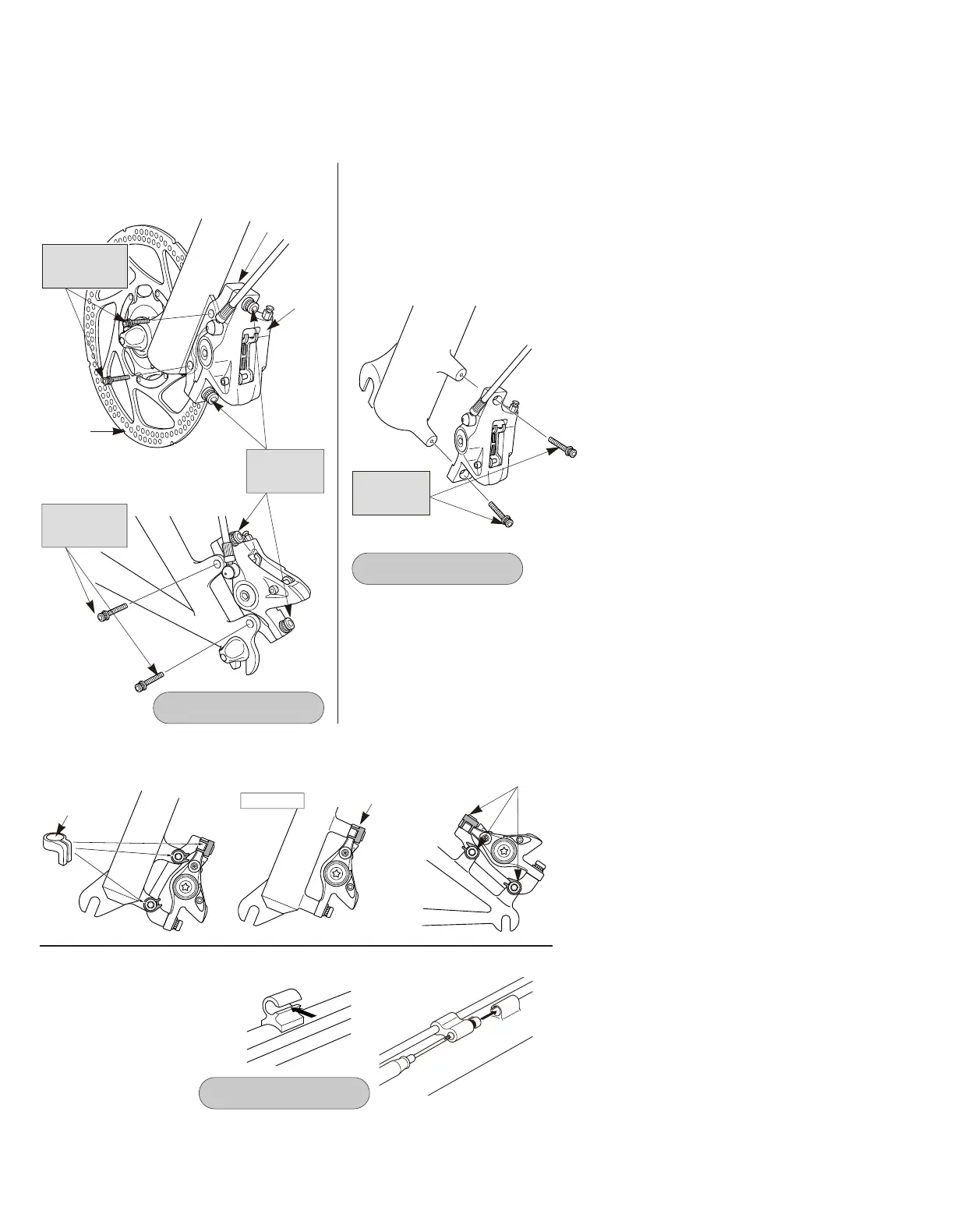
For international-standard mounts, attach adapters to calipers for post-type mounts.
(Separate front and rear adapters are available.)
1. Loosen the caliper fixing bolts so that the caliper can move sideways, and then install the
adapter to the frame.
2. Depress the brake lever so that the rotor is being clamped by the pads, and then tighten the
caliper fixing bolts.
Provisionally install the caliper to the
frame (so that the caliper can move
sideways), depress the brake lever so that
the rotor is being clamped by the pads,
and then tighten the caliper fixing bolts.
● Post mounting type
Caliper
Rotor
Adapter
● International standard mounting type
Tightening torque:
6 - 8 N·m {53 - 69 in. lbs.}
< Front >
< Rear >
Adapter fixing
bolts
20mm
Adapter fixing
bolts
20mm
Caliper fixing
bolts
20mm
Tightening torque:
6 - 8 N·m {53 - 69 in. lbs.}
Caliper fixing
bolts
24.5mm
< Front >
Operate the brake lever several times and check whether the brakes operate normally or
not. Also check that there are no oil leaks visible.
For C-shaped guides and the
usual type of cable stoppers,
use the special Shimano
cable supporter (sold
separately) to secure as
shown in the illustration.
< C-shaped guide > < Usual type of cable stopper >
Tightening torque:
0.3 - 0.5 N·m {2.7 - 4.4 in. lbs.}
Install the accessory caps as shown in the illustration to prevent the bolts from loosening.
Caps
< Front > < Rear >
Post type
Caps
Caps



 To Next Page