SC3122 User Guide
6
ALARM OFF means this function is off. Use UP key to select ON or OFF
The alarm feature is to ensure other telephone is unable to use the
same line as your SC3122. Once activated, any other telephone
connecting to the same line cannot call out at all and when listening to
incoming call, there will be constant noise.
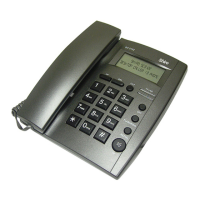
4. Function key operation
UP key
In any mode, press UP key to check all the incoming numbers. If there is no incoming number,
the unit will display END. The unit can receive up to 16-digit phone numbers.
OUT key
In any mode, press OUT key to check the outgoing numbers with time. Press REDIAL key to
dial the selected number.
DEL key
In any mode, when checking the incoming and outgoing call, press DEL key to delete the
number you are checking. Press and hold DEL key for 4 sec and it will delete all incoming call
or outgoing call numbers. When you pre-dial, press DEL key to delete one digit one by one.
When you enter IP number or password, use DEL key to delete error digit.
REDIAL key
In the on-hook mode, press this key to redial the last dialed number.
FLASH (600ms) / RING key
In the on-hook mode, press FLASH/RING key, the phone LCD will display TONE 1-4, which
means there are four selectable ringing tones. Select your preferred ringing tone by pressing
FLASH/RING. When LCD panel displays TONE OFF, it means the ringing tone is turned off.
In the on-hook mode, press this key to auto-hang up for 600ms, after that you can press
REDIAL key or dial out another number.
HANDSFREE (HF) key
While on-hook, press the HANDSFREE key to go into handsfree mode. You can talk through
the microphone and listen from the speakerphone without lifting the handset. While off-hook,
press the HANDSFREE key and put down the handset to go into handsfree mode.
5. ADDITIONAL NOTES
INCOMING CALL LCD INDICATOR
When there is incoming call, the unit will be automatically display the caller number, date
and time, and also display its serial number. If the incoming call is in private mode, it will
display “__p__”; it will display “__0__” if exchange cannot determine the number; it will
display “—E—“ if the call signal contains error.


 To Next Page