3
Air Conditioner Service Manual
Note: Each mode and relevant function will be further specified in following pages.
Operation Details
Remote controller
1
2
4
3
5
6
7
8
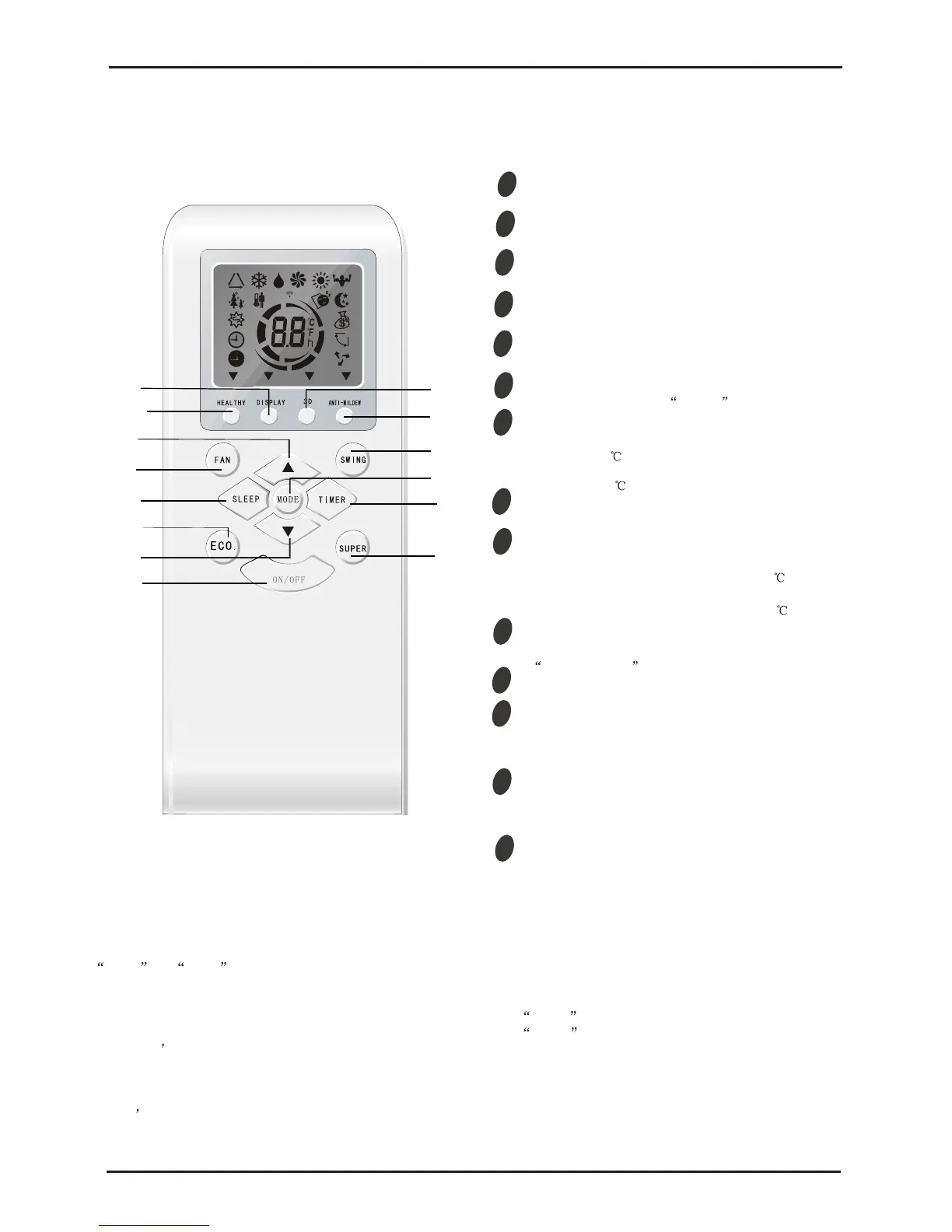
MODE button
ON/OFF button
To select the mode of operation.
ECO button
In cooling mode,press this button ,the temperature
will increase 2 on the base of setting temperature:
In heating mode, press this button, the temperature
will decrease 2 on the base of setting temperature.
To switch the conditioner on and off.
FAN SPEED button
To select the fan speed of auto/low/mid/high.
TIMER button
To set automatic switching-on/off.
TEMP UP button
Increase the temperature or time by 1 unit.
SLEEP button
To activate the function SLEEP .
TEMP DOWN button
Decrease the temperature or time by 1 unit.
Remote Control
The remote controller is not presetting as Cooling Only Air Conditioner or Heat Pump by manufacturer.
Each time after the remote controller replace batteries or is energized, the arrowhead will flashes on the front of
Heat or Cool on LCD of the remote controller.
User can preset the remote controller type depending on the air conditioner type you have purchased as
follows:
Press any button when the arrowhead flashes on the front of Cool , Cooling Only is set.
Press any button when the arrowhead flashes on the front of Heat , Heat Pump is set.
If you don t press any button within 10 seconds, the remote controller is preset as Heat Pump automatically.
Note :
If the air conditioner you purchased is a Cooling Only one, but you preset the remote controller as Heat Pump, it
doesn t bring any matter. But if the air conditioner you purchased is a Heat Pump one, and you preset the
remote controller as Cooling Only, then you CAN NOT preset the Heating operation with the remote controller.
9
SUPER button
In cooling mode, press this button, the unit will give
the maximum cooling temperature with 16
In heating mode, press this button, the unit will give
the maximum heating temperature with 31 .
10
9
SWING button
To activate or deactivate of the movement of the
DEFLECTORS .
12
DISPLAY button
LED display (if present).To
switch on/off the
13
HEALTHY button
To switch - on /off HEALTHY funtion.It is a button
which controls the ionizer or plasma generator only
for inverter type.
14
9
RESET button
This button is useless for wall-mounted type.
When you press "3D", the horizontal and vertical
vanes will swing together at the same time.
14
3
4
2
1
9
5
6
7
8
10
12
13
16
16
9
ANTI MILDEW button
To activate the function ANTI-MILDEW.
10
14
16


 To Next Page