24 | SHOREMASTER.COM
ACCESSORY INSTALLATION
Parts List
DESCRIPTION
PART NUMBER
QTY
ITEM
QC Leg Pocket
100382111
Bolt Bag QC Leg Pocket
10044601
-
BLUE CAP 2 x 2
100181512
Nut Square 1/2
100179323
Set Screw 1/2 X 1.5
100255824
Bolt 3/8 x 1.25
10024222
5
M
QC Leg Pocket Add-On Bracket
Instructions
Part #: 1006672
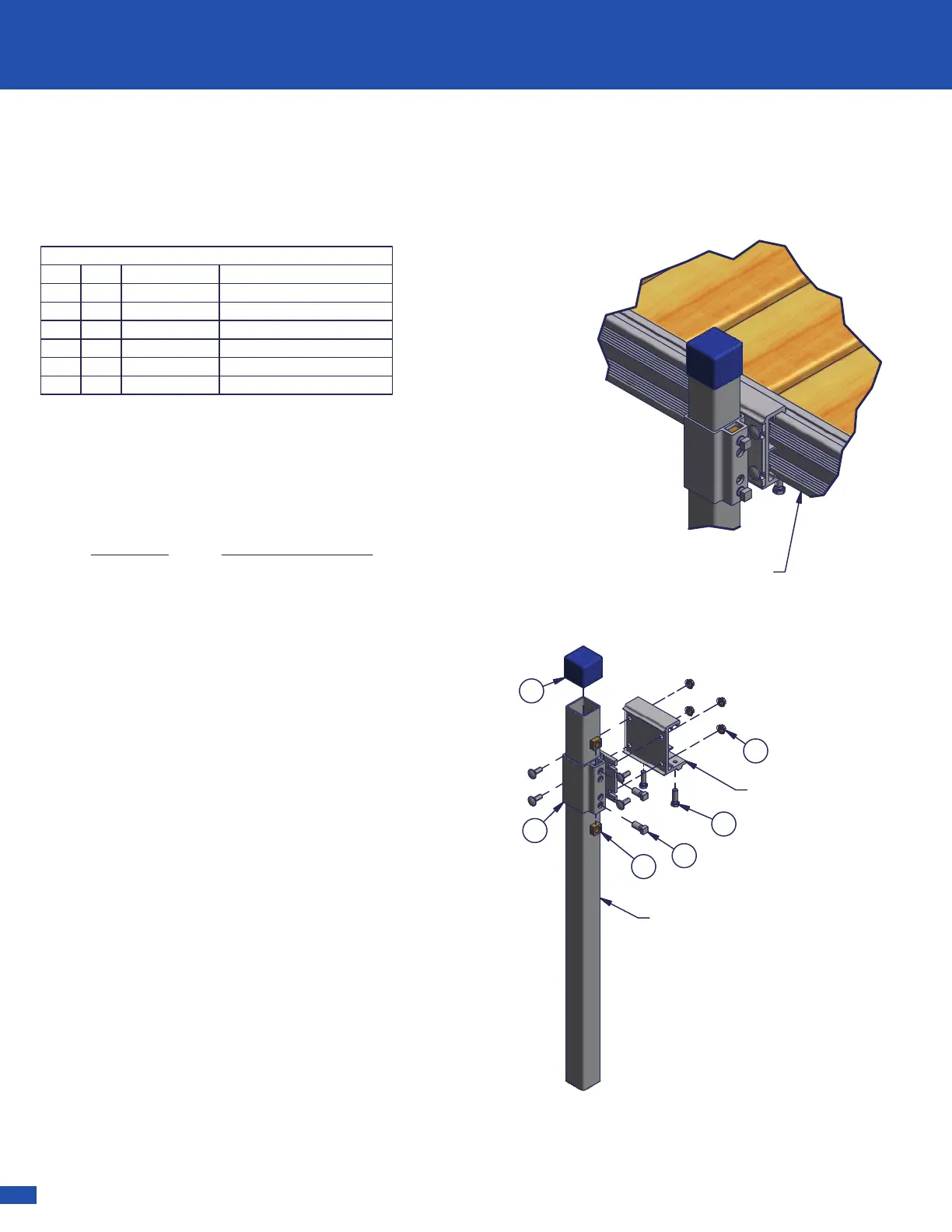
Step 1. Attach the QC Leg Pocket to QC
Accessory Bracket using carriage bolts and flange
nuts with QC Accessory Bracket.
Step 2.
Secure the QC Accessory Bracket to the
Dock Frame with two 3/8 x 1 1/4 Hex Bolts- as
shown.
Step 3.
Slide a Leg Post (sold separately) into the
QC Leg Pocket and secure with two 1/2 x 1 1/4 Set
Screws in the channel of the Leg Pocket and two
1/2 Square Nuts- as shown.
Step 4.
Slide the 2 x 2 Blue Cap over the exposed
Leg Post.
Note: A foot pad is required for the bottom of the
Leg Post.
2
5
4
3
1
2
Leg Post
QC Bracket
Dock Frame
(RS4 shown)
Connect QC Leg Pocket Add-On Bracket to
accessory bracket (Sold Separately) according to
accessory bracket instructions.
Dock Type Bracket Part Number
RS4 Dock 1006706
RS7 Dock 1006708
TS9 Dock 1006730
Note: QC Leg Pocket Add-On Bracket will be
attached to one of four different type of Accessory
Dock Connectors in order to be attached to your
dock. Below is a list of the four different types of
docks and the required bracket.


 To Next Page
 Loading...