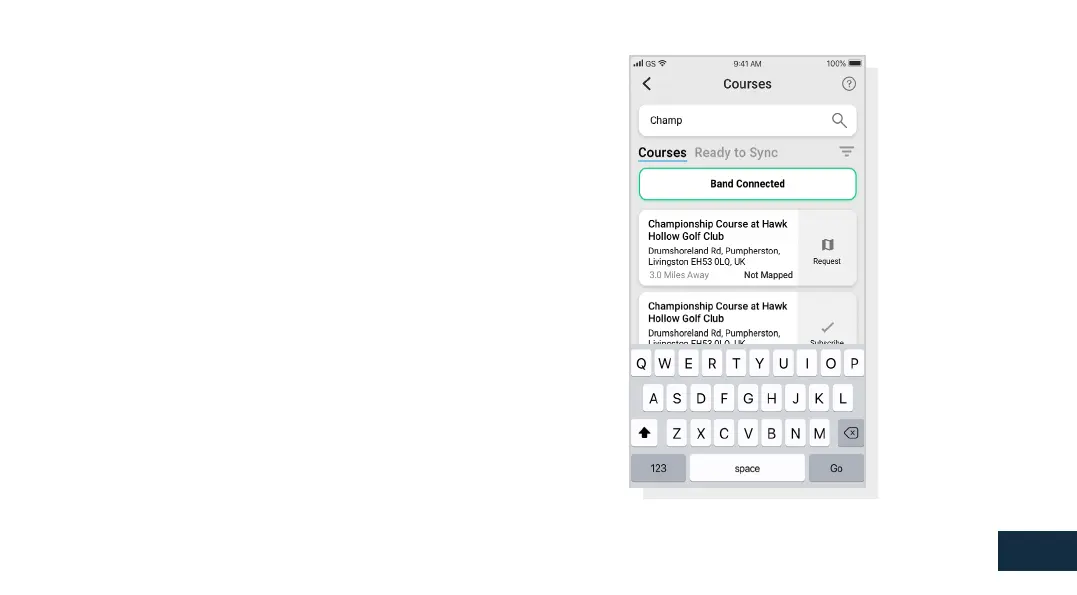
Step 5: Searching for, subscribing and adding a course
You can search our course database by entering the name of the
HTZWXJTWZXNSL^TZWQTHFYNTSYTܪSISJFWG^HTZWXJX*NYMJWZXJ
YMJXJFWHMGFWTWZXJYMJܪQYJWFYYMJYTUWNLMYTKXHWJJSYTܪQYJW
courses by proximity to your current location.
To make sure you always have the most up to date course maps,
XZGXHWNGJYTFS^HTZWXJYMFY^TZUQF^FQTYYTLJYSTYNܪHFYNTSX
when the course map has been updated. To subscribe, tap on the
HTZWXJFSINY\NQQGJMNLMQNLMYJIGQZJYTHTSܪWRYMNXFHYNTS.KFS^
of the courses you selected are due an update then they will be
automatically added to the sync list.
If your course is mapped but not yet on the handheld, the course
will have an ‘add’ button beside it, tap this and the course will be
automatically added to your sync list.
We may have your course in the database but it has not yet been
mapped. In this situation the course will have a ‘request’ button
beside it, tap this to request the course be mapped. This will
notify the mapping team who will endeavour to get the course
mapped in 48 hours.
.K^TZHFSѣYܪSIYMJSFRJTKYMJHTZWXJUWJXXYMJѢ7JVZJXYѣGZYYTS
at the bottom of the screen. This will bring up a form that can be
ܪQQJITZYFSIXJSYYTTZWRFUUNSLYJFR&LFNS\J\NQQFNRKTWYMNX
to be mapped in 48 hours.
05
View course maps



 To Next Page