Need help?
Do you have a question about the ShotTrack VoD305 and is the answer not in the manual?
Steps to power on the unit, including button press and illumination feedback.
Display shows battery percentage, followed by calibration factor.
Unit displays current calibration factor for five seconds.
Unit displays '0000' and requires 5-10 mins for GPS fix and RTC update.
Connect the cable to the unit and observe the displayed cable length.
Identify potential cable errors based on unexpected length readings.
Unit attempts to recover from momentary cable disconnections.
Unit enters a wait period for Bluetooth communication before shutting down.
The ShotTrack VoD-305 is a device designed for measuring and recording data related to cable length and trigger events, likely in applications such as blasting or other industrial processes requiring precise timing and distance measurements. Its design emphasizes simplicity and ease of use, making it a key feature for successful operation.
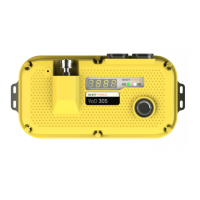
The primary function of the ShotTrack VoD-305 is to measure cable length and detect trigger events. It is equipped with a digital display to show various operational parameters, including battery condition, calibration factor, and cable length. The device is designed to be robust, featuring a durable yellow casing and a clear digital readout. It incorporates a Real Time Clock (RTC) that can be updated via GPS, ensuring accurate timekeeping for recorded data. An optional repeat function allows the unit to reset itself and perform multiple recordings, which can be advantageous in certain operational scenarios. The device also includes a shutdown procedure that involves a waiting period for Bluetooth communication, allowing for data download before automatically powering off.
The device features a digital display that shows a 4-digit number, likely indicating measurements or status codes. It has an ON/OFF button that illuminates in different colors (Blue for ON, Red for flashing during certain operations, and steady Red after setting) to indicate its status. The battery condition is displayed as a percentage, with 100% indicating approximately 10 hours of operation. The unit can acquire a GPS fix to set its Real Time Clock, which is important for accurate data logging, especially when the unit is used in different locations. The cable length measurement is a critical specification, and the device is designed to detect cable errors if the measured length deviates significantly from the expected value.
Operating the ShotTrack VoD-305 is designed to be straightforward, following a 5-step process after initial preparation.
The device also incorporates a recovery mechanism for momentary disconnections or cable distortions. If a trigger event occurs, the unit saves the data and then checks the cable length 10 seconds later. If the cable has returned to its original length, the unit resets itself and awaits further trigger events.
An optional repeat function allows for multiple recordings. If enabled, after a trigger event, the unit will reset itself using the new cable length as the starting point, calculate a new trigger length, and await further triggers until all programmed repeats are completed.
While the manual doesn't explicitly detail routine maintenance, it highlights the importance of checking battery condition before use, as 100% charge provides 10 hours of operation. This suggests that regular charging is a key aspect of maintaining the device's readiness. The device's ability to detect cable errors (due to incorrect calibration or suspect connectors) also implies a need for periodic checks of the cable and its calibration.
The shutdown procedure includes a 15-minute "wait for Bluetooth communication" period, during which the button flashes briefly RED every 30 seconds. This allows users to connect via Bluetooth to download recorded data. If no communication is received within this period, the unit automatically switches off, conserving battery life. Users can also manually switch off the unit during this wait period by pressing the ON/OFF button for 2 seconds until it illuminates BLUE.
The ShotTrack VoD-305 is designed to be a reliable and user-friendly tool for applications requiring precise measurement and event logging, with features aimed at ensuring data integrity and operational efficiency.
 General
| Brand | ShotTrack |
|---|---|
| Model | VoD305 |
| Category | Measuring Instruments |
| Language | English |

 To Next Page