Need help?
Do you have a question about the Show MA-4075 and is the answer not in the manual?
Covers power supply, external connections, covers, fuse, ground, and operating conditions.
Ensure mains voltage matches product rating to prevent damage.
Use insulated mains cabling; consult electrician if unsure.
Covers contain high voltages; only qualified personnel should remove.
Use correct fuse type; replace with unit OFF and disconnected.
Ensure connection to Ground before ON to prevent electric shock.
Install according to manufacturer instructions.
Safe handling and use of the power cord and plug.
Guidelines for cleaning the product safely.
Specifies that servicing should only be done by qualified personnel.
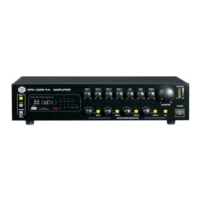
Controls for input gain, treble, and bass adjustments.
Buttons and LEDs for muting channels and status indication.
Controls for overall volume, headphone volume, and zone selection.
Controls for monitor output signal level and headphone output socket.
Adjusts the output signal level for ZONE1.
Displays the overall output signal level using LED segments.
Manages signal connection to the monitor volume.
LED indicator for power status and the main power switch.
Features an intelligent fan that adjusts speed based on internal temperature.
Connects the unit to the main power supply and contains the fuse.
Allows selection of input mains voltage (115V or 230V).
Provides a line output for connecting to external devices.
For connecting a small external loudspeaker driven by an internal amplifier.
Enables signal attenuation for priority functions when short-circuited.
Input for auxiliary signals featuring a voice priority override.
Dip switches for zone selection and volume control for Tel Paging.
Inputs for high-level audio sources like tuners or CD players.
Mono channels for microphone or line level instrument inputs.
Controls input sensitivity and provides phantom power for condenser microphones.
Balanced and unbalanced line outputs for connecting to other equipment.
Terminals for connecting speakers to the power amplifier output.

 To Next Page
 General