50mV
50
Jtsec:
50
mV
50,tsec
50mV
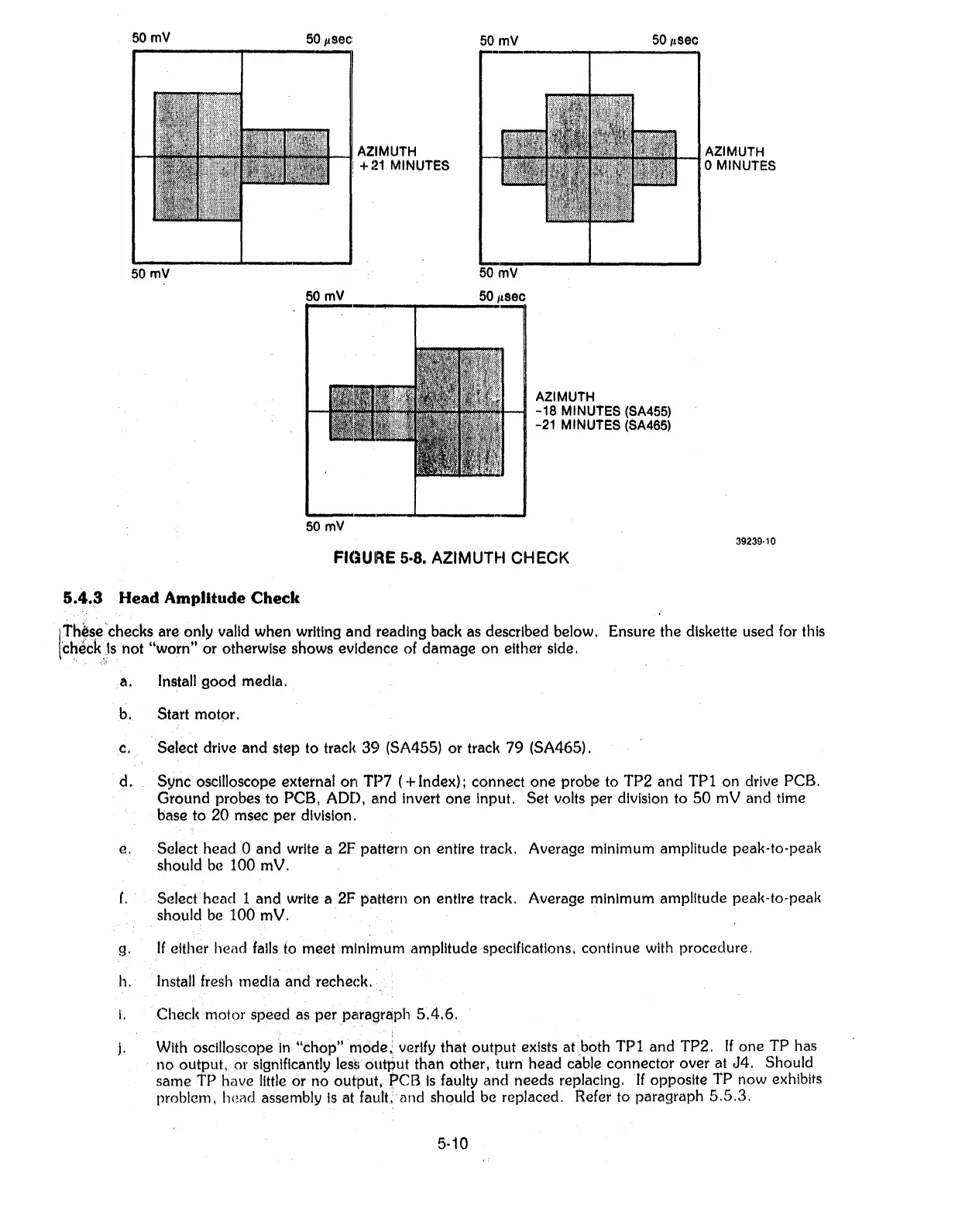
AZIMUTH
+
:~1
MINUTES
AZIMUTH
oMINUTES
50
mV
AZIMUTH
-18
MINUTES (SA455)
-21 MINUTES (SA465)
FICJURE
5·8.
AZIMUTH CHECK
39239·10
5.4.3
Head Amplitude Check
Ith~se
..
·.·.CheckS
are
..
only valid when writing
and
reading back as described below. Ensure the diskette used for this
t'check}s not "worn"
or
otherwise shows evidence of
damage
on
either side.
a.
Install
good
media.
b. Start motpr.
c. Select drive
and
step to track.
39
(SA455)
or
track
79
(SA465).
d.
Sync
oscilloscope external
on
TP7
(+
Index); connect
one
probe to
TP2
and
TPI
on drive PCB.
Ground
probes to PCB, ADD,
and
invert
one
input.
Set
volts
per
division to
50
mV and time
base to
20
msec
per
division.
e. Select
head
a
and
write a 2F pattern
on
entire track. Average minimum amplitude peak-to-peak
should be
100
mV.
f.
Select
head
1
and
write a 2F pattern
on
entire track. Average minimum amplitude peal<-to-peak
should be
100
mV.
g. If either
head
falls to
meefmlnlrnum
amplitude spe!clflcatlons. continue with procedure.
h. Install fresh media
andrecheck.
i.
Checl<motor speed as
per
pi:uagraph
5.4.6.
j. With oscilloscope In"chop" rnode,:verlfy that
output
exists
atboth
TPI
and
TP2. If
one
TP
has
no
output. or significantly
les~.output
than otherI turn
head
cable
connector
over at
J4.
Should
same
TP
have little
or
no
output, pes
Is
faulty
and
needs
replacing. If opposite
TP
now exhibits
problem,
head
assembly
Is
atfaulLand
should be replaced. Refer to
paragraph
5.5.3.
5·10



 To Next Page