ENGLISH
3
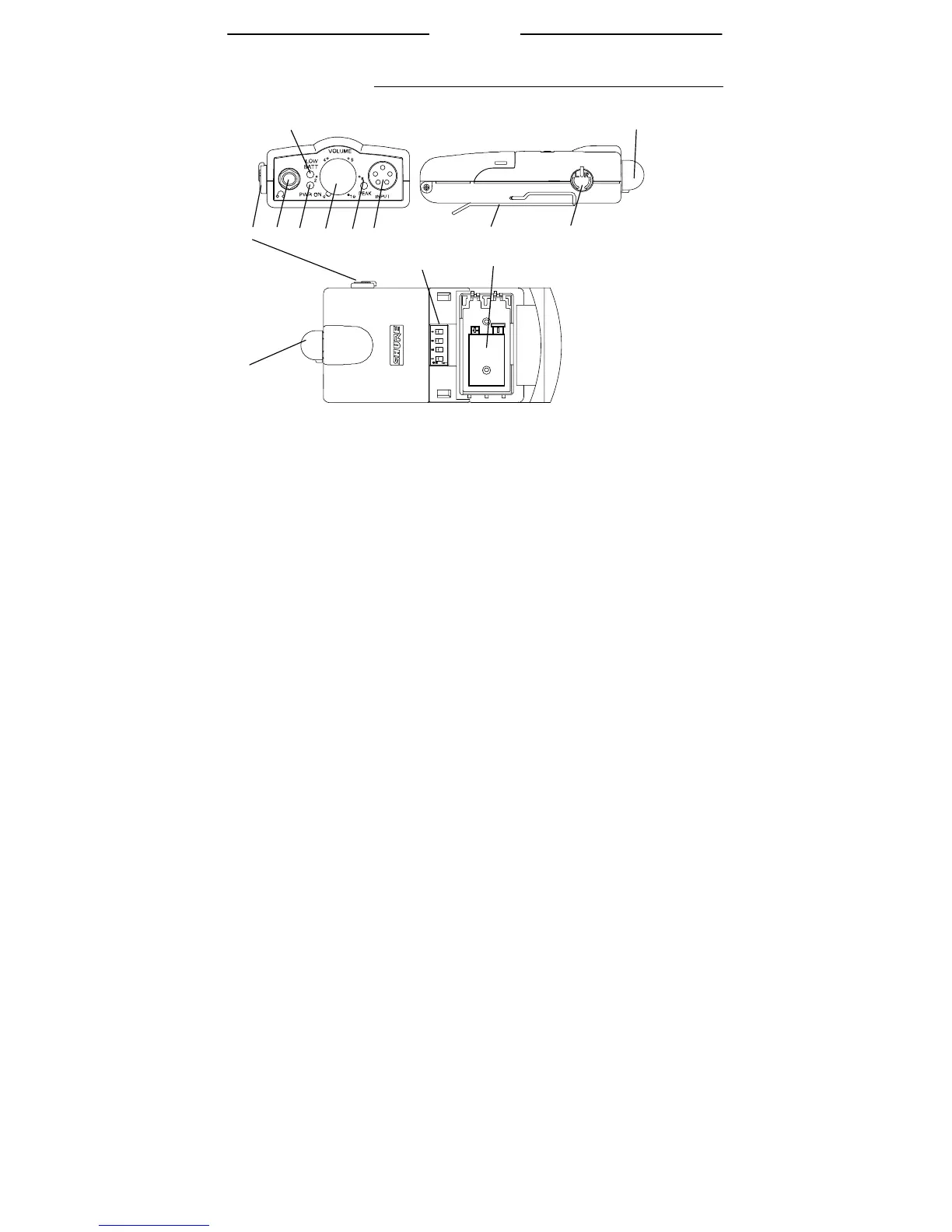
P6HW OVERVIEW
Ò
ÍÊÊË
Ì
ÎÏÐ Ñ
Î
Î
Ó
Ê Balance Knob. In stereo control, this knob adjusts the left/right
balance. In MixMode control, this knob adjusts the relative
levels of two different mono signals.
Ë Output Connector. This 3.5-mm jack connects to earphones.
Ì LOW BATT Indicator. This LED illuminates red when the bat-
tery has approximately 45 minutes of operating time remaining.
Í PWR LED. This green LED illuminates when the power is ON
and the battery is fresh.
Î ON/OFF/Volume Knob. Rotate the knob clockwise to turn the
P6HW ON. Rotate the knob further clockwise to increase the
volume.
Ï PEAK LED. Illuminates when the input signal is within 5 dB of
overloading the input.
Ð AUDIO INPUT Connector. A 5-pin connector for input from a
mixer or other sound source. The supplied dual-XLR-to-5-pin-
connector Y-cable is required for proper connection.
Ñ Belt Clip. Secures the P6HW to a belt, pocket, or to other
clothing.
Ò Battery Compartment. Press the side buttons to open. Con-
tains one 9-volt battery. This compartment also contains the
DIP Switches.
Ó DIP Switches. Provide features to customize the operation of
the receiver.



 To Next Page