ENGLISH
6
ATTACHING THE UT1 BODY-PACK TRANSMITTER TO BELT OR
GUITAR STRAP
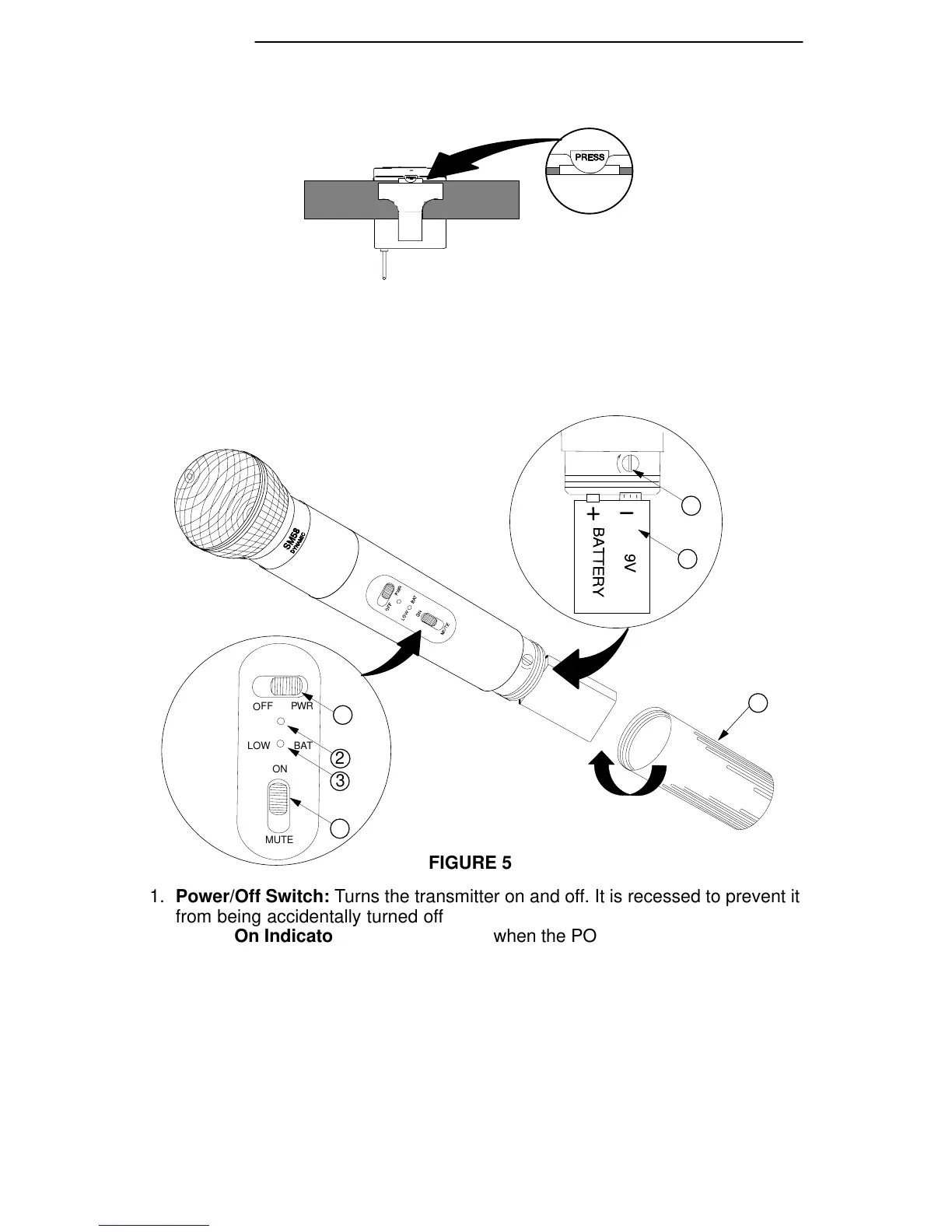
FIGURE 4
1. Depress the tab marked PRESS and slip your belt, waist band or guitar strap be-
tween the transmitter body and the belt clip (Figure 4).
2. The clip holds tighter if the material is drawn to the clip’s top wire, especially when
using thinner guitar straps.
UT2 MICROPHONE-TRANSMITTER FEATURES (FIGURE 5)
4
1
7
6
5
1. Power/Off Switch: Turns the transmitter on and off. It is recessed to prevent it
from being accidentally turned off.
2. Power On Indicator: Green light glows when the POWER/OFF switch is in the
POWER position, as a reminder to turn the transmitter off when it is not in use.
3. Low Battery Indicator: A red light glows when there is one hour or less of useful
operating time, allowing battery to be changed before power is depleted.
4. On/Mute Switch: Allows muting of the microphone audio, avoiding the “thump”
noise that can occur when turning the transmitter on and off.
5. Audio Gain Control: Allows the level of vocals to be matched with the transmit-
ter for better performance.
6. 9 V Battery (shown installed): Provides power to the microphone-transmitter.
7. Battery Cover: Unscrews for access to the 9 V battery and gain control.


 To Next Page