9
After assembly and installation of
the Tidal™ Filter on a lled aquarium
connect the power cord to the intended
outlet. The lter is self-priming and will
immediately begin ltering water. Adjust
the three possible settings according to
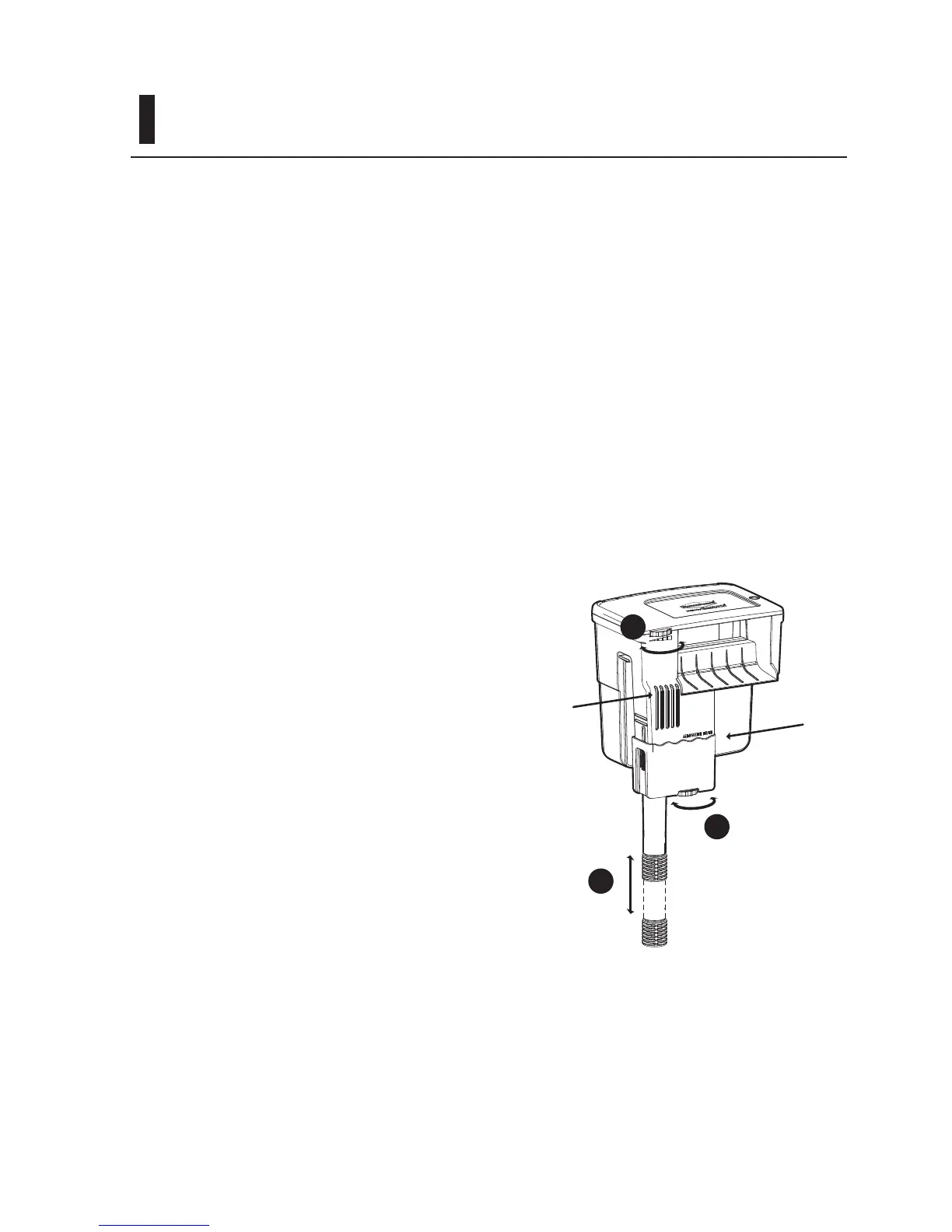
preferences or needs (Figure 6):
1. Raise or lower the telescoping
intake to the desired depth in the
aquarium.
2. Adjust the total amount of
ow through the lter. Adjust
performance to a specic aquarium
volume, type, or provide an
environment for sh which prefer
more or less water movement or
oxygenation. This feature oers up
to 80% reduction of maximum ow
intake while making continuous
full use of the lter motor. When
reduced intake ows are selected,
the reltration grid allows for
water to re-circulate through the
lter media to maximize ltration
performance through increased
contact time
3. Adjust the amount of ow intake
from the surface vs. the telescoping
intake.
Figure 6
2
3
1
STARTING THE FILTER
The minimum water level in the
aquarium should not fall below the
“Minimum Water Level” mark. A lower
level might stop the ow of water and
cause damage to the pump – do not
allow the pump to run dry. There is
no maximum water level although it is
recommended that the level not exceed
the height of the of the surface skimmer
slots.
Minimum
Water Level
Surface
Skimmer



 To Next Page