11
MAINTENANCE
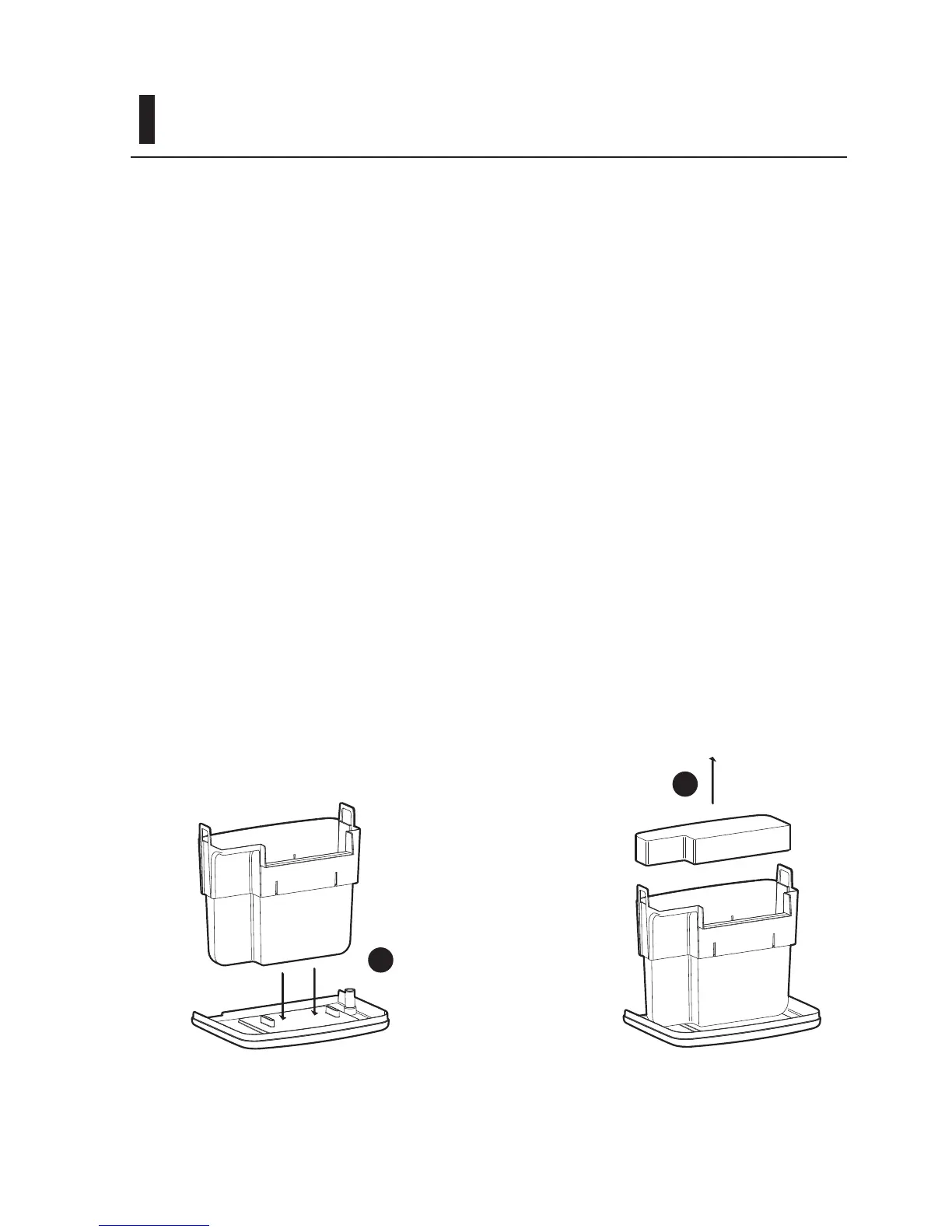
Turn the cover over (Figure 9-A) and set
the lter media basket into the slots on the
cover (1). You can now carry the lter media
basket to a cleaning area without spilling or
dripping water.
Remove the bag of Matrix™ biological
media, any chemical ltration media and
the foam lter (Figure 9-B).
Rinse the foam lter thoroughly. Do not use
any soaps or detergents as these can harm
aquarium inhabitants. Rinse or replace any
chemical ltration media as necessary.
Replacement ltration packs designed
specically for Tidal™ Filter units (Matrix™,
MatrixCarbon™, and Zeolite) are sold
separately.
The bag of Matrix™ biological media
contains important bacteria for the stability
of the aquarium environment. Do not allow
the media to dry out. The media can be
rinsed gently in a container with some of
the water from the aquarium to remove
any slime coating that may build up on the
media over time. If the Matrix™ media is
replaced it is advisable to replace no more
than half of the media at any time so as to
protect the bacteria culture that allows for a
stable aquarium environment. At this time
we would suggest re-seeding the aquarium
with Seachem Stability™. Rinse the lter
media basket. Reassemble media and all
components in reverse order.
1
1
Figure 9-A Figure 9-B



 To Next Page