Pro ce du re
• Put the system in main te nan ce mode.
• Open the key pad rear cover and open the unit.
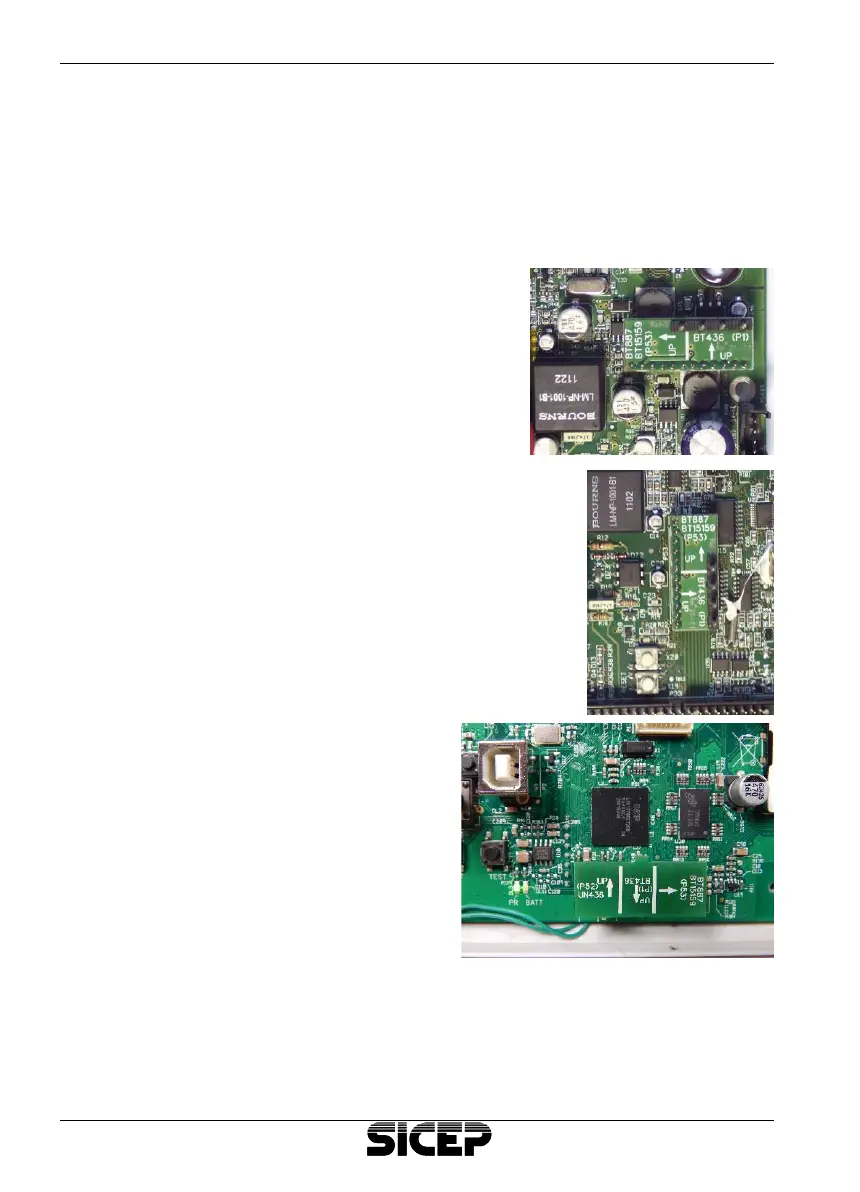
• Remo ve the memory inter fa ce moun ted on the 12-pin con nec tor.
• Switch off the unit, insert care fully the memory inter fa ce in one of the
con nec tors which are used nor mally for the BT-MF inter fa ce.
• In the BT-436 unit it must be inser ted
into the lower con nec tor (P1) with the
arrow poin ting up on the card.
• In the BT-887 / BT15159 units it must be inser -
ted into the con nec tor on the left (D53) with the
arrow poin ting up on the card.
• In the UN-436 unit sit must be
inser ted into the bot tom con -
nec tor nearUSB.
• Supply the unit and wait 10
seconds.
• Turn off the unit and remo ve the
memory inter fa ce.
• Reas sem ble it insi de the key -
pad.
• Clo se the covers.
Pag. 17
English Cap. 4 - Programming


 To Next Page