EasyManua.ls Logo

sideclick Universal Remote Attachment - User Manual

sideclick Universal Remote Attachment
2 pages
Print Icon
To Next Page IconTo Next Page
Loading...
Streamline your Streaming Experience
Amazon Fire TV
®
Amazon Fire TV | Amazon Fire TV Stick
Alexa Voice Remote | Echo Voice Remote
Universal Remote Attachment for
Sideclick Universal Learning Remote
2 AAA Batteries
2 Adapter Clips
All Rights Reserved. Sideclick Remotes operates under True Bloom LLC and is not
affiliated with Amazon.com Inc.
Simple Setup
What’s Included
Tips
Insert the included 2 AAA Batteries into Sideclick Remote.
Select and attach the Adapter Clip that corresponds to your Amazon Fire TV
remote.
(directions on reverse)
Snap your Amazon Fire TV remote into Adapter Clip.
Program Sideclick and you’re ready to go.
1 -
2 -
3 -
4 -
Please visit our website, www.sideclickremotes.com for additional
information including:
Assembly videos
Programming videos
Troubleshooting
Information on selecting the right Adapter Clip for your streaming remote
Additional Sideclick products and accessories
Registering your device
Question and Answer IconNeed help?

Do you have a question about the sideclick Universal Remote Attachment and is the answer not in the manual?

Summary

Whats Included with Sideclick

Simple Setup for Sideclick

Getting Started with Amazon Fire TV Sideclick

Select Adapter Clip

Guides users on how to choose the correct adapter clip for their Amazon Fire TV remote.

Attach Adapter Clip

Explains how to physically attach the selected clip to the Sideclick remote.

Install Your Amazon Fire TV Remote

Details the process of snapping the Amazon Fire TV remote into the Sideclick attachment.

Program Your Sideclick Remote

Provides step-by-step instructions for programming the Sideclick remote with device functions.

Removing Your Clip

Overview

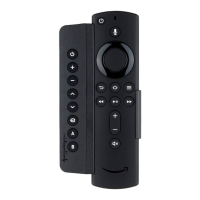
The Sideclick is a universal learning remote attachment designed to streamline the streaming experience, specifically for Amazon Fire TV devices. It allows users to consolidate the functions of their Amazon Fire TV remote and other device remotes into a single, convenient unit.

Function Description:

The Sideclick functions as a universal learning remote, meaning it can "learn" commands from existing infrared (IR) remotes. This capability allows users to program its buttons to control various functions of their television, soundbar, or other IR-controlled devices, alongside the native functions of their Amazon Fire TV remote. The attachment is designed to physically clip onto an Amazon Fire TV remote, creating a unified control device. This integration aims to reduce remote clutter and simplify the user experience by eliminating the need to switch between multiple remotes for different tasks, such as adjusting TV volume or changing inputs while watching content on Fire TV.

The core functionality revolves around its ability to receive and store IR signals. Each button on the Sideclick remote can be programmed independently. For instance, a user might program one button to power on their TV, another to control the TV's volume, and a third to switch the TV's input. This is particularly useful for functions not natively controlled by the Amazon Fire TV remote, such as TV power, volume, and input selection, which are often essential for a complete home theater experience.

The Sideclick is compatible with various Amazon Fire TV remote styles, including the Alexa Voice Remote and Echo Voice Remote, as well as non-voice remotes. It comes with different adapter clips (Clip ID FB for Voice Remotes and FA for Non-Voice Remotes) to ensure a secure and proper fit for the specific Amazon Fire TV remote model. This modular design ensures broad compatibility within the Amazon Fire TV ecosystem.

Usage Features:

The Sideclick is designed for ease of use, from its initial setup to daily operation.

Simple Setup:

  1. Battery Installation: The first step involves inserting the two included AAA batteries into the Sideclick remote.
  2. Adapter Clip Selection and Attachment: Users select the appropriate adapter clip based on their Amazon Fire TV remote style (Voice Remote or Non-Voice Remote). The clip is then attached to the Sideclick remote by aligning tabs with keyholes and sliding it up until it locks in place.
  3. Amazon Fire TV Remote Integration: The Amazon Fire TV remote is then snapped into the attached adapter clip, creating a single, integrated unit.
  4. Programming: The final and most crucial step is programming the Sideclick. This is a learning process where the Sideclick remote "learns" commands from other device remotes.

Programming Process:

  • Entering Programming Mode: To begin programming, users simultaneously press and hold the "+" and "B" buttons on the Sideclick until its LED lights up solid.
  • Positioning Remotes: The Sideclick remote and the device remote (from which commands are being learned) are positioned head-to-head, approximately one inch apart, on a flat surface. This close proximity ensures reliable IR signal transmission.
  • Learning Commands:
    • The user presses and releases the specific button on the Sideclick they wish to program. The LED on the Sideclick will start blinking, indicating it's ready to learn.
    • Immediately after, the user presses and releases the corresponding button on their device remote (e.g., the TV power button).
    • A successful learn is indicated by the Sideclick's LED blinking three times, then returning to a solid state. This signifies that the command has been successfully stored, and the Sideclick is ready to program another button.
    • If the LED does not return to solid, it indicates a programming issue, and the user is advised to exit programming mode and try again.
  • Repeat for Multiple Buttons: This process is repeated for every button on the Sideclick that the user wishes to program.
  • Exiting Programming Mode: To exit programming mode, users can either simultaneously press the "+" and "B" buttons again (which turns off the LED) or simply wait approximately 10 seconds, and the Sideclick will automatically exit programming mode.

Daily Operation:

Once programmed, the Sideclick allows users to control their Amazon Fire TV device and other programmed devices (like TVs or soundbars) using a single, integrated remote. The buttons on the Sideclick will execute the learned IR commands, while the Amazon Fire TV remote's buttons will continue to control Fire TV functions. This seamless integration enhances the user's ability to manage their entertainment system without juggling multiple controllers.

Removing the Clip:

Should a user need to remove the Sideclick from their Amazon Fire TV remote, a simple mechanism is in place. They gently pull out on a locking tab with their index finger while simultaneously sliding the clip down and then away from the remote.

Maintenance Features:

The Sideclick is designed for minimal maintenance, primarily focusing on battery replacement and ensuring proper physical attachment.

  • Battery Replacement: The device uses two AAA batteries, which are easily replaceable when they run out. There are no complex power management systems or rechargeable components, simplifying power maintenance.
  • Physical Durability: The adapter clips and the Sideclick unit itself are designed for a secure fit, ensuring that the attachment remains stable during regular use. The process for attaching and removing the clip is straightforward, minimizing the risk of damage during these actions.
  • Online Support: For any issues related to assembly, programming, troubleshooting, or selecting the correct adapter clip, Sideclick provides comprehensive online resources through its website (www.sideclickremotes.com). This includes assembly videos, programming videos, and troubleshooting guides, empowering users to resolve common issues independently.
  • Product Registration: Users are encouraged to register their device, which may offer additional support or warranty benefits, though specific details are not provided in the manual.
  • Accessory Information: The website also provides information on additional Sideclick products and accessories, suggesting a modular and expandable ecosystem for users who might want to enhance their setup further.

In summary, the Sideclick offers a practical solution for simplifying the home entertainment experience by integrating multiple remote functionalities into one ergonomic unit, specifically tailored for Amazon Fire TV users. Its intuitive setup and programming, combined with readily available online support, make it a user-friendly accessory for streamlining remote control management.

sideclick Universal Remote Attachment Specifications

General IconGeneral
CategoryUniversal Remote Attachment
ConnectivityIR (Infrared)
Programmable ButtonsYes
ColorBlack
Power SourceBatteries
FunctionalityControl TV power, volume, input, and streaming device
InstallationAttaches to existing remote
DimensionsVaries by model
WeightLightweight
CompatibilityUniversal