Quick Start Guide Continued…
B. Next, connect & power up the appliance.
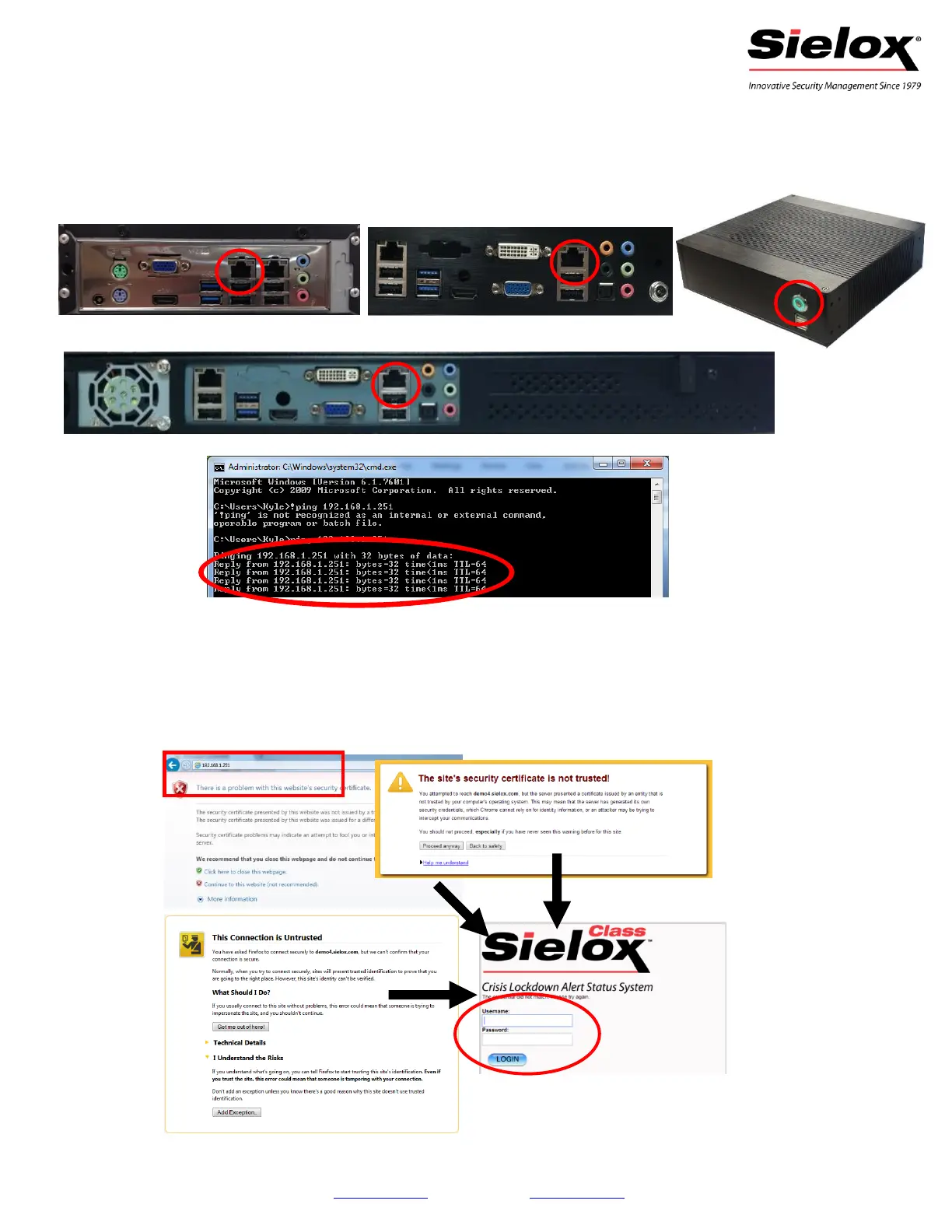
7. Connect an Ethernet cross over cable from your computer to the left Ethernet port on the appliance.
8. Plug the power into the appliance and turn on the power by pressing the button on the front panel.
9. Verify connectivity between the appliance and computer. Make sure you can ping the appliance at
address 192.168.1.251 and that you get a reply.
C. Now that you’re connected, log into Sielox Class or AnyWare.
10. Open a browser on the computer and type in 192.168.1.251 in the address bar.
11. This should bring up a “certificate error”, click accept/continue. Note: You may need to add an
exception to your browser.
12. Once the Sielox Class or AnyWare Login page is displayed, log in using the default credentials,
Username: admin Password: admin.
Class 50/100 & AnyWare 40:
© 2014 Sielox LLC | www.sielox.com | 800-424-2126 info@sielox.com | 10/9/14



 To Previous Page