Siemens AG 2003, C:\Daten\Siemens\Produkte\C65\output\FUG\C65_fug_en_040615_rs_pk_druck\C65_Overview.fm
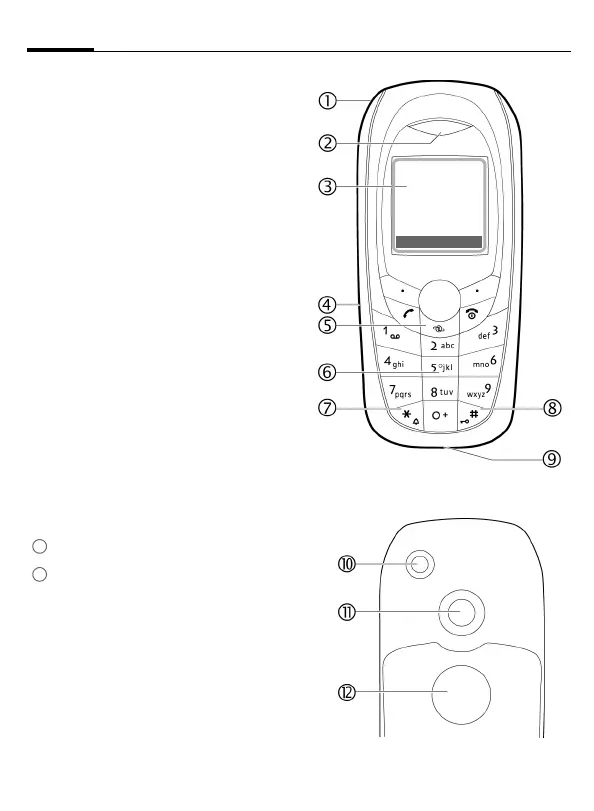
Overview of phone (schematic)6
VAR Language: en; VAR issue date: 040517
left page (6) of C65 Hera en, A31008-H7800-A1-1-7619 (15.06.2004, 09:36)
1
Integrated antenna
Do not obstruct the phone above the
battery cover unnecessarily. This
reduces the signal quality.
2
Loudspeaker
3
Display
4
Infrared interface (IrDA)
5
Access to the Internet portal
6
Input keys
7
* Ringtone
• Press and hold in standby mode:
Switch all audible signals on/off
(except alarm).
• Press and hold on incoming call:
Switch off ringtone for this call only.
8
#
Key lock
Press and hold in standby mode:
Switch key lock on/off.
9
Connection socket
For charger, headset, flash etc.
:
Connection for external antenna
Camera lens
Mirror (depending on phone model)
11
12
Z X
Service provider
15.03.2004 10:15
NewMMS Menu
í


 To Next Page