EasyManua.ls Logo

Siemens RVP200/210 - User Manual

Siemens RVP200/210
6 pages
Go to English
Print Icon
To Next Page IconTo Next Page
Loading...
Energiebewusstes Heizen mit dem
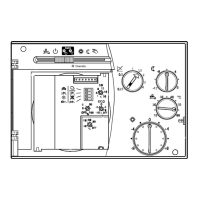
Heizungsregler RVP200/210
Bedienungsanleitung
Wollen Sie die Heizung einschalten?
1. Ist die Heizungsanlage betriebsbereit? Prüfen Sie
den Elektro-Hauptschalter.
2. Prüfen Sie die Uhrzeit und (bei Wochenuhr) den Wo-
chentag; korrigieren Sie, wenn nötig (siehe folgenden
Abschnitt).
3. Stellen Sie den Wahlschieber auf die gewünschte
-Betriebsart.
Wollen Sie die Uhr einstellen?
Die Schaltscheibe darf nur
im
Uhrzeigersinn gedreht
werden,
niemals gegen
den Uhrzeigersinn!
1. Nehmen Sie zuerst die Grobeinstellung vor:
Drehen Sie die Schaltscheibe langsam im Uhrzeiger-
sinn, bis die aktuelle Tageszeit bei der Zeitmarke
ist
(bei der Wochenscheibe auch Wochentag berück-
sichtigen).
2. Jetzt folgt die Feineinstellung:
Drehen Sie am größeren Uhrzeiger, bis die aktuelle
Tageszeit genau stimmt.
Tipp: Die Umstellung von Winterzeit auf Sommerzeit und
umgekehrt müssen Sie manuell vornehmen!
Wollen Sie im Automatikbetrieb heizen?
Der Regler hat zwei -Betriebsarten:
Auto
Automatische Umschaltung zwischen
NORMALER Temperatur und Regelung AUS
nach Tagesprogramm
Auto
Automatische Umschaltung zwischen
NORMALER und REDUZIERTER Temperatur
nach Tagesprogramm
Wollen Sie momentan nicht heizen?
Stellen Sie den Wahlschieber auf . Die Regelung ist
ausgeschaltet, aber betriebsbereit.
Nur mit Typ RVP210:
Wählen Sie entweder
für Regelung ausgeschaltet, oder
für Braucherwasserbereitung automatisch, Rege-
lung ausgeschaltet
Tipp: Frostschutz ist in allen Betriebsarten gewährleistet.
Was bedeutet die Anzeige “Override”?
-
“Override” blinkt: Es liegt eine Störung vor – siehe
Abschnitt über Betriebsstörungen.
-
“Override” leuchtet ständig: Das Raumgerät steuert
den Regler; es gelten die Einstellungen am Raumgerät.
Eine Störung liegt nicht vor.
Wollen Sie im Dauerbetrieb heizen?
-
Kein Absenken: Wählen Sie Betriebsart
-
Ständig abgesenkt: Wählen Sie Betriebsart
Tipp: Vergessen Sie nicht, die Betriebsart wieder zurück-
zustellen!
Sind Ihre Räume zu kalt/warm?
Vorwiegend bei mildem Wetter:
Korrigieren Sie die Raumtemperatur mit Drehknopf
.
1 Punkt entspricht einer Raumtemperaturänderung von
ungefähr 2 °C.
Question and Answer IconNeed help?

Do you have a question about the Siemens RVP200/210 and is the answer not in the manual?

Overview

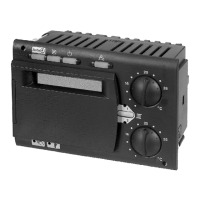
The Siemens RVP200/210 is an energy-efficient heating controller designed to manage heating systems in residential or commercial buildings. It offers various operating modes and adjustment options to optimize comfort and energy consumption.

Function Description:

The primary function of the RVP200/210 is to regulate the heating system based on time programs, desired room temperatures, and, for the RVP210, domestic hot water temperature. It supports automatic switching between different temperature levels (NORMAL, REDUCED, or OFF) according to a programmed schedule. The controller features a mechanical time switch (or a digital time switch for specific models, requiring a separate manual) with tilting riders for setting heating periods. It also incorporates frost protection in all operating modes, ensuring the system is protected even when heating is temporarily switched off.

The RVP200/210 monitors the heating system's operational status and indicates faults via an "Override" LED. When the "Override" LED flashes, it signals a system malfunction, such as a faulty flow, boiler, outside, or room temperature sensor. A steady "Override" LED indicates that the controller is being managed by a room unit, and its settings take precedence.

Important Technical Specifications:

While the manual does not provide specific electrical ratings (voltage, current, power consumption) or physical dimensions, it implies the device is a wall-mounted controller for heating systems. The temperature adjustment knob for room temperature changes the setting by approximately 2 °C per point. The heating curve slope adjustment (for cold weather) allows for changes of approximately 0.2 per adjustment. The domestic hot water temperature (RVP210 only) is ideally set between 55 and 60 °C. The controller is designed to work with various sensors (flow, boiler, outside, room) to provide accurate temperature regulation.

Usage Features:

  • Switching On: To activate the heating, users must ensure the heating system is ready (main switch on), check and correct the time and weekday on the time switch, and then set the operating mode selector to the desired "Auto" mode.
  • Setting the Clock: The mechanical time switch dial should only be turned clockwise. Users first make a coarse adjustment by turning the dial until the current time aligns with the time indicator (considering the weekday for 7-day dials). A fine adjustment is then made by turning the larger hand. Manual adjustment is required for daylight saving time changes.
  • Automatic Operation (Auto Modes):
    • Auto (with C symbol): Automatic changeover between NORMAL temperature and heating control OFF according to the 24-hour program.
    • Auto (without C symbol): Automatic changeover between NORMAL and REDUCED temperature according to the 24-hour program.
  • Temporary Heating Off: Moving the selector to the "OFF" position (circle with line) switches off heating but keeps the system ready. For RVP210, users can choose between complete control off or automatic domestic hot water heating with heating off. Frost protection remains active.
  • Continuous Heating (Permanent Modes):
    • No Setback (Sun symbol): Continuous heating at NORMAL temperature.
    • Continuous Setback (Moon symbol): Continuous heating at REDUCED temperature.
    • Users are reminded to reset the operating mode to "Auto" after using these permanent modes.
  • Temperature Adjustment:
    • Room Temperature (Mild Weather): The room temperature can be adjusted using the rotary knob (circle with thermometer symbol). Each point on the knob changes the temperature by approximately 2 °C.
    • Heating Curve Slope (Cold Weather): The slope of the heating curve can be adjusted using the rotary knob (X symbol). Reducing the slope by 0.2 lowers the room temperature, while increasing it by 0.2 raises it.
    • Night Setback: The setback temperature (reduction from NORMAL temperature) can be adjusted using the rotary knob (C symbol).
  • Changing Heating Periods: For mechanical time switches, heating periods for NORMAL and REDUCED/OFF temperatures are set using tilting riders on the dial. Riders tilted outward correspond to NORMAL temperature, while riders tilted inward correspond to REDUCED temperature or OFF. For digital time switches, a separate manual is required.
  • Domestic Hot Water Temperature (RVP210 only): The domestic hot water temperature can be adjusted using the rotary knob (faucet symbol). The ideal range is 55 to 60 °C.
  • Troubleshooting: The manual provides guidance on what to check if the heating system is not working as desired, including power interruptions, incorrect operating modes, and sensor faults.

Maintenance Features:

The manual emphasizes several energy-saving tips that can be considered maintenance-related for optimal system performance and longevity:

  • Temperature Control: Maintain room temperatures at a maximum of 21 °C during the day.
  • Ventilation: Air rooms briefly with windows fully open.
  • Unoccupied Rooms: Set thermostatic radiator valves in unoccupied rooms to the frost protection position.
  • Radiator Obstruction: Ensure no curtains, furniture, or other objects block radiators.
  • Insulation: Close shutters and blinds whenever possible to reduce heat loss.
  • Monitoring: Regularly check heating energy consumption.

The manual also advises users to wait two days after any room temperature adjustment for the system to stabilize and to contact a heating engineer if the "Override" LED flashes, indicating a fault. It also reminds users to manually reset the clock after a power interruption and to check the burner's reset button if it has gone into lockout.

Siemens RVP200/210 Specifications

General IconGeneral
BrandSiemens
ModelRVP200/210
CategoryController
LanguageEnglish

Related product manuals