5
The 3 and 6 module racks can be used as an extension to any of the other racks or pairs of racks. Settings must be such that no
address is used more than once. Duplication of addresses will return an error on setup.
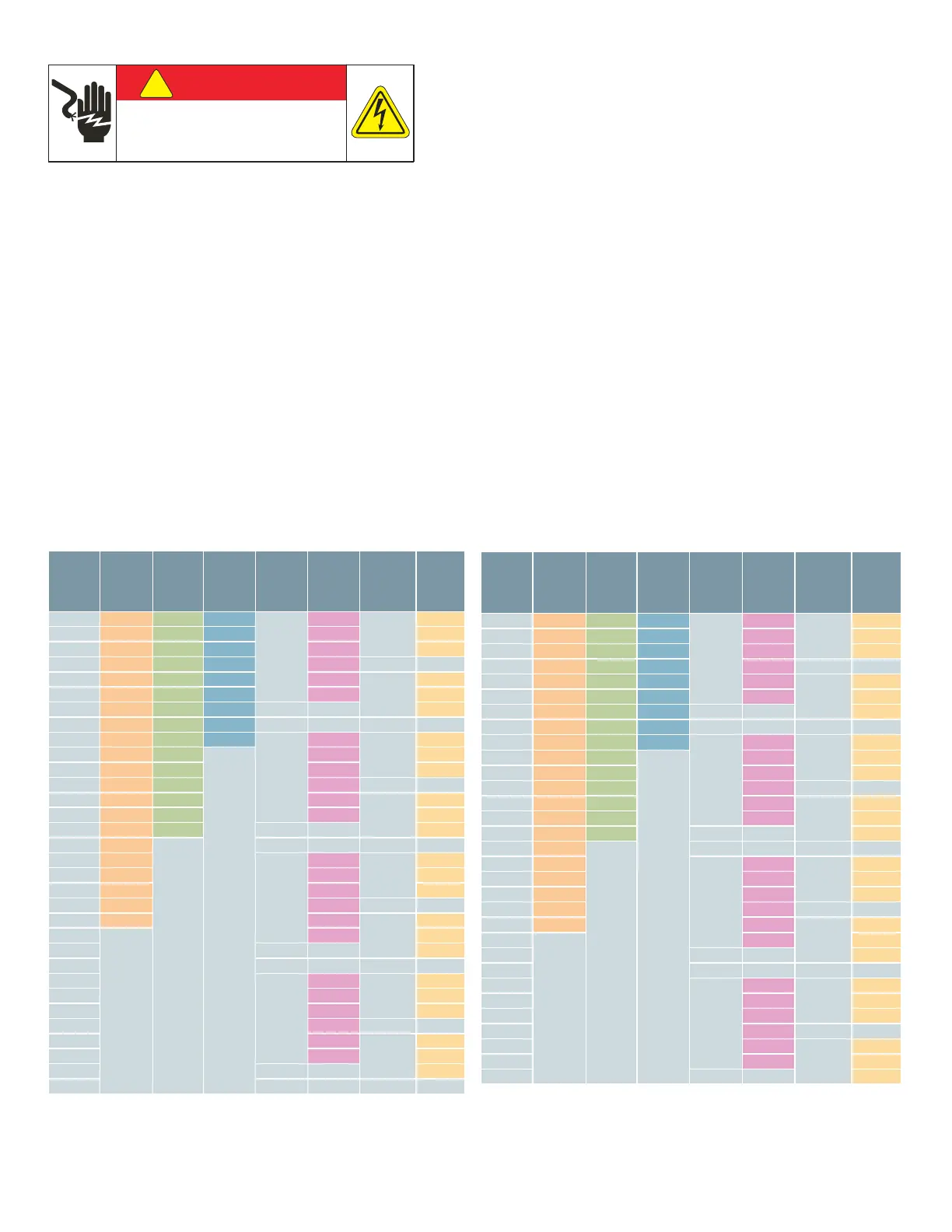
Meter Module Internal Addresses – Dip and rotary switches on the racks are used to assign the unique addresses for the
meter module. Table 1 indicates rack addresses for Left setting on 9, 15 and 21 module racks and setting 0‐7 on 3 meter module
rack, 0‐3 on 6 meter module rack. Table 2 indicates addresses for right setting on 9, 15, and 21 module racks and 8‐F on 3 meter
module rack, 4‐7 on 6 meter module rack. Right chart indicates addresses for right setting on 9, 15, and 21 module racks and 8‐F on
3 module rack.
Meter Racks – The meter module racks have the addresses for the module to controller communications hard coded into them. The 9,
15 and 21 module racks have a two position dip switch for setting one of two address ranges for each. The three and six module rack
has a rotary switch to allow it to be configured for multiple address ranges. The chart below shows the ranges available for each rack.
Ping statistics for 192.168.1.65:
Packets: Sent = 4, Received = 4, Lost = 0 (0% loss),
Approximate round trip times in milli‐seconds:
Minimum = 56ms, Maximum = 78ms, Average = 65ms
If not, then check your connection between the PC’s Ethernet port and the Controller MODBUS TCP/IP port.
Open Explorer or Chrome and type out the IP address 192.168.1.65.
At the Login Page, the default user name is “admin”, and the default password is “sem3”.
!
DANGER
Hazardous Voltage.
Will cause death or serious injury.
Turn off and lock out all power before working on
this equipment.
Single
Phase
Monitor
Modbus
Addresses
21
Position
Rack
Modbus
Addresses
15
Position
Rack
Modbus
Addresses
9
Position
Rack
Modbus
Addresses
6
Position
Rack
Rotary
Switch
Setting
6
Position
Rack
Modbus
Addresses
3
Position
Rack Rotary
Switch
Setting
3
Position
Rack
Modbus
Addresses
1 1 1 1
0 (8)
1
0
1
2 2 2 2 2 2
3 3 3 3 3 3
4 4 4 4 4
5 5 5 5 5
1
5
6 6 6 6 6 6
7 7 7 7 7
8 8 8 8
9 9 9 9
1 (9)
9
2
9
10 10 10
Open
Address
Space
10 10
11 11 11 11 11
12 12 12 12
13 13 13 13
3
13
14 14 14 14 14
15 15 15 15
16 16
Open
Address
space
17 17
2
17
4
17
18 18 18 18
19 19 19 19
20 20 20
21 21 21
5
21
22
Open
Address
Space
22 22
23 23
24
25
3
25
6
25
26 26 26
27 27 27
28 28
29 29
7
29
30 30 30
31 31
32
Single
Phase
Monitor
Modbus
Addresses
21
Position
Rack
Modbus
Addresses
15
Position
Rack
Modbus
Addresses
9
Position
Rack
Modbus
Addresses
6
Position
Rack
Rotary
Switch
Setting
6
Position
Rack
Modbus
Addresses
3
Position
Rack Rotary
Switch
Setting
3
Position
Rack
Modbus
Addresses
33 33 33 33
4
33
8
33
34 34 34 34 34 34
35 35 35 35 35 35
36 36 36 36 36
37 37 37 37 37
9
37
38 38 38 38 38 38
39 39 39 39 39
40 40 40 40
41 41 41 41
5
41
A
41
42 42 42
Open
Address
Space
42 42
43 43 43 43 43
44 44 44 44
45 45 45 45
B
45
46 46 46 46 46
47 47 47 47
48 48
Open
Address
space
49 49
6
49
C
49
50 50 50 50
51 51 51 51
52 52 52
53 53 53
D
53
54
Open
Address
Space
54 54
55 55
56
57
7
57
E
57
58 58 58
59 59 59
60 60
61 61
F
61
62 62 62
63 63


 To Next Page
 Loading...