6
Brief User Manual
Thank you for purchasing СOOL TOUCH water dispenser. This user manual contains important
information about its installation, operation and maintenance, and will help you fully use all functions of
your device and operate it many years.
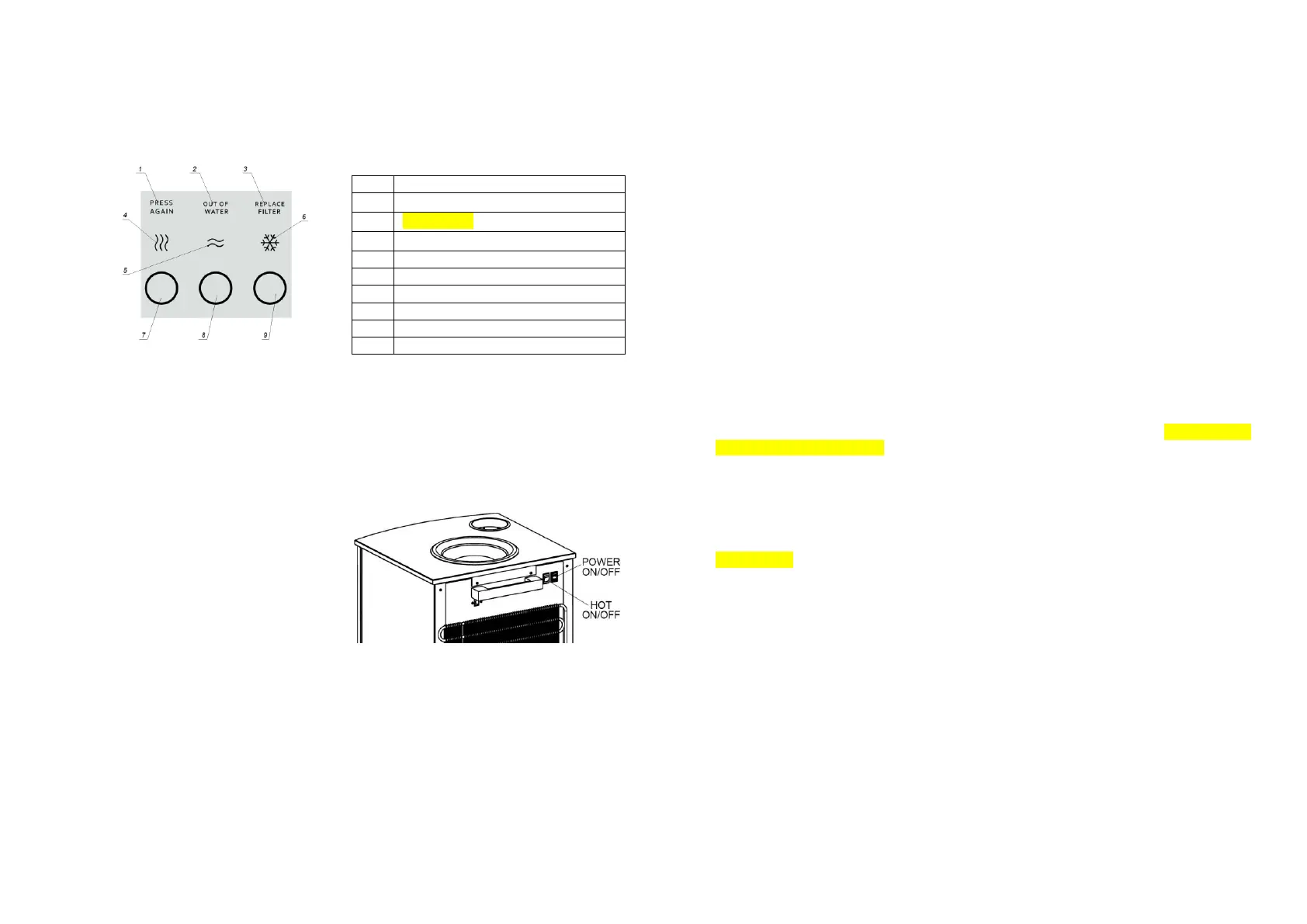
Device indication and operation controls
Operation mode selection
Device has a number of operation modes and user setting of main operation parameters. Read full
user manual to obtain more detailed information.
Device switching on
1. Set Hot on/off switch to off.
2. Switch device on with Power on/off
switch – device is filled with water,
illumination of water dispense buttons
7, 8, 9 is blinking. After water
dispense buttons stop blinking, switch
water heater with Hot on/off switch,
check if boiler is filled with water by
pressing Hot water button until water
is dispensed from the tap.
3. If you don’t need hot water, switch water heater off with Hot on/off switch, hot water indicator
goes off, and device will not dispense hot water.
Water dispense
1. Hot water dispense – press and hold hot water dispense button until cup is filled.
2. Hot water dispense with enabled water accidental spillage protection function – press and
release hot water dispense button – Press again indicator starts blinking. Press and hold hot
water dispense button until cup is filled. This function may be enabled by your request, contact
a service centre.
3. Ambient water dispense – press and hold ambient water dispense button until cup is filled.
4. Cold water dispense – press and hold cold water dispense button until cup is filled.
Warning!!!
Use of containers not suitable for hot water may result in burns and device damage.
In case of problems read full user manual and/or contact an authorized service centre.
Do not unplug the device without necessity, in order to prevent spoiling of water in the device.
If there is no water in the device for a long time (bottle removed), unplug the device.
Device regular maintenance
1. Regularly drain water from drop container before it is overfilled.
2. Regularly clean drop container, using mild disinfectants, after removing it from the device.
3. To clean device outer surfaces, you may use neutral detergents. Never use abrasive or
aggressive detergents. After cleaning outer surfaces, wipe them dry with soft napkins to avoid
damaging device surface.
4. Used water may not get:
a. into cup holder;
b. on the device rear wall;
c. into the device when drop container is removed.
Possible problems
1. Illumination of water dispense buttons is on, other indicators are blinking, audio signal is
produced by device (beeping) – water bottle is damaged. Remove damaged water bottle, drain
cold water until indication goes off, install new water bottle. If new bottle cannot be installed, it
is forbidden to install damaged bottle.
2. Indicators are off – device is unplugged or damaged. In case of malfunction remove bottle from
the device and contact a service centre.
3. Call Service indicator is blinking, water dispense buttons are dim – device is damaged.
Remove bottle from the device and contact a service centre.
4. Out of water indicator is blinking, water dispense buttons are dim, water cannot be dispensed
– no water in the bottle. Replace the bottle.
5. After dispensing water drops may come from the tap, it is normal.
6. In case of unusual operation, e. g., water is not heated, cold water is dispensed instead of hot
water or vice versa – unplug the device, remove water bottle and contact a service centre.
Hot water dispense button
Ambient water dispense button
Cold water dispense button



 To Next Page
 Loading...