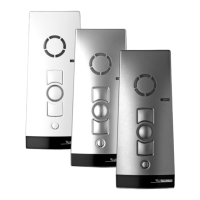
The Silent Gliss SG 10302 is a multi-channel hand-held radio transmitter designed for controlling Silent Gliss shading systems equipped with corresponding radio receivers. It supports both unidirectional and bidirectional communication, with bidirectional operation possible only if all participating devices are bidirectional. Otherwise, the system defaults to unidirectional mode.
Function Description
The transmitter operates by sending radio signals to a radio receiver. In a bidirectional system, the receiver provides feedback to the transmitter, and signals can be forwarded via other bidirectional participants if a direct connection is not possible. The target receiver executes the command and sends a confirmation back. In a unidirectional system, radio receivers cannot send replies to the transmitter, and signal transmission between receivers is not possible.
Initial Operation:
To activate the hand-held transmitter, press any button. This will illuminate the status display (LED ring around the STOP button) and the operating mode display. The transmitter enters automatic mode upon initial operation.
Programming:
Programming involves assigning the transmitter to a receiver. Ensure the receiver is in programming mode before pressing the P button on the transmitter. The active channel for a radio system is determined during programming. If the receiver is not in teach-in mode, the transmitter channel will switch to unidirectional mode. To force unidirectional mode, press and hold the STOP and P buttons simultaneously for 6 seconds until the status display lights up.
Programming the Transmitter to a Receiver:
- For already installed receivers, switch the circuit breaker off and on again after a few seconds. The receiver will enter programming mode for approximately 5 minutes.
- Briefly press the P button on the back of the transmitter (approx. 1 second) until the status display lights briefly. The blind will move up and down for about two minutes, indicating programming mode.
- Press the OPEN button within 1 second of the blind starting to move in the Open direction. The status display lights briefly. The blind will stop, move again, stop, and then move in the Close direction.
- Immediately (within 1 second) after close travel begins, press the CLOSE button. The status display lights briefly, and the blind stops. The transmitter channel is now programmed. If the blind does not stop, it must be programmed again. A bidirectional programming process can be cancelled by pressing the STOP button for 6 seconds.
Programming Additional Transmitters:
- On an already programmed transmitter, simultaneously press the OPEN, CLOSE, and P buttons (rear of unit) for 3 seconds. The status display lights briefly, and the receiver enters programming mode.
- Briefly press the P button on the new transmitter until the status display lights briefly. The receiver will enter programming mode (open/close movements).
- Press the OPEN button within 1 second of the blind starting to move in the Open direction. The status display lights briefly. The blind stops, moves again, and then moves downwards.
- Immediately (within 1 second) after close travel begins, press the CLOSE button. The status display lights briefly, and the blind stops. The new transmitter channel is programmed.
If more than 10 bidirectional receivers are programmed simultaneously, the transmitter channel switches to group mode, indicated by fast flashing with pauses. Group mode programming completes after a 2-minute pause or by pressing the STOP button for 6 seconds.
Stopping Programming Mode (Bidirectional):
Press the STOP button for at least 6 seconds until the status display lights orange.
Approaching End Positions:
Once the transmitter/channel is programmed and drive end positions are set:
- "Closed" end position: Briefly press the CLOSE button. The blind closes completely.
- "Open" end position: Briefly press the OPEN button. The blind opens.
Intermediate Position 1 (from open end position):
- Move the blind to the desired position using the CLOSE button (keep it pressed).
Option: Press and hold STOP and CLOSE for 3 seconds to enter slow travel mode ("20 series 867/868/915").
- Press the STOP button. The blind stops, and the status display lights briefly. Intermediate position 1 is programmed.
Intermediate Position 2 (from closed end position):
- Move the blind to the desired position using the OPEN button (keep it pressed).
Option: Press and hold STOP and OPEN for 3 seconds to enter slow travel mode ("20 series 867/868/915").
- Press the STOP button. The blind stops, and the status display lights briefly. Intermediate position 2 is programmed.
- Intermediate Position 1 (from upper end position): Briefly press the CLOSE button twice. The blind travels to intermediate position 1 (or "closed" if not programmed).
- Intermediate Position 2 (from lower end position): Briefly press the OPEN button twice. The blind travels to intermediate position 2 (or "Open" if not programmed).
- Intermediate Position 1: Press and hold STOP and CLOSE buttons for approximately 3 seconds.
- Intermediate Position 2: Press and hold STOP and OPEN buttons for approximately 3 seconds.
Deleting Transmitter Channels in the Receiver:
- Press and hold the STOP button and the P button (rear of unit) for approximately 6 seconds. The status display will light orange briefly, then red. For unidirectional operation, it lights green briefly twice, then red. The channel in the transmitter is also deleted.
Deleting All Transmitters in the Receiver:
- Press and hold the STOP, P (rear of unit), OPEN, and CLOSE buttons for approximately 6 seconds. The status display will light orange-green briefly twice, followed by red (bidirectional). For unidirectional operation, it lights green briefly twice, then red. The channel in the transmitter is also deleted.
Important Technical Specifications
- Name of unit: SG 10302 hand-held radio transmitter
- Operating voltage: 3 V DC
- Battery type: 2 x LR06 (AA mignon)
- IP Code: IP 20
- Temperature range: 0 to +55 °C
- Radio frequency: 867/868 MHz frequency band (for Europe), 915 MHz frequency band (for USA, Canada, Australia, and some South American countries)
- Dimensions (hand-held transmitter): L 120 x W 51 x H 26 mm
- Weight (including batteries): 120 grams
Usage Features
- Channel Indicator (1): LEDs indicate the selected channel (up to 5 individual channels). When the central channel is selected, all five LEDs light up, controlling all radio channels simultaneously.
- Operating Mode Indicator (2): Displays the current operating mode.
- OPEN Button (3): Initiates opening movement.
- STOP Button (4): Stops movement.
- Status Indicator (5): LED ring around the STOP button displays radio signal status and battery level through various colors and flashing patterns (e.g., flashing orange for unprogrammed, orange then green for bidirectional operation with signal received, flashing red for weak batteries).
- CLOSE Button (6): Initiates closing movement.
- Select Button (7): Briefly press to select from 5 channels or query the current status (automatic/manual) of programmed receivers. Press and hold for approximately 1 second to switch off automatic mode for the current bidirectional channel or all unidirectional channels (operating mode indicator lights red). Press and hold again to switch automatic mode back on (operating mode indicator lights green).
- Learn Button P (8): Used for programming the transmitter to receivers.
Group Control Unit:
The transmitter can control multiple receivers simultaneously as a group. All 5 channels can be used for group control, and any number of receivers can be programmed to each channel.
Transmitting power and radio range are reduced as battery performance decreases. Functions cease and nothing is displayed if the voltage drops below 2 V.
Maintenance Features
Battery Replacement:
- Unscrew the underside of the unit and open the housing.
- Remove the old batteries.
- Insert two new LR06 (AA mignon) batteries of the identical type in the correct position.
- Reassemble the unit.
- Dispose of used batteries properly.
Cleaning:
Clean the unit with a damp cloth. Do not use detergents, as they may damage the plastic.
Disposal:
At the end of its service life, dispose of the unit in accordance with relevant regulations.
Troubleshooting:
The manual provides a troubleshooting table to address common issues:
- System does not run, status display does not light:
- Cause: Low batteries or incorrectly installed batteries.
- Remedy: Insert new batteries or install them correctly.
- System does not run, status display lights red or flashes orange (unidirectional: green):
- Cause: Receiver out of transmitting range, faulty receiver, or receiver not yet programmed.
- Remedy: Reduce distance to receiver, switch on/replace receiver, or program receiver.
- System operates in the wrong direction:
- Cause: Directions incorrectly allocated.
- Remedy: Delete transmitter and reprogram.
- Required system does not run:
- Cause: Incorrect channel selected.
- Remedy: Select correct channel.
Repair:
For any questions or repairs, contact your dealer. Provide the item number, name on the type plate, type of fault, unusual events prior to fault, accompanying conditions, and your own suspicion.


 To Next Page

 General