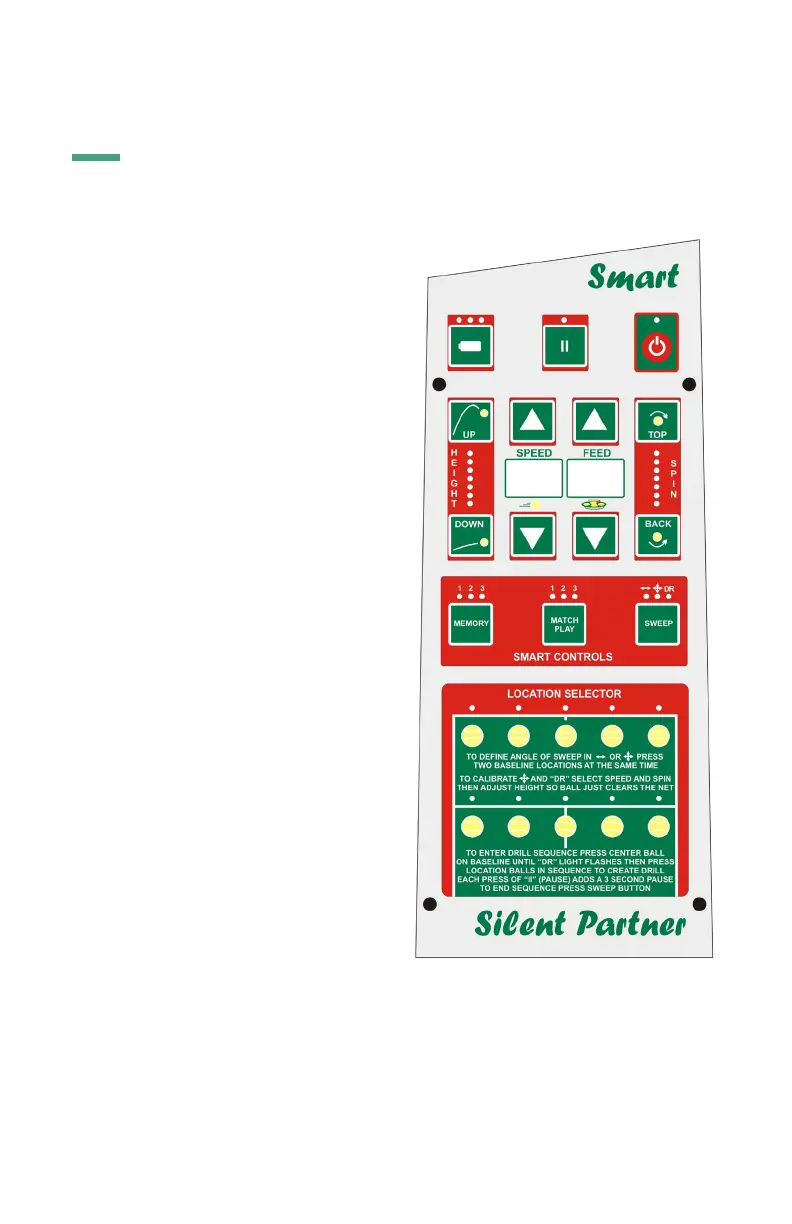
Power is turned ON and OFF by pressing
the button in the upper right hand corner.
The red light above the button stays on
as long as the machine is on. The height
adjustment goes through a calibration
procedure every time the machine is
turned on. Wait a few seconds until the
“height lights” stop flashing before using
the machine. In battery powered Scoops,
there is also a toggle switch on the le of
the machine (as one looks at the panel).
The toggle switch disconnects the battery
completely from the circuitry of the
machine and is normally only used when
storing the machine for a long time. If it
is necessary to “reboot” the processor in
the machine, the toggle switch must be
placed in the OFF position for at least 30
minutes. In AC machines, this is done by
disconnecting the power cord from the
outlet.
Power Button
The pause button controls ball feed.
When the machine is turned on, the feed
automatically goes into pause. This is
reflected by the slow flashing of the light
located above the button. To start feed,
press the pause button once. If you wish
to delay the start of feed by 15 seconds,
press the pause button continuously for
two seconds until it starts flashing rapidly.
This will allow you to get to the other side
of the court. For safety, a beep will sound
periodically during the delay and will get
faster just before feed starts.
Pause
The Control Panel of the Smart
To check the battery level, the machine must be turned “ON” at the silver toggle switch
and “OFF” at the control panel. No lights on. Press and hold the “Battery Test Level”
button and 0, 1, 2, or 3 lights will light up. The lights do not automatically come on.
Battery Level Indicator
4


 To Next Page