EasyManua.ls Logo

silentgliss SG 10303 - User Manual

silentgliss SG 10303
29 pages
Print Icon
To Next Page IconTo Next Page
Loading...
18202.1101/0711 DE/EN
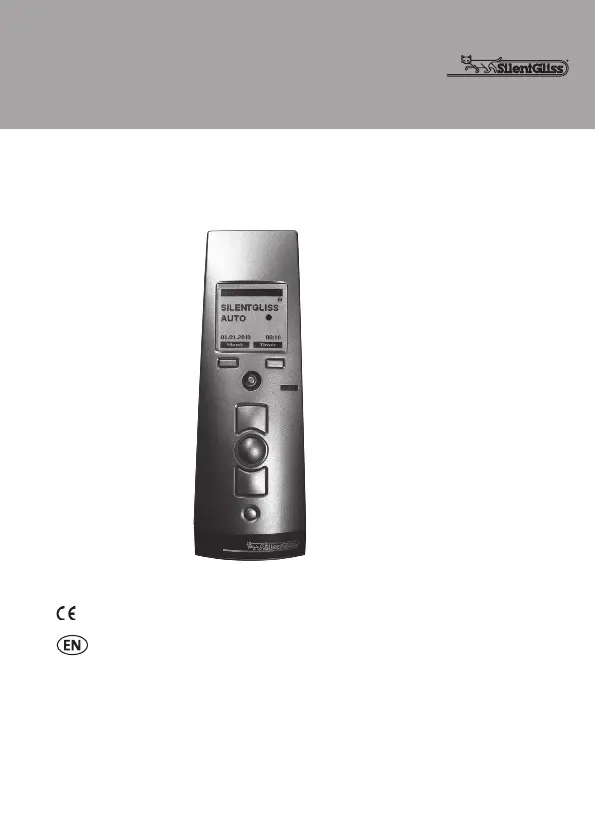
Hand-held radio transmitter SG 10303
867 MHz
868 MHz
915 MHz
0682
Operating instructions (translation)

Questions and Answers

  • J
    Joseph BowersAug 14, 2025
    What to do if my Silentgliss Transmitter system does not run, and the status display lights red or flashes orange?
    • V
      Veronica BurnettAug 14, 2025
      If the status display lights red or flashes orange, it could be due to several reasons. First, the receiver might be outside of the sending range; try reducing the distance to the receiver. Alternatively, the receiver could be out of order or defective, in which case you should switch on or exchange the receiver. Finally, the receiver may not be programmed yet, so you should program the receiver.
  • T
    Teresa KennedyAug 17, 2025
    What to do if my silentgliss SG 10303 Transmitter does not carry out the set switching commands?
    • M
      Martin ParkerAug 18, 2025
      If the hand-held transmitter isn't executing the set switching commands, there are several potential causes: * The date and time may not be set; in this case, set the date and time. * 'MANUAL' operating mode may be active; switch to 'AUTO' operating mode. * The timed switching functions for specific channels may not be activated; ensure you activate the timed switching function for the channel.
  • J
    Jason MaldonadoAug 21, 2025
    Why does my silentgliss SG 10303 system not run, and the status display doesn't light up?
    • A
      Ashley ThorntonAug 21, 2025
      If the system does not run and the status display doesn't light up, it's likely due to the batteries. Either the batteries are low, in which case you should insert new batteries, or the batteries are incorrectly installed, so ensure they are inserted correctly.
  • K
    Katherine TaylorAug 25, 2025
    Why does the Astro program switch inaccurately on my silentgliss SG 10303 Transmitter?
    • N
      Nathaniel HuntAug 25, 2025
      If the Astro program is switching inaccurately, it could be due to a few reasons. Check if the date is set incorrectly and set the correct date. Also, verify whether the holiday function is switched on, and if so, switch it off. Finally, examine if an Astro offset is set and adjust the Astro offset if needed.
  • B
    Brianna MurphyAug 27, 2025
    What to do if my silentgliss SG 10303 Transmitter system operates in the wrong direction?
    • A
      andrew08Aug 28, 2025
      If the system operates in the wrong direction, it is likely that the directions are incorrectly allocated. To resolve this, delete the transmitter and reprogram it.
  • K
    Kevin Brock Jr.Aug 30, 2025
    Why does the Silentgliss hand-held Transmitter not carry out the set switching commands accurately?
    • D
      dwayne68Aug 30, 2025
      If the hand-held transmitter is not carrying out the set switching commands accurately, it might be because the holiday function is switched on. Try switching the holiday function off.
  • Y
    Yvonne HughesSep 3, 2025
    What to do if the required silentgliss SG 10303 system does not run?
    • J
      Jordan RuizSep 3, 2025
      If the required system does not run, it is possible that the incorrect group or channel is selected. Make sure to select the correct group or channel.
  • C
    Carl ConwaySep 6, 2025
    Why is there no timed switching function for automatic switching commands after replacing the batteries in my Silentgliss Transmitter?
    • G
      Gabriel GibsonSep 6, 2025
      If there is no timed switching function after replacing the batteries, it's likely because the power supply was interrupted for too long. You should set the date and time again.
  • T
    theresaguzmanSep 10, 2025
    How to fix inaccurate end positions on my silentgliss SG 10303 Transmitter?
    • S
      Sydney WalkerSep 10, 2025
      If the end positions are approached inaccurately, it means that the end positions have not been set yet. To solve this, have the end positions set by a specialist in accordance with the product instructions.

Summary

Safety Instructions

Transport

Instructions for handling the device during shipping.

Installation

Guidelines for properly setting up the device.

Operation

Safety Instructions for Radio Operation

Intended Use

Exclusion of Liability

Scope of Supply

Technical Data

Mounting of Wall Bracket

Device Explanation

Front of Device

Identification of components on the front of the transmitter.

Back of Device

Identification of components on the back of the transmitter.

Explanation of Functions

Bidirectional Radio System

How the system communicates with two-way feedback.

Unidirectional Radio System

How the system communicates with one-way transmission.

Initial Operation

Steps for first-time setup and basic use.

Factory Settings

Menu Structure

DATE;TIME Menu

PROGRAM Menu

Individual

Setting daily custom open/close times.

Astro

Automating operation based on sunrise/sunset.

Astro Evening

Automating close movement based on sunset.

Lock Time

Preventing premature Astro function movements.

ADMINISTRATION Menu

Channels

Allocating channels to rooms or groups.

Rooms

Assigning channels or groups to specific rooms.

Groups

Creating and managing groups of channels or rooms.

SETTINGS Menu

Global Settings

Settings affecting all channels (holiday, astro, language, etc.).

Holiday

Simulating occupancy by delaying programmed times.

Astro

Configuring Astro function with town or coordinates.

Town Selection

Choosing a town for geographical Astro function settings.

Longitude; Latitude

Direct input of geographic data for Astro function.

Astro Offset

Adjusting Astro function times locally.

Language

Selecting the language for menu texts.

Lighting

Controlling the display background lighting.

Su;Wi Time

Managing automatic Summer/Winter time changes.

Settings for Specific Channels

Program Position

Defining intermediate positions for channel operation.

FUNCTION Menu

Factory Setting

Resetting all settings to default values.

Version

Displaying the current firmware version.

Programming the Transmitter

Programming Additional Transmitters

Stopping Programming Mode (Bidirectional) in the Transmitter

Approaching End Positions

Approaching Closed End Position

Setting the fully closed position for the blind.

Approaching Open End Position

Setting the fully open position for the blind.

Programming the Intermediate Position 1 in the Receiver

Programming the Intermediate Position 2 in the Receiver

Approaching Intermediate Position 1

Approaching Intermediate Position 2

Deleting the Intermediate Position 1 in the Receiver

Deleting the Intermediate Position 2 in the Receiver

Deleting the Transmitter Channel in the Receiver

Deleting All the Transmitters in the Receiver

Battery Replacement

Cleaning

Disposal

Towns for the Selection

Troubleshooting

Repair

EC Declaration of Conformity

Silent Gliss International

silentgliss SG 10303 Specifications

General IconGeneral
Brandsilentgliss
ModelSG 10303
CategoryTransmitter
LanguageEnglish