12
10.3.1) Update via USB: search and download into a USB device the new FW. The control panel will be automatically updated without changing any setup by introducing the USB
in its lodging and strarting the reboot. At the end the panel will be upgrade and ready to perform.
10.3.2) Update by Cloud: the control panel must be programmed as Client and on-line. Starting the operation, the panel searchs new FW: finding a new FW the panel uploads
automatically, without changing any setup. At the end the panel will be upgrade and ready to perform. This operation can be locally effected, by using the taclite screen, or remote
effected, after activation and confirmation of the link between panel and installer.
11) Restore Default settings: this operation deletes all settings and delivers a "new" control panel (requires authorization).
12) Security: supervisory, tamper protection, low battery, anti-scanner.
The system’s devices communicate with each other via two way radio transmission and each report is followed by a confirming signal. This allows all wireless devices to be
supervised and alerts to be sent in the event of a fault. Battery charge is also checked and any need to replace it is notified. Each device features tamper protection. Any attempt
to open housings and/or to detach devices from their location is immediately reported by a tamper alarm which operates also when the system is disarmed. TEST mode must be
enabled before replacing batteries for this reason.
The control panel checks and reports any radio interference that may prevent system’s operations.
Networking: the control panel is supplied with all security systems that need to be properly enabled to prevent unauthorized access.
Caution! The manufacturer is not liable for any unauthorized access that may at any rate occur.
13) Hardwired expansion board part no. 7015 (panels no. 7001 - 7002 only - see diagram).
This additional board allows you to connect wired detectors and sirens as well as other devices that use the two available programmable relays. Relays must be setup using the
control panel and may be used to repeat control panel’s signals or to control selected home automation functions. Available connections are:
8 single or double balanced inputs (adjustable), balanced pulse counter or NC, NO and pulse counter (not compliant)
1 InKey input: it allows you to arm/disarm the control unit with a programmable pulse contact or a bistable contact
2 tamper inputs, to be used only when the alarm inputs are setup as NC.
1 always active balanced tamper input to be used to connect a self-powered sounder.
1 balanced fault input
Warning! to activate cable inputs same must be closed, with or without resistance, for at least five seconds from when the control panel is initially powered.
1 +12V detectors supply - max 200mA total current
2-10-18-20 GND (ground)
3-4-5-6-11-12-13-14 alarm inputs
7-15 anti-tamper inputs (to use with NC alarm inputs only - not complain with EN 50131 . . )
8 +OFF: positive signal general purpose - max 100mA
9 +12V detectors supply - max 200mA total current
16 R22K balanced input "fault" (EN 50131 - GND referred)
17 +12V siren output - max 500mA
19 +14,5V supply to outdoor siren with battery inside
21 +N : positive signal switched off during alarm time
22 R22K balanced anti-tamper input for cabled outdoor siren (EN 50131 - GND referred)
23 V1 : positive signal switched off during alarm time, to start the vocal message 1 of cabled siren cod. 7210
24 V2 : positive signal switched off during alarm time, to start the vocal message 2 of cabled siren cod. 7210
25-26-27 NC/C/NO : free contacts relays 1 - max 1A
28-29-30 NC/C/NO : free contacts 2 - max 1A
Installation and mounting
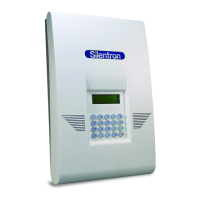
Control panels are formed by:
a) a bottom for the hardwired board and batteries (not supplied). The bottom must be wall mounted at a height that is useful for operations and wires (including main power
supply cable) must run along the appropriate ducts. Before securing the bottom you must fasten the magnet to the wall for tamper protection against removal (see provided
template). In this manner a tamper alarm will be triggered should the control panel be detached from the wall.
b) a main body containing Carrier and Som electronic boards. Connect the wires of any hardwired devices, the hardwired board connector and place the batteries in the main body
of the device to power the control unit. Then fasten the main body of the device to the bottom using the provided three screws.
c) a cover: slip it onto the control panel and secure it using the supplied screw.


 To Next Page
 Loading...