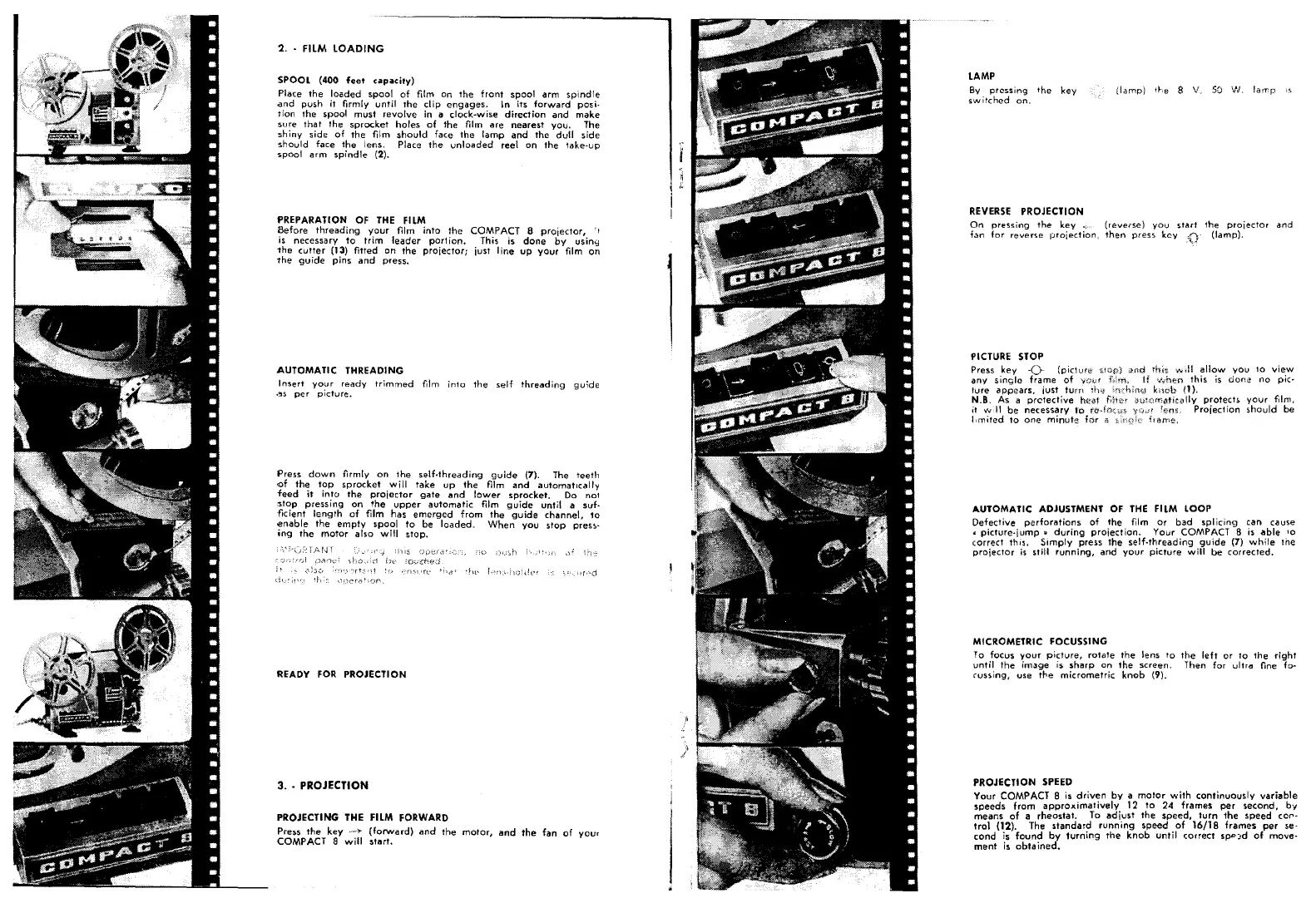
SPOOL (400 feet capacity)
Place the loaded spool of film on the front spool arm spindle
and push
it
firmly until the
dip
engages. In its forward posi-
tion the spool must revolve in a dock-wise direction and make
sure that the sprocket holes of the film are nearest you. The
shiny side of the film should face
tne
lamp and the dull side
should face the lens. Place the unloaded reel on the take-up
spool arm spindle (2).
PREPARATION OF THE FILM
8efore threading your
film
into the COMPACT 8 projector, .~
is necessary to trim leader portion. This is done by using
the cutter (13) fitted on the
proiectorj
just
line
up your film on
the guide pins and press.
AUTOMATIC THREADING
Insert your ready trimmed film into the self threading guide
.~s per picture.
Press down firmly on the self-threading guide (7). The teeth
<of the top sprocket will take up the film and automatically
feed
it
into
the praiector
gate
and lower sprocket. Do
not
5top pressing on
'the upper
automatic
film guide until
a suf·
-ticient length of film has emerged from the guide channel,
10
enable the empty spool to be loaded< When you stop pres~·
ing the motor also will stop.
PROJECTING THE FILM FORWARD
Press the key .-.)- (forward) and the mator
l
and
ttJe
fan of
yOur
COMPACT Swill starl.
lAMP
By pressing the key
switched on.
REVERSE PROJECTION
On pressing the key., (reverse) you start the
proiector
and
fan for reverse proiection, then press key (lamp).
PICTURE STOP
Press key
-0
(pict~,lf;;)
any single frame of
ture appears, just turn
N.B. As a prctective hej)l
it ""
:11 be necessary
limited to one minute
rhitr ,+·",;11allow you to view
'.,vhen this is
doni!
no pic-
bob (1).
iHitfirt'D:'h:f'lllV protects your
ftlm,
fBn~c
Projection 5hould be
AUTOMATIC ADJUSTMENT OF THE FilM LOOP
Defective perforations of the film or bad splicing can cause
<l
picture.iump» during projection. Your COMPACT 8 is able
10
correct this. Simply press the self-fhreading guide (7) while
Ine
projector is still running, and your picture will be corrected.
MICROMETRIC FOCUSSING
To focus your picture, rotate the lens to the left or
10
the right
until the image is sharp on the screen. Then for ultra fine fo~
cussing, use t"e micrometric knob (9).
PROJECTION SPEED
Your COMPACT 8 is driven by a
motOr
with continuously variable
speeds from approximatively 12 to 24 frames per second, b't'
means of a rheostat. To adiust tile speed, turn the speed cor-
tro\ (12). The standard running speed of 16/18 frames per se-
cond is found
by
turning the knob until cor~ect spp::d of move-
ment is obta ined.


 To Next Page
 Loading...