27
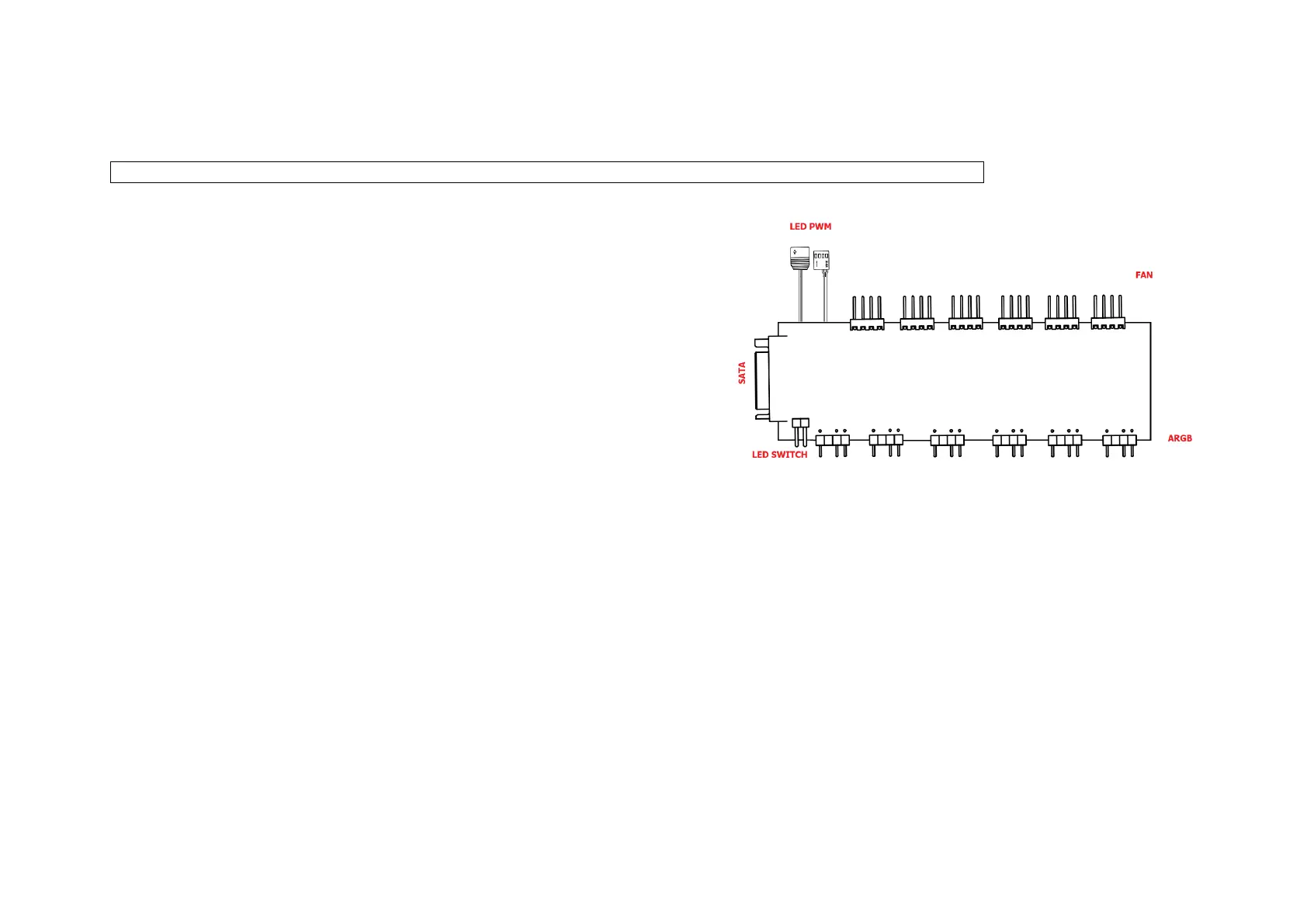
1.16 Connecting the fans to the controller.
Remark! Before connecting the controller, please refer to the specifications and instructions of your motherboard.
Connect the power supply to the controller using the SATA cable from your
power supply.
Connect the power supply to the fan connector "FAN".
Connect the fan backlight to the "ARGB" connector.
Connect the "PWM" cable to the SYS_FAN connector on the motherboard.
Once connected, you can control the fan speed from the settings
Motherboard.
Connect the "LED" wire to the corresponding connector on the board. Depending on the motherboard model: D-LED, ARGB, JRAINBOW,
ADDR_LED.
Connect the wire from the front panel labeled "LED SW" to the "LED SWITCH" connector.
1.17 Backlight Control.
1. Short press the LED button to switch between backlight modes.
2. Press and hold the LED button for 3 seconds to change the mode to mainboard control.
3. Press the LED button to return to manual control.
4. Hold the LED button for 5 seconds to turn off the backlight.



 To Next Page