Need help?
Do you have a question about the Silvercrest PAC-10 and is the answer not in the manual?
Details on individual channel controls including Treble, Bass, Effect, Volume, and input types.
Covers 3-Band EQ for acoustic tuning and Master controls for volume and overall effect.
Information on connecting external audio sources, recording devices, and effects loops.
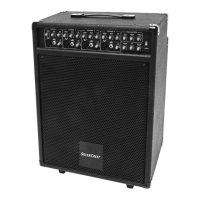
This document describes the Silvercrest PAC-10 Loudspeaker System, model number 54559, which is a compact PA (public address) system designed for amplifying vocals, musical instruments, and audio playback. It is presented in the form of a trolley for easy transport.
The Silvercrest PAC-10 Loudspeaker System is an integrated unit comprising a mixer console, a Hall Effect processor, a loudspeaker box, and an amplifier. Its primary function is to amplify and reproduce sound for an audience, making it suitable for home use, rehearsal rooms, and smaller live performances by soloists, entertainers, and bands in venues like restaurants.
The system features four independent channels (CHANNEL 1 to CHANNEL 4), each equipped with controls for TREBLE, BASS, EFF (Hall Effect mix), and VOL (volume). Each channel also includes LINE UNBAL (12) jack inputs for instruments such as keyboards or acoustic guitars, and MIC IN BAL (13) XLR inputs for microphone connections.
In addition to individual channel controls, the system incorporates a 3-Band EQ section on the control panel, labeled EQUALIZATION, which allows for overall acoustic characteristic adjustments. This EQ includes controls for BASS (4), MIDDLE (5), and TREBLE (6) to fine-tune the low, medium, and high frequencies of the overall sound.
The MASTER (8) control manages the overall volume of the entire loudspeaker system, while the EFF (9) control adjusts the intensity of the Hall Effect, which can then be mixed into each channel.
For external audio sources, the system provides a CD/TAPE control (10) to mix signals from devices like MP3 players. The CD/MP3 IN (16) input, located on the rear panel, facilitates this connection, typically requiring a Y-cable from a 3.5 mm stereo jack plug to 2x cinch connectors.
The system also includes an EFFECT LOOP with two 6.3 mm jack sockets: SEND UNBAL (18) and RETURN UNBAL (17). This loop allows for the integration of external effects devices to further enhance the sound. The SEND UNBAL socket connects to the input of an external effects device, and the RETURN UNBAL socket connects to its output.
For recording purposes, the REC OUT socket (15) enables individual signals to be edited and recorded with a connected recording device.
The Silvercrest PAC-10 is designed for portability and ease of setup. It features two rollers and a telescopic handle, allowing it to be easily towed like a trolley case. A flanged bush on the underside of the unit enables it to be placed on a box stand with a 35 mm crossbar diameter (stand not included).
To set up the system:
When connecting external audio sources like MP3 players via the CD/MP3 IN (16) input, a Y-cable is typically used. The 3.5 mm stereo jack plug connects to the MP3 player's headphone output, and the color-coded cinch connectors (red and white) connect to the corresponding inputs on the loudspeaker system. The signal can then be mixed using the CD/TAPE control (10).
The device requires minimal maintenance, primarily focusing on safe operation and proper handling.
Cleaning:
Fuse Replacement:
Safety Guidelines (Crucial for Maintenance and Operation):
 General
| Brand | SilverCrest |
|---|---|
| Model | PAC-10 |
| Category | Speaker System |
| Type | Portable Speaker |
| Frequency Response | 100 Hz - 18 kHz |
| Connectivity | AUX |
| Power Source | Battery |
| Input Voltage | 5V DC |

 To Next Page