EasyManua.ls Logo

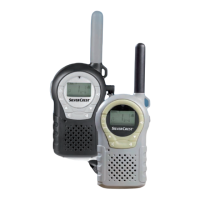
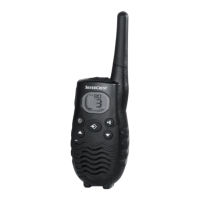
Silvercrest SPMR 8000 A1 - User Manual

Silvercrest SPMR 8000 A1
94 pages
Print Icon
To Next Page IconTo Next Page
Loading...

Table of Contents

Other manuals for Silvercrest SPMR 8000 A1

Questions and Answers

  • D
    David LambAug 1, 2025
    What to do if Silvercrest Two-Way Radio has no transmission?
    • S
      seanandersonAug 1, 2025
      If your Silvercrest Two-Way Radio isn't transmitting, ensure both radio transceivers are set to the same channel and, if applicable, the same CTCSS or DCS code. Also, make sure you fully press and hold the PTT button while speaking. If there's still interference, try switching to a different channel.
  • J
    James JamesAug 6, 2025
    Why is the range so short on my Silvercrest SPMR 8000 A1?
    • I
      Isaiah MoralesAug 6, 2025
      The range of your Silvercrest Two-Way Radio can be affected by the environment. Steel constructions, concrete buildings, or using the unit in a vehicle may reduce the range. If possible, try moving to a location where you have a clear line of sight to the receiving station.
  • M
    margaret45Aug 11, 2025
    What to do if Silvercrest SPMR 8000 A1 Two-Way Radio has reception interference?
    • P
      pcallahanAug 11, 2025
      If your Silvercrest Two-Way Radio is experiencing reception interference, move away from electromagnetic sources like high-voltage power lines or machines with electric motors. Also, ensure the sending and receiving units are at least 1.5 meters apart. You might also try switching to a different channel to see if the communication quality improves.
  • R
    Rachel HughesAug 15, 2025
    How to turn on Silvercrest Two-Way Radio if it doesn't power on?
    • K
      Katie PowellAug 15, 2025
      If your Silvercrest Two-Way Radio won't power on, press and hold the On/Off button for at least three seconds. If that doesn't work, charge the batteries or insert new ones.
  • S
    scottlawrenceAug 21, 2025
    What to do if I experience reception interference with my Silvercrest SPMR 8000 A1?
    • W
      Wanda AndersonAug 21, 2025
      To resolve reception interference on your Silvercrest Two-Way Radio: * Move away from electromagnetic sources such as high-voltage power lines or machines with electric motors. * Ensure the sending and receiving units are at least 1.5 m apart. * Try a different channel to see if the communication quality improves.
  • N
    Nathan SmithAug 26, 2025
    What to do if my Silvercrest Two-Way Radio has no transmission?
    • D
      David NelsonAug 27, 2025
      If your Silvercrest Two-Way Radio isn't transmitting, ensure that both radios are set to the same channel and, if applicable, the same CTCSS or DCS code. Also, make sure you fully press and hold the PTT button while speaking. If interference persists, try switching to a different channel.

Summary

Technical Specifications

Safety Instructions and Warnings

General Safety Instructions

Provides essential safety guidelines for operating electronic devices, especially concerning children and potential hazards.

Explosion Danger Warning

Warns against using batteries in potentially explosive environments due to spark risk and explosion hazards.

Burn Risk Warning

Alerts users to potential burns from touching the antenna or battery terminals with conductive materials.

Injury Risk Warning

Advises on preventing injury from airbags and keeping devices away from pacemakers.

Product Overview

Getting Started and Setup

Inserting Batteries

Step-by-step guide on inserting batteries into the handheld transceiver, ensuring correct polarity.

Charging the Batteries

Details the process of preparing the charging cradle and charging the transceiver batteries.

Basic Operation

Powering On and Off

Explains how to turn the handheld transceivers on and off using the designated button.

Setting Communication Channels

Step-by-step guide to changing the communication channel on the transceiver.

Transmission Procedure

Details the process of transmitting a message, including holding the PTT button and speaking into the microphone.

Advanced Features and Settings

CTCSS;DCS Codes Explained

Introduces CTCSS/DCS codes for reducing interference and enhancing privacy in communications.

Setting CTCSS Code

Instructions on how to select and set a CTCSS code for communication.

Setting DCS Code

Instructions on how to select and set a DCS code for communication.

Voice-Controlled Send (VOX)

Details the VOX function for hands-free transmitting based on voice detection.

Channel Scan

Explains how to scan all channels to find active stations.

Troubleshooting Common Issues

Maintenance and Cleaning

Warranty and Service Information

Silvercrest SPMR 8000 A1 Specifications

General IconGeneral
Channels8
FrequencyPMR446
Transmission power0.5 W
VOX functionYes
CTCSS/DCS codes38 CTCSS / 83 DCS
Scan functionYes
Battery typeAAA
RangeUp to 8 km in open field
Batteries required3

Related product manuals