GB
8
Operation
Switching ON & OFF
1. Connect the mains plug of the power cable to a mains socket and switch ON the vacuum by
pressing in the ON Switch (5)
2. To switch OFF press the OFF Switch (4)
Dry vacuum cleaning
• The vacuum suction power can be varied with the sliding cover on the hose (image C) by opening
for less suction and closing for more suction
• As the Dust Bag (11) gets full, suction will reduce and the bag will need replacing
Wet vacuum cleaning
WARNING:WhenvacuumingliquidthereisagreaterelectricalsafetyriskastheTankllswith
liquid. It is recommended the vacuum is only connected to a mains supply with an integrated RCD
on its circuit or with an additional plug-in RCD.
IMPORTANT:Thevacuumisequippedwithaoatmechanismthatindicateswhenthetankisfullof
liquid (image E right side). When the motor noise changes and becomes a higher pitch, switch the
vacuum OFF immediately and empty the Tank.
1. Fit the required accessory or use the bare hose connector. The Brush Tool (14) has a squeegee bar
(image D) for helping to collect liquid on a surface for easy vacuuming
2. When vacuuming, try to create an easy passage for the liquid by keeping the hose more
horizontal than vertical
3. Always empty the Tank after use
• DrytheinsideoftheTankandrettheDustBag(11)fordryvacuumcleaning
Blowing
WARNING: Do not point the end of the Hose towards any person or animal; debris/particles may
beejectedfromthehoseend,especiallywhenrstswitchedON.ALWAYSwearsafetygooglesto
protect eyes.
• Theblowingfunctioncanbeusedforclearingsurfaces,inatinglowpressuredevices(normally
inatedbymouth),andforcoolingsurfaces.
Accessories
• Arangeofaccessoriesandconsumables,includingltersanddustbags,isavailablefromyour
Silverline stockist. Spare parts can be obtained from toolsparesonline.com
Maintenance
The motor requires no maintenance or additional lubrication. There are no user serviceable parts
within the motor assembly.
General inspection
• If the power cable is damaged, it must be replaced by the manufacturer, its service agent or
similarlyqualiedpersonsinordertoavoidahazard.Ifthepowercablecannotberepairedor
replacedtooriginalspecicationtheapplianceshouldbescrapped.
Cleaning
WARNING: Before cleaning, ensure the appliance is OFF then remove the power plug from the
wall socket.
• Clean the vacuum body with a soft damp cloth using a mild detergent. Do not use alcohol, petrol
or strong cleaning agents
• Never use caustic agents to clean plastic parts
Filter cleaning
Note:Acloggedlterwillcausesuctionpowerandcleaningefciencytodeteriorate.Check
whether the Filter (10) is dirty if performance deteriorates.
• Remove the Filter then clean using a light brush and the vacuum in blower mode
Hose blockages
• The hose can be moved to the blower position to remove some blockages. Ensure the hose is
pointed away from people or animals as the blockage may exit the hose with some force. The
hose end can be lightly tapped against a surface to aid removal
Storage
• Store this tool carefully in a secure, dry place out of the reach of children. The Hose Tubes (16)
and one of the brush accessories can be stored in Accessory Holders (8) at the top of the Caster
Mounts (9), which will create a recess around the body of the tool for storing the mains cable
Disposal
Always adhere to national regulations when disposing of power tools that are no longer functional
and are not viable for repair.
• Do not dispose of power tools, or other waste electrical and electronic equipment (WEEE), with
household waste
• Contact your local waste disposal authority for information on the correct way to dispose of
power tools
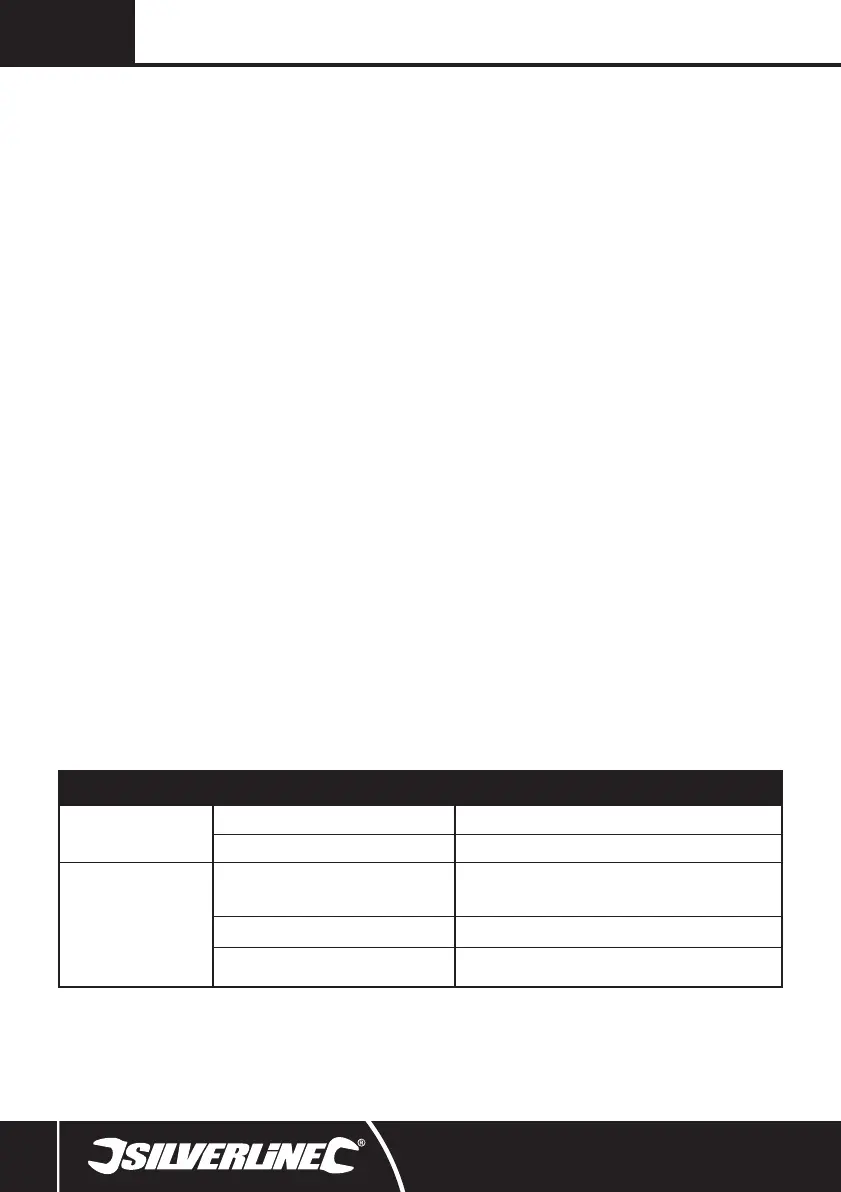
Problem Possible cause Solution
No function when ON Switch (5)
is operated
No power Check power supply
Defective ON Switch Replace the ON Switch at an authorised Silverline service centre
Poor suction power
The Dust Bag (11) is full or Filter (10) dirty
The vacuum performance will deteriorate when the bag is nearly full or the
Filter is partially blocked. Remove and replace the Dust Bag once full and/or
check the Filter
Hose blockage Dismantle the hose assembly and clear any blockages that may be present
Air leak
Ensure suction control on Hose (12) is closed and there is no damage to the Hose
itself causing air leaks
Troubleshooting
319548_Manual.indd 8 31/01/2017 11:34



 To Next Page