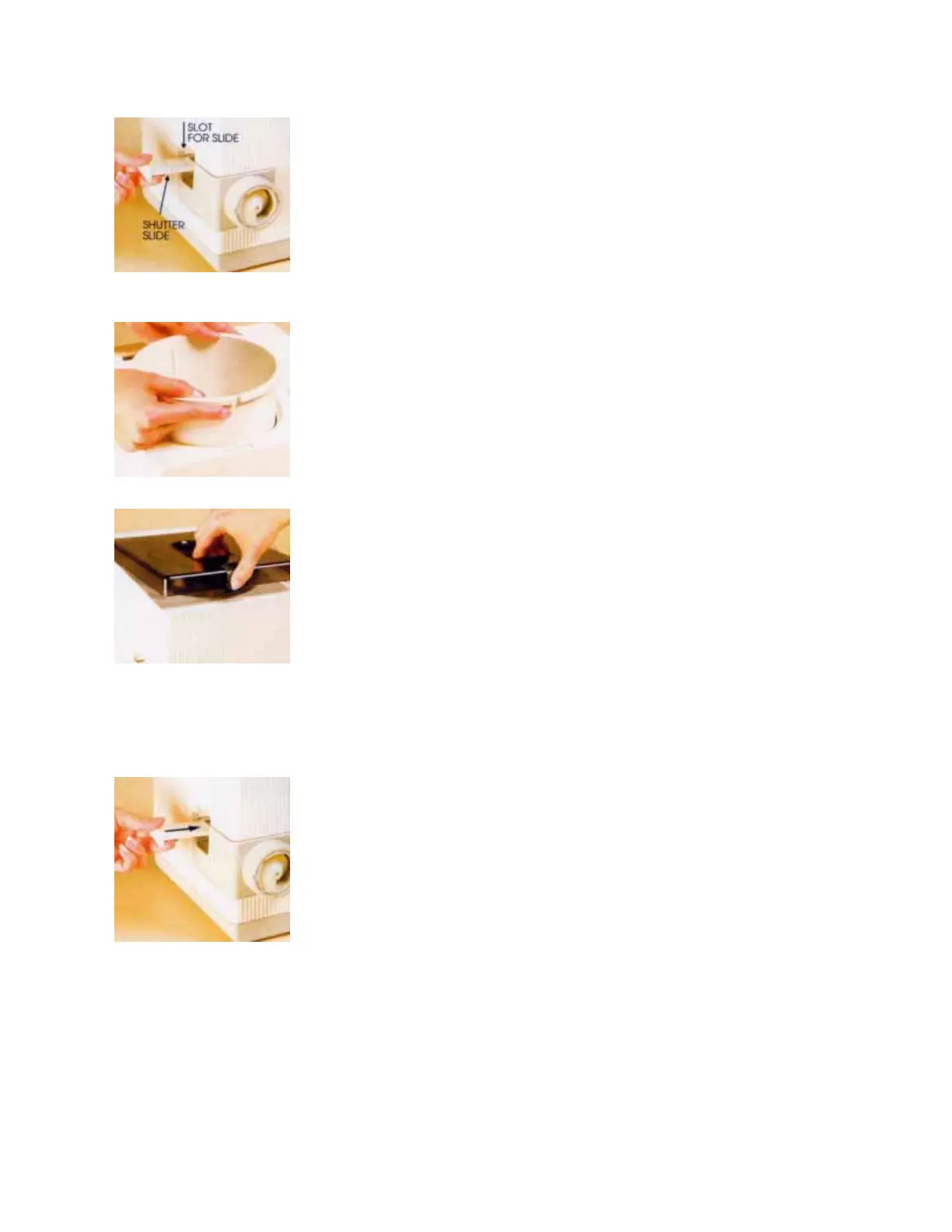
· Step 1.
Check to be sure the main switch is turned "OFF." (When it sticks out,
it is "OFF;" when it is pushed in, it is "ON.")
Be sure the bowl is empty of all accessories.
Push the Shutter Slide all the way into the slot.
· Step 2.
Put the bowl in place by inserting it into the main housing with the
Bowl's Locking Tab fitted to the Bowl Locking Notch, toward the front
of the PastaMatic.
· Step 3.
Put the cover in place by first fitting the Cover Lip into the Slot toward
the rear of the top. Push in the Cover Latch and press down to lock the
cover.
Plug the electric cord into a grounded 3-prong outlet and push the
ON/OFF switch to turn it ON.
If it does not turn on, remove and replace both the cover and the bowl,
making sure they are positioned correctly.
· Step 4.
Now that you know the unit is working properly, unlatch the cover and
remove it.
Make sure the slide is fully in place before adding any ingredients.
Check from above the bowl to make sure the space at the bottom is
fully covered by the closed Shutter Slide. If it is not fully closed, flour
and other ingredients can clog and permanently damage the PastaMa
tic.


 To Next Page